
VTech Play Smart Preschool Laptop
4.6Editor score
30 leveled learning activities
Personalized name and avatar
Spanish words and music games
This guide compares the top 10 laptops designed for 5 year olds focusing on educational value durability and age appropriate features to help parents choose.
Finding the right laptop for a five year old requires balancing fun educational content and durability. Young learners need devices that are safe easy to use and engaging enough to hold their attention while building foundational skills.
We have carefully compared ten top rated options based on educational features design usability and user feedback. This list includes a variety of toys and tablets that cater to different learning styles and budgets for young children.
Each pick highlights key strengths and potential limitations to help you make an informed decision. Note that product details and availability may change over time so always check the latest information before purchasing.
4.6Editor score

4.7Editor score

4.2Editor score
This table provides a quick side-by-side overview of all ten selected products. Compare key specs features and ratings at a glance to find the model that best fits your child needs learning goals.





This versatile toy stands out as a top choice for young learners seeking an interactive experience. With a high rating it offers a unique design that transforms from a laptop into a tablet easily.
We may earn a commission when you buy through this link, at no additional cost to you.
The keyboard features letters and numbers while the flip screen allows for tablet mode play. Parents can customize the device with their child name name to make spelling and recognition more personal and engaging.
While it requires batteries which are only included for demo the long term value is excellent for early education. The transition between modes keeps children engaged and supports different types of play throughout the day.
It is an ideal pick for preschoolers and early elementary kids who need a robust educational tool. This model balances fun and learning effectively making it a strong recommendation for parents.
The dual mode design lets kids switch between typing and touch play seamlessly.
Personalizing the device with a name helps children feel more connected to the activity.
We may earn a commission when you buy through this link, at no additional cost to you.
This sleek toy laptop offers a realistic look and feel that appeals to young children. It comes highly rated and provides a solid introduction to computer concepts with personalized elements.
We may earn a commission when you buy through this link, at no additional cost to you.
Children can input their name and age to create a unique avatar. The activities cover letters numbers and sounds while also introducing basic Spanish words which adds educational depth at a low cost.
The logic games and animal sounds keep entertainment high while teaching categorization skills. It is perfect for parents looking for a budget friendly option that still delivers quality content and design.
Ideal for ages three to six this model is a fantastic starter device. It encourages early tech familiarity without the need for expensive or complex systems.
Activities adjust to help children progress at their own pace with ease.
The look and feel mimic real laptops to boost imaginative play.
We may earn a commission when you buy through this link, at no additional cost to you.
This device stands out as a premium option with genuine tablet capabilities and a large display. It is designed to grow with the child offering access to real apps and ebooks.
We may earn a commission when you buy through this link, at no additional cost to you.
The 10.1 inch HD screen provides a clear view for content and learning apps. With a fast processor and ample storage it handles multitasking and large files better than toy laptops.
Parents can manage time and access with customizable profiles and safe browsers. This makes it a safe gateway to digital content for families ready to invest in a more capable device.
Best for kids who need a real computer experience this model bridges toys and tech. It is perfect for learning and play with high quality visuals and extensive content.
The HD screen makes reading and videos more comfortable for young eyes.
Safe browsing and time limits help manage screen time effectively.
We may earn a commission when you buy through this link, at no additional cost to you.
This laptop is designed to look like a real computer with a full size keyboard. It is excellent for children who benefit from bilingual exposure and structured learning activities.
We may earn a commission when you buy through this link, at no additional cost to you.
Every activity can be played in English or Spanish to immerse kids in a new language. The pre-loaded content means no internet is required making it safe and simple for travel or home.
Apps like a weekly calendar and notebook help develop organizational and basic computer skills. The inclusion of music player and games adds fun to the educational tasks.
Ideal for age five and up this model is perfect for early literacy and tech skills. It combines realism with education to prepare kids for future learning environments.
Real QWERTY keys help children learn proper typing skills early.
Pre-loaded apps mean no internet is needed for safe play.
We may earn a commission when you buy through this link, at no additional cost to you.
This educational laptop features a charming unicorn design that appeals to many children. It balances aesthetics with function by including a realistic mouse and keyboard for interactive play.
We may earn a commission when you buy through this link, at no additional cost to you.
Activities cover English Spanish math and even clock reading which is a unique skill. The games test logic memory and speed to reinforce what has been learned in a fun way.
The slim design makes it easy to grip and carry around. Music activities help introduce notes and composition for a well rounded educational experience.
Perfect for kids who love animals and colors this model is a great gift. It encourages learning through play with a focus on cognitive and motor skills.
A realistic mouse helps develop hand-eye coordination effectively.
Musical activities introduce notes and melody for creative growth.
We may earn a commission when you buy through this link, at no additional cost to you.
Inspired by authentic laptops this slim and stylish educational laptop features a realistic mouse and keyboard. It creates an immersive learning environment that kids will adore while encouraging ergonomic usage.
We may earn a commission when you buy through this link, at no additional cost to you.
With 124 activities in English and Spanish it covers math clock logic and music. Each activity offers multiple levels allowing kids to learn and test skills at their own pace.
Games like Snake Memory and Puzzle keep entertainment high after learning sessions. The compact size makes it ideal for on-the-go learning in cars or during trips.
It is a fantastic choice for fans of the theme who need educational value. This model combines fun and function to encourage learning in an engaging way.
Compact size allows kids to take learning anywhere easily.
Adaptable difficulty keeps challenges fresh and engaging.
We may earn a commission when you buy through this link, at no additional cost to you.
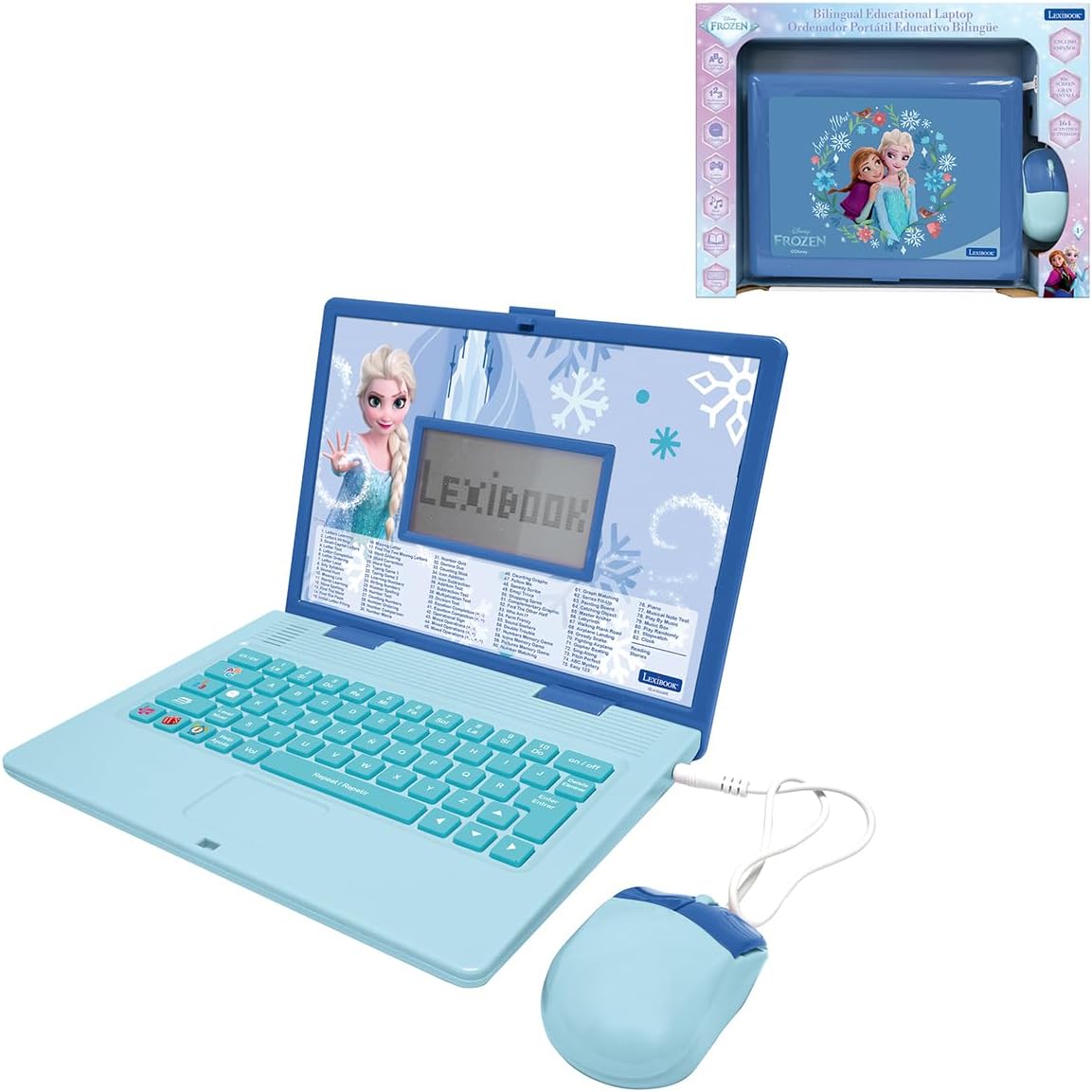
This laptop is packed with 164 activities in English and Spanish covering vocabulary and math. It features helpful voice guidance and a clear LCD screen for easy navigation by kids.
We may earn a commission when you buy through this link, at no additional cost to you.
Quiz challenges and music modes make every learning session enjoyable. The lightweight design is ideal for learning at home or taking on the go without strain.
Bilingual learning helps build strong language skills through fun motivating activities. Games and music modes keep children engaged from the first activity to the last.
Perfect for young fans this model delivers quality learning with a familiar theme. It is a reliable choice for encouraging education through play and interaction.
Helpful voice cues support independent learning and navigation.
Easy to carry so kids can take it anywhere.
We may earn a commission when you buy through this link, at no additional cost to you.
This laptop features a 4.3 inch color screen that makes watching much clearer. It offers a mix of learning activities and games designed for kids ages five and up.
We may earn a commission when you buy through this link, at no additional cost to you.
There are 48 learning modes covering alphabet math colors and animals. The screen has a protective film that needs to be removed for clear viewing which is easy to do.
The ergonomic design is inspired by real laptops with a realistic mouse and keyboard. It is convenient for easy handgrip and encourages comfortable use during play.
Ideal for home use this model provides vibrant visuals to hold attention. It balances education and fun with a clear display and structured content.
A 4.3 inch screen offers clear lifelike visuals for kids.
Designed for easy handgrip to prevent fatigue during use.
We may earn a commission when you buy through this link, at no additional cost to you.
This kids laptop includes a camera for photography and creativity alongside educational modes. It is an ideal gift with 64 activities covering alphabet math and more.
We may earn a commission when you buy through this link, at no additional cost to you.
The clear lenses and photo frames allow kids to record memories. This adds a creative layer to learning that makes the device stand out from standard laptops.
Vibrant true-to-life colors on the 4.3 inch display make content easy to see. After learning kids can enjoy exciting games and take funny pictures for fun.
Great for creative kids this model blends education and entertainment well. It is perfect for children who enjoy photography and digital exploration.
Kids can take photos and use filters to express creativity.
True-to-life colors make content engaging and easy to see.
We may earn a commission when you buy through this link, at no additional cost to you.
This learning tablet develops math reading coding and creativity with educator approved apps. It includes a stylus a tough bumper and a kickstand for versatile use.
We may earn a commission when you buy through this link, at no additional cost to you.
A seven inch shatter-safe screen ensures durability for young hands. Parents can set time limits and manage apps to keep content safe and appropriate.
While it offers a free trial the full access needs a subscription for hundreds of games and videos. This makes it a versatile choice for long term learning.
Best for kids who need more than basic toys this model grows with them. It is a powerful tool for developing essential skills in a safe environment.
Access hundreds of games videos and books through the App Center.
Bumper and shatter-safe screen protect the device from drops.
We may earn a commission when you buy through this link, at no additional cost to you.
Choosing the right device involves considering content design and safety features to match your child needs development.
Look for devices that offer a wide range of activities covering subjects like math reading and logic. Quality content should adapt to your child skill level to keep them challenged and engaged over time.
Prioritize content that offers variety and progressive learning paths for sustained interest.
Children can be rough with toys so a durable build with rounded corners and a sturdy chassis is essential. Devices with rugged bumpers or reinforced edges are more likely to survive drops.
Check for materials that can withstand daily play and potential falls without damage.
A clear and bright screen helps keep attention and reduces eye strain. Larger screens with color displays are generally better for visual content and reading activities.
Ensure the screen is large enough and has good resolution for viewing.
The device should have a simple interface that children can navigate without frustration. Physical buttons or touch interfaces should be responsive and easy for small hands to manipulate.
Select a design with intuitive controls and clear navigation options.
If your family speaks or is learning a second language bilingual models can be very beneficial. These devices help children practice vocabulary and comprehension in both languages seamlessly.
Consider bilingual capabilities if language learning is a priority for your child.
Long battery life ensures the device is ready when your child wants to use it. Rechargeable options are eco-friendly but may need a charging cable while battery powered ones are portable.
Check if the device uses rechargeable or disposable batteries based on your preference.
For more advanced devices parental controls allow you to manage time and access to content. This feature ensures that your child is exposed to safe and appropriate material.
Ensure there are tools to limit time and filter content effectively.
Some devices require internet while others work offline. Consider whether you want your child to access online content or prefer a safe offline experience.
Decide if Wi-Fi connectivity or offline play best fits your family needs.
Start by setting up the device according to the manual. Insert batteries or charge the device and remove any protective films on the screen.
Guide your child through the basic functions such as turning it on and using the keyboard. Show them how to use the mouse or touch screen to navigate activities.
Clean the device regularly with a soft dry cloth to remove dust and fingerprints. Store it in a safe place away from moisture and direct sunlight.
Yes these devices are designed with safety in mind. They feature rounded corners non-toxic materials and no sharp edges. Many also include parental controls to manage content and time.
Most toy laptops are offline and do not require internet. However some advanced models like tablets may offer online app access. Always check the product details for connectivity requirements.
Battery life depends on usage and model. Some offer hours of continuous play while others may need frequent changes. Rechargeable models offer convenience while battery powered ones are more portable.
Yes many models include math activities to teach counting numbers and simple operations. These games help build foundational skills through interactive and fun exercises.
Several bilingual laptops offer activities in both English and Spanish. This feature allows children to practice language skills and vocabulary in a fun and interactive way.
Most models are designed for ages five and up. Some may be suitable for younger children starting at three while others offer more advanced content for older kids.
Use a soft dry cloth to gently wipe the screen. Avoid harsh chemicals or wet wipes as they can damage the display. Store the device in a dry place to prevent dust.
Advanced models often come with parental controls to manage time and content. This helps you ensure a safe and balanced digital experience for your child.
We reviewed ten top options including budget and premium picks to suit different needs. The LeapFrog 2-in-1 LeapTop Touch and VTech Play Smart stand out for educational value.
When choosing prioritize content quality durability and ease of use for your child. Consider whether offline or online access is better for your family environment.
Remember to check current details and availability before purchasing to ensure you get the best value. These tools can provide hours of learning and fun for your five year old.