
WALI Computer Monitor Stand for Desk
4.7Editor score
Affordable price point
Large shelf capacity
Under-stand storage space
Finding the right laptop riser can transform your workspace into a healthier and more efficient environment. A good stand elevates your screen to eye level, reducing neck strain and improving posture during long work sessions. It also promotes better airflow to keep your device cool and functioning at peak performance throughout the day.
We compared ten top-rated laptop risers based on build quality, adjustability, stability, and user reviews. Each product was evaluated for its compatibility with various laptop sizes and its ability to provide a comfortable viewing angle. Our goal is to help you choose a reliable stand that fits your specific desk setup and professional requirements.
Each pick in this list highlights unique features like portability, rotation capabilities, or heavy-duty support. You will see detailed specs and honest assessments to guide your decision-making process. Please note that product prices and availability can change frequently, so check the current listings before making a purchase decision today.
4.7Editor score

4.8Editor score
4.7Editor score
As an Amazon Associate we earn from qualifying purchases.
This side-by-side comparison highlights the key specifications and features of each laptop riser to help you quickly identify the best fit for your specific needs and budget constraints.






The BESIGN LS03 Aluminum Laptop Stand stands out as a top contender for anyone seeking a reliable ergonomic solution. With a high rating of 4.8 stars, users praise its solid construction and ability to elevate screens to a comfortable viewing level. It transforms any desk into a healthier workspace by reducing neck strain during long hours of typing or video calls.
We may earn a commission when you buy through this link, at no additional cost to you.
This stand features a premium aluminum alloy design that ensures durability without adding excessive weight. The open structure promotes excellent airflow, keeping your laptop cool during intensive tasks like gaming or rendering. Its detachable design allows you to assemble it in just three steps, making it convenient for both home and office use.
While the stand does not offer angle adjustments, its fixed elevation is sufficient for most standard desk setups. The rubber on the holder hands grips your device tightly, preventing slips and scratches. Some users might wish for more flexibility, but the stability provided here is unmatched in its price range.
We recommend this product for users who want a no fuss, durable stand that looks professional and works well with various laptop brands. Whether you use a MacBook or a Windows notebook, the LS03 provides a stable platform that enhances your overall productivity and comfort throughout the workday.
By raising your screen by 6 inches, this stand aligns your monitor with your eye level to significantly reduce neck and shoulder pain over time.
The open aluminum design allows cool air to circulate underneath your device, preventing overheating and maintaining optimal performance during heavy usage.
We may earn a commission when you buy through this link, at no additional cost to you.
The Lamicall Aluminum Laptop Stand offers exceptional versatility with its adjustable height and angle features. Rated 4.7 stars by users, it is designed to accommodate a wide range of laptop sizes from 10 to 17.3 inches. This adaptability makes it a strong choice for households or offices with multiple different devices that need consistent ergonomic support.
We may earn a commission when you buy through this link, at no additional cost to you.
Its large, heavier base ensures that the stand remains rock solid even when you are typing vigorously. The upgraded design prevents shaking and sliding, providing a secure typing experience. Multiple ventilation holes enhance airflow to keep your laptop cool, while the smooth edges and silicone pads protect your device from scratches and damage.
Although this model is more expensive than basic stands, the investment pays off in terms of flexibility and build quality. The ability to fold it up makes it easy to carry in a laptop bag for business trips. Some users might find the base occupies a bit more desk space, but the stability it offers is worth the trade-off.
This stand is ideal for professionals who need to adjust their setup frequently or travel often. It supports everything from MacBooks to large gaming laptops, ensuring that every device benefits from proper elevation. For those prioritizing comfort and adjustability, this Lamicall model delivers reliable performance.
You can easily modify the height and angle to suit your specific seating position, ensuring a custom ergonomic fit for any workspace.
The foldable design allows you to pack it away quickly, making it a perfect companion for remote work and business travel needs.
We may earn a commission when you buy through this link, at no additional cost to you.
The LOXP Adjustable Laptop Stand introduces a unique feature with its 360 degree rotating base. This allows you to share your screen easily during meetings or collaborative sessions without moving the entire setup. Users appreciate the flexibility and the durable one-piece fiber metal material that ensures longevity compared to standard aluminum models.
We may earn a commission when you buy through this link, at no additional cost to you.
Designed for stability, the upgraded rotating base keeps the stand steady even when you adjust the laptop angle. The non-slip silicone protects your device from sliding, while the ergonomic design lets you keep the screen at eye level. It fits laptops from 10 to 16 inches, covering most standard business and personal devices.
Some users might find the rotation mechanism slightly sensitive to touch, but it generally provides smooth movement. The stand is foldable, making it convenient to store when not in use. While it is slightly heavier than plastic options, the extra weight contributes to its robust and professional feel on your desk.
We recommend this stand for teams or individuals who frequently need to display their screens to others. It is a practical tool for presentations and remote collaboration. The combination of rotation, stability, and comfort makes it a strong contender for modern work environments.
The 360 degree rotation feature lets you pivot your screen effortlessly to face colleagues or clients without lifting the laptop.
Constructed from high-quality fiber metal, this stand offers enhanced durability and stability compared to typical aluminum alloy alternatives.
We may earn a commission when you buy through this link, at no additional cost to you.
The Nulaxy Ergonomic Adjustable Laptop Stand is engineered for stability with its dual rod support mechanism. This design eliminates wobble, providing a secure typing experience even with heavy devices. With a capacity of up to 22 lbs, it supports large gaming laptops and workstations that other stands might struggle to hold safely.
We may earn a commission when you buy through this link, at no additional cost to you.
Its advanced heat-vent panel ensures that your laptop stays cool during intensive tasks. The unique geometric design maximizes airflow, preventing thermal throttling and hardware damage. The stand folds completely flat for portability, making it easy to slip into a backpack for work away from home. Users love the balance of sturdiness and convenience.
While the stand is robust, some users note that it can be slightly bulkier when folded compared to ultra-slim models. The plastic components on the joints are functional but might not appeal to those seeking an all-metal aesthetic. However, the performance and stability it offers far outweigh these minor design considerations.
We suggest this stand for users with heavy laptops or those who need a reliable solution for long hours of typing. It is perfect for home offices where space is limited and portability is key. The Nulaxy stand delivers professional-grade support at a reasonable price point.
The dual rod mechanism distributes weight evenly, ensuring a wobble-free typing experience that feels secure and professional.
The advanced vent panel design actively promotes airflow to keep your laptop cool, extending its lifespan during demanding tasks.
We may earn a commission when you buy through this link, at no additional cost to you.
The Amazon Basics Sturdy and Portable Ergonomic Laptop Stand offers a reliable solution from a trusted brand. Designed with rust-resistant aluminum, it provides durability and a sleek look that fits any desk. Users value its 7 inches of height adjustment, which helps achieve a comfortable viewing angle for various sitting positions.
We may earn a commission when you buy through this link, at no additional cost to you.
Its open hollow design promotes airflow, keeping your laptop cool during extended use. The stand folds flat for easy storage and portability, fitting into most laptop bags effortlessly. With a weight of only 1.7 lbs, it is easy to carry without adding bulk to your gear. The non-slip silicone pads secure your device safely.
While the design is functional, it lacks angle adjustments and has a basic aesthetic compared to premium models. Some users might find the height range slightly limiting for standing desk setups. However, for everyday use, it offers excellent value and reliability without compromising on essential ergonomic benefits.
We recommend this stand for those who prefer a straightforward and dependable option from a well-known brand. It works well with laptops up to 15.6 inches and is ideal for students or office workers. The combination of quality and affordability makes it a popular choice for many.
As an Amazon Basics product, this stand offers consistent quality and dependable performance that you can trust for daily use.
Its lightweight and foldable design allows you to carry it anywhere, ensuring you have an ergonomic setup wherever you work.
We may earn a commission when you buy through this link, at no additional cost to you.
The WALI Computer Monitor Stand for Desk is an exceptional budget-friendly option that supports devices up to 44 lbs. Its large shelf accommodates laptops, monitors, and printers, providing versatility beyond just a laptop riser. Users appreciate the value it offers, delivering solid performance without breaking the bank.
We may earn a commission when you buy through this link, at no additional cost to you.
This stand features a ventilated platform that prevents overheating and keeps devices cool during operation. The three height options allow you to choose a comfortable viewing position to reduce neck strain. The open space beneath the stand is perfect for storing keyboards or notebooks, helping to reduce desktop clutter and keep your workspace organized.
Although it is made of metal rather than lightweight aluminum, its sturdiness is a major advantage. The rubber pads prevent slipping and protect your work surface. Some users might wish for more angle adjustment flexibility, but the fixed heights are sufficient for most ergonomic needs and provide a stable typing platform.
We recommend this stand for anyone looking for an affordable yet capable solution for multiple devices. It is ideal for home offices where storage space is at a premium. The WALI stand proves that you do not need to spend a lot to get a high-quality ergonomic lift.
At a fraction of the cost of premium stands, this model delivers reliable support and essential features for all users.
The open space below the stand provides a convenient place to store accessories, helping you keep your desk clean and organized.
We may earn a commission when you buy through this link, at no additional cost to you.
The Lamicall Aluminum Laptop Stand for Desk is designed for professionals who need to align their laptop with external monitors. Its 360 degree rotation base allows for easy screen sharing during meetings and presentations. With a sturdy large base, it remains stable even when you are typing intensely on large 17.3 inch laptops.
We may earn a commission when you buy through this link, at no additional cost to you.
This stand supports dual screen setups by keeping both devices at the same height, improving your workflow and posture. The all-aluminum alloy material provides superior heat dissipation to extend the lifespan of your device. You can fold it for travel, making it suitable for business trips and remote work scenarios.
The premium price reflects its advanced features and robust construction. Some users might find the large footprint takes up more desk space than compact models. However, the versatility and stability it offers for professional environments are unmatched. It is a tool built for serious productivity and collaboration needs.
We suggest this stand for users who frequently present screens or use dual monitor setups. It is excellent for collaborative work and ensures your laptop stays at the same ergonomic height as other displays. The combination of features makes it a top-tier choice for professionals.
This stand helps align your laptop with external monitors, creating a cohesive and comfortable multi-screen workspace.
The 360 degree swivel base allows you to share your screen instantly without moving the entire setup, streamlining communication.
We may earn a commission when you buy through this link, at no additional cost to you.
The Adjustable Laptop Stand Portable Riser is a great choice for those who travel frequently and need a lightweight solution. Weighing only 0.49 pounds, it is easy to carry in any bag. Its six height levels allow you to find a comfortable viewing angle, reducing neck and back strain during work sessions.
We may earn a commission when you buy through this link, at no additional cost to you.
The triangle support design ensures stability despite its minimal weight. Smooth edges and anti-slip silicone pads protect your hands and device. It fits laptops from 10 to 15.6 inches, covering most standard devices. The open design offers ventilation to keep your laptop cool while you work.
While it is very portable, the basic build might feel less premium than heavy-duty models. There is no angle locking mechanism, so settings remain fixed once adjusted. However, for occasional users or travelers, these trade-offs are acceptable given the convenience and affordability of this product.
We recommend this stand for students or travelers who prioritize weight and portability. It provides essential ergonomic benefits without adding bulk to your gear. For those who need a simple and effective riser on the go, this model fits the bill perfectly.
Weighing less than half a pound, this stand is designed for easy transport, ensuring you stay ergonomic wherever you go.
Six different height options let you customize your viewing angle, ensuring a comfortable posture for various tasks and setups.
We may earn a commission when you buy through this link, at no additional cost to you.
The Adjustable Laptop Stand for Desk Metal offers a solid build that ensures long-term durability. Made of sturdy metal, it can support up to 17.6 lbs, providing a secure base for heavier laptops. The ventilation holes on top help keep your device cool, preventing overheating during extended usage periods.
We may earn a commission when you buy through this link, at no additional cost to you.
Its smooth edges ensure safety for your hands and device, while the rubber mats secure your laptop in place. The foldable design makes it easy to store in a backpack when needed. Users appreciate the simple yet effective design that focuses on stability and protection.
Some users may find the fixed angle limits flexibility compared to adjustable models. The metal construction also adds a bit of weight compared to lighter plastic alternatives. However, the durability and security it offers make it a reliable choice for daily office use.
We recommend this stand for users who want a robust and safe solution for their laptop. It is ideal for environments where stability is paramount. The balance of strength and portability makes it a strong candidate for everyday ergonomic needs.
The sturdy metal build provides exceptional stability and durability, ensuring the stand withstands daily wear and tear effectively.
Ventilation holes on the top promote airflow to keep your laptop cool, extending its lifespan during intensive work sessions.
We may earn a commission when you buy through this link, at no additional cost to you.
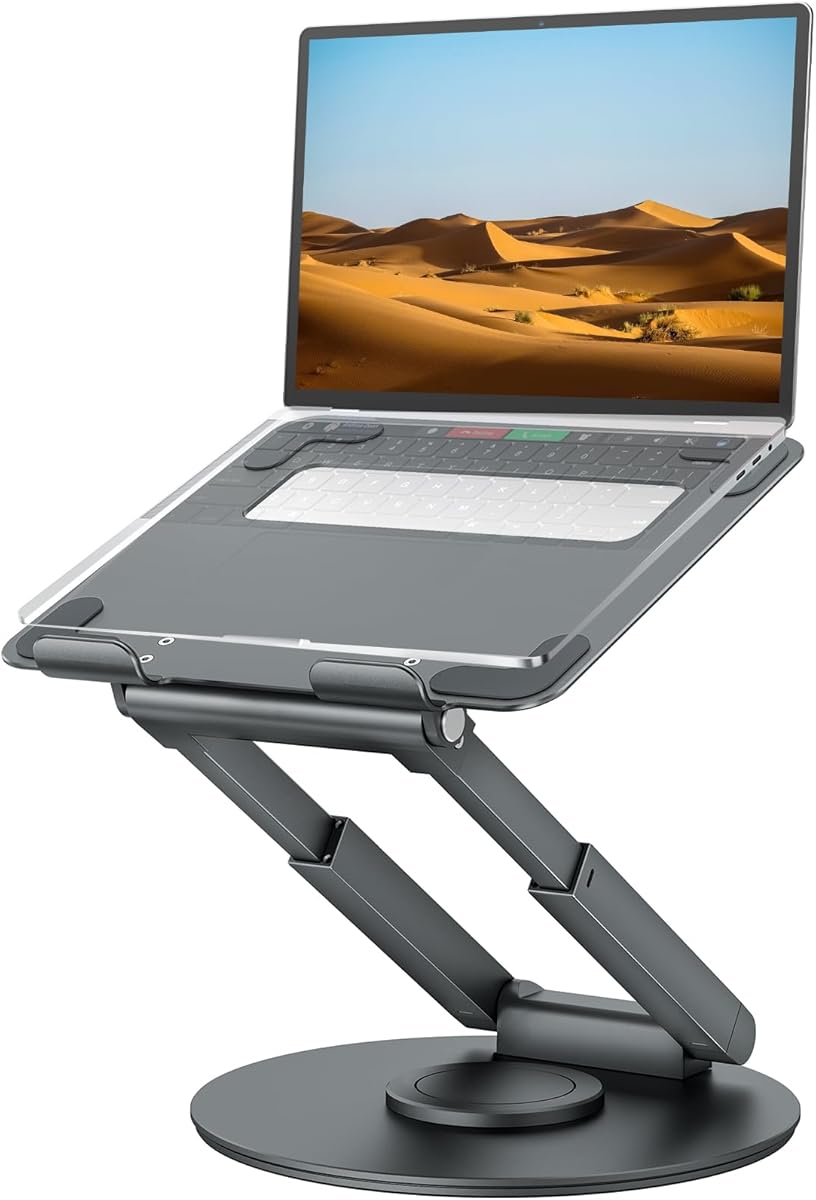
The tounee Telescopic Laptop Stand is the ultimate solution for users who want to integrate standing into their workday. With a height range from 2.1 to 21 inches, it adapts to both sitting and standing positions effortlessly. The 360 degree swivel base allows for easy screen sharing and flexible viewing angles.
We may earn a commission when you buy through this link, at no additional cost to you.
Constructed from high-quality aluminum alloy, this stand features a large heavy base that supports up to 22 lbs. Two pivot joints make it twice as strong as single pivot models, ensuring rock-solid stability. The telescoping button allows you to switch postures quickly without disrupting your workflow or balance.
While it comes at a premium price, the health benefits of standing throughout the day are invaluable. Some users might find the base requires more desk space, but the stability it provides justifies the footprint. It is a robust investment for those committed to long-term health and posture correction.
We recommend this stand for health-conscious professionals who need a dynamic workstation. It supports active standing and reduces muscle tension effectively. For those willing to invest in their well-being, this model offers unparalleled flexibility and support.
The sit-to-stand feature encourages movement and reduces sitting time, helping to relieve muscle tension and boost overall productivity.
The smooth swivel base lets you rotate your screen effortlessly, facilitating collaboration and face-to-face communication during meetings.
We may earn a commission when you buy through this link, at no additional cost to you.
Choosing the right laptop riser involves considering several key factors that affect your comfort and productivity. This guide helps you evaluate what matters most for your specific needs.
Adjustability is crucial for achieving a personalized ergonomic setup. Look for risers that offer multiple height levels or the ability to tilt the screen to match your eye line. Fixed stands are simpler but may not suit everyone.
Prioritize models that allow you to customize the viewing angle to reduce strain.
Ensure the riser supports your laptop size and weight. Most stands work with 10 to 16 inch devices, but larger gaming laptops require heavier-duty options. Check the weight capacity before purchasing.
Verify that your device fits securely within the specified range.
A stable stand prevents wobbling while typing. Aluminum or metal builds are generally sturdier than plastic. Look for non-slip silicone pads to protect your device and the desk surface.
Choose a material that balances durability with portability.
Laptops generate heat during use, so airflow is important. Open designs with ventilation holes help dissipate heat efficiently. This prevents thermal throttling and extends the lifespan of your device.
Select a riser that promotes airflow to keep your laptop cool.
If you travel often, look for a foldable or lightweight design. Some stands collapse flat to fit easily into backpacks. Consider how much space it takes when not in use.
Prioritize models that fold compactly if you move frequently.
Price varies from affordable to premium. Determine which features are essential for you. A basic stand may suffice for home use, while professionals might need advanced adjustability.
Balance your spending against the benefits offered.
Heavier laptops require stands with higher weight limits. Check the manufacturer's specs to ensure safe support. A sturdy base is key for larger devices.
Ensure the stand can handle your specific laptop weight.
Quick setup saves time and frustration. Some stands come pre-assembled while others require minimal tools. Look for simple mechanisms that are easy to use daily.
Choose a design that is easy to set up quickly.
To use your laptop riser effectively, place it on a flat and stable surface. Adjust the height so that the top of your screen is at eye level. This ensures proper posture and reduces strain on your neck and shoulders.
Regular cleaning helps maintain performance and appearance. Wipe down the stand with a dry cloth to remove dust and debris. Check for any loose screws or parts periodically to ensure safety and stability.
Store the riser properly when not in use. If it is foldable, collapse it and keep it in a dry place. Avoid exposing it to moisture or extreme temperatures to prevent damage to the materials.
A riser improves ergonomics, which can lead to more comfortable typing sessions. By aligning your screen with your eyes, you reduce neck strain and allow for better hand positioning. While it does not directly increase speed, the improved comfort can help maintain productivity.
Most risers are universal and compatible with major brands like MacBook, Dell, HP, and Lenovo. Check the size range provided by the manufacturer to ensure your specific model fits. If you have a very large or small device, verify compatibility before purchasing.
Yes, using a riser with an external keyboard is highly recommended. This setup allows you to place the keyboard at a comfortable height while keeping the screen at eye level. It offers the best ergonomic experience for long working hours.
Most laptop risers support between 10 to 20 pounds. Heavy-duty models can hold up to 22 pounds or more. Always check the specific weight capacity of the product to ensure it supports your laptop safely.
Yes, risers with open designs promote airflow under the laptop. This helps dissipate heat more effectively than a flat surface. Good ventilation prevents overheating and maintains performance during demanding tasks.
Yes, some risers like the tounee telescopic model are designed for standing desks. They allow you to adjust the height significantly to accommodate standing positions. Look for models specifically marketed as sit-to-stand solutions.
Use a soft, dry cloth to wipe down the surface regularly. Avoid harsh chemicals that might damage the finish. If the stand is metal, a slightly damp cloth can help remove sticky residue, but dry it thoroughly immediately.
Choosing a laptop riser can significantly impact your daily comfort and health. The top picks like the BESIGN LS03 and tounee Telescopic Stand offer distinct benefits ranging from basic stability to advanced sit-to-stand capabilities. Assessing your specific needs is key to finding the right fit.
Prioritize ergonomic features that align with your work habits and physical needs. A stand that offers adjustability and strong support will pay off in reduced fatigue over time. Consider both your desk space and portability requirements when making a decision.
Prices and availability can change frequently, so always verify current listings before buying. We hope this guide has helped you narrow down the options. With the right laptop riser, you can create a healthier and more productive workspace.