
VSDISPLAY H/D VGA DVI LVDs Controller Board 40Pin
4.4Editor score
Works with 40 pin LVDs
Supports VGA and DVI input
Includes speaker connector output
Finding the right replacement hardware can transform a broken display into a functional monitor. These boards act as the bridge between your video source and the LCD panel itself.
We evaluated ten top rated models based on compatibility, signal support, and ease of installation. Each option offers unique features for different screen sizes and connector types.
Every pick details key specifications and common use cases to streamline your decision process. Please note that product availability and pricing may vary over time on retailer sites.
4.4Editor score

4.4Editor score

4.0Editor score
As an Amazon Associate we earn from qualifying purchases.
This table provides a side by side overview of the key specifications and capabilities for each controller board model featured in this guide.




This controller board is designed specifically for laptops using 1366×768 resolution with a 30 pin eDP interface. It maintains a solid rating and offers a reliable solution for DIY monitor projects.
We may earn a commission when you buy through this link, at no additional cost to you.
The board ensures stable signal transmission and includes a pre connected cable for easier installation. It features low standby consumption and works with popular panels like NT156WHM and B156XTN series.
Users must ensure their screen is not 1920×1080 as this model does not support that resolution. Power requirements are standard but require a specific adapter that is not included.
It is ideal for technicians or hobbyists needing a dependable driver for HD screens. Verify your panel model before purchase to ensure compatibility with this driver kit.
The board is optimized strictly for 1366×768 resolution to prevent display errors on incompatible panels.
Signal cables are pre connected and Pin 1 alignment is clearly marked to reduce installation time.
We may earn a commission when you buy through this link, at no additional cost to you.
This budget friendly option targets 15.6 inch screens with a 40 pin LVDs interface. It supports standard VGA and DVI inputs making it versatile for various video sources.
We may earn a commission when you buy through this link, at no additional cost to you.
The board comes with a speaker connector and clear instructions for troubleshooting signal issues. An LED indicator helps users verify if the board is functioning correctly before connecting the screen.
Power requirements are typical for this category but necessitate purchasing a separate DC adapter. Ensure the adapter provides sufficient current to avoid restart loops or flickering.
It is a strong choice for cost conscious repairs of older laptop panels. Always match the specific screen model number to confirm it is supported.
The board accepts both VGA and DVI signals allowing flexibility with different desktop or laptop connections.
An integrated speaker connector enables audio output without needing an external audio solution.
We may earn a commission when you buy through this link, at no additional cost to you.
This board is engineered for Full HD panels using a 30 pin eDP interface. It supports a wide range of models from 11.6 to 17.3 inches making it versatile for different builds.
We may earn a commission when you buy through this link, at no additional cost to you.
Installation is straightforward as no driver installation is needed. The board connects directly to cables and ports and boots up once powered correctly.
Troubleshooting steps are provided for common issues like black or white screens. Users should verify cable connections and resolution settings if display errors occur.
It is recommended for users upgrading to or repairing Full HD laptop screens. Confirm your panel model number matches the supported list before ordering.
Designed to support numerous 1920×1080 panel models across various laptop manufacturers and sizes.
Drivers are not required allowing for immediate use upon correct physical connection and power.
We may earn a commission when you buy through this link, at no additional cost to you.
This controller board is tailored for 17 and 19 inch panels with 1280×1024 resolution. It holds a high rating and offers stable performance for gaming or standard use.
We may earn a commission when you buy through this link, at no additional cost to you.
The board accepts VGA and DVI inputs and includes audio support. A self check LED system helps diagnose power or signal issues quickly during setup.
Users need to ensure they provide a 3A power adapter to avoid instability. The packaging does not include a power supply so plan accordingly.
It is a solid choice for reviving larger laptop screens used in gaming contexts. Verify the exact screen model to ensure it is in the supported list.
This model consistently receives high ratings indicating stable performance and customer satisfaction over time.
Specifically compatible with many 17 and 19 inch panels often found in gaming laptops.
We may earn a commission when you buy through this link, at no additional cost to you.
This board is designed for larger screens ranging from 21.5 to 23.8 inches with Full HD resolution. It supports 30 pin LVDS interfaces common in these display types.
We may earn a commission when you buy through this link, at no additional cost to you.
The package includes an inverter board and USB cable which adds value to the kit. Users should note that the power adapter is not included and must be sourced separately.
Compatibility notes highlight specific models that are not supported so check your screen model carefully. This prevents return hassles and ensures a successful installation.
It is a strong candidate for DIY desktop monitors using laptop panels. Ensure your screen model matches the supported list before purchase.
Optimized for 21.5 to 23.8 inch panels which are popular for secondary monitors.
The kit includes an inverter board and USB cable to facilitate immediate setup.
We may earn a commission when you buy through this link, at no additional cost to you.
This board focuses on 1920×1080 resolution with 30 pin eDP connections. It is field tested for compatibility with a wide range of popular laptop screen models.
We may earn a commission when you buy through this link, at no additional cost to you.
Installation is simplified with pre connected signal cables. The design ensures vibrant color reproduction and crisp image quality for DIY projects.
Support is available for verifying compatibility via message if your model is not listed. This reduces the risk of ordering an incompatible part.
It is ideal for users working with modern laptop screens requiring Full HD support. Always confirm your panel interface type matches the 30 pin eDP standard.
The board has been tested on many common models to ensure reliable performance and signal stability.
Pre connected cables simplify the physical installation process for users with limited technical experience.
We may earn a commission when you buy through this link, at no additional cost to you.
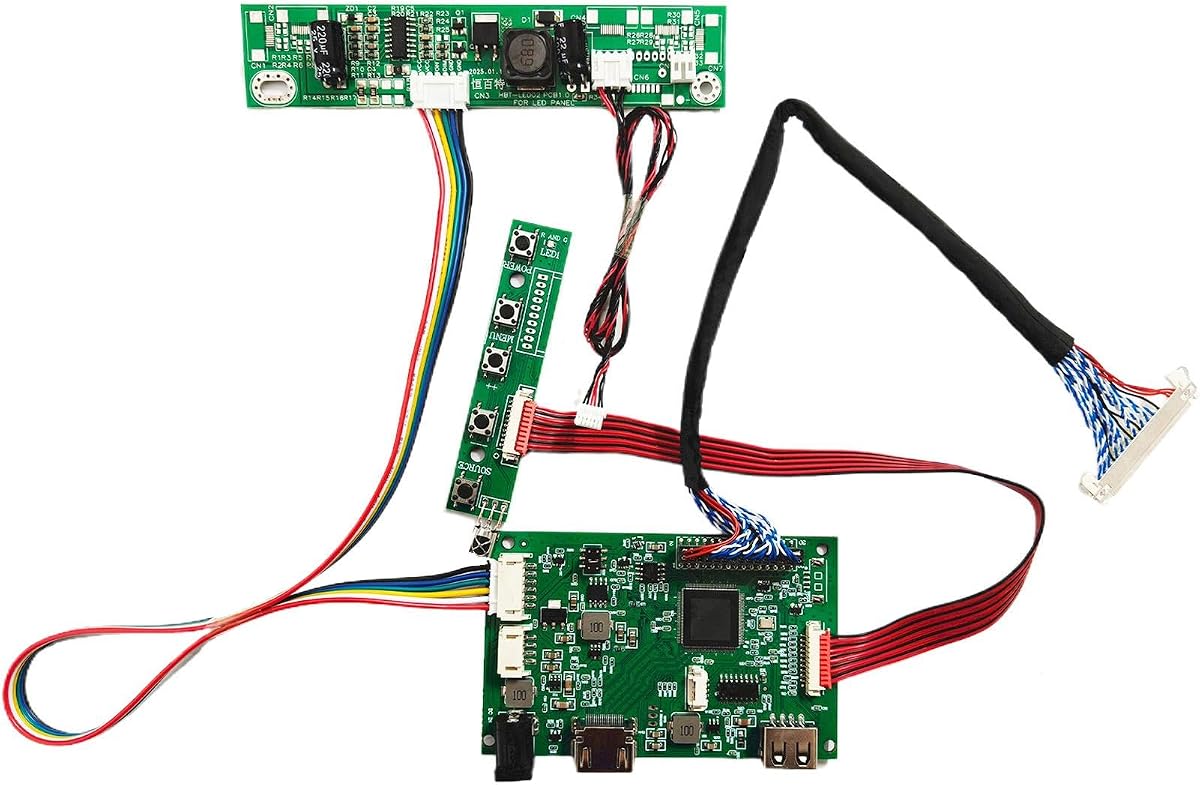
This universal board supports a massive range of screen sizes from 10 to 65 inches. It uses an LVDS interface and accepts HDMI DVI and VGA inputs.
We may earn a commission when you buy through this link, at no additional cost to you.
The OSD menu supports many languages which helps international users navigate settings. Key functions like power and volume are accessible via included buttons.
Installation requires matching the correct LVDS connector type for your panel. Users must ensure their screen supports the interface used by this board.
It is a versatile option for large scale DIY projects or diverse panel types. Always verify the LVDS pin count before purchasing.
Supports screens ranging from small portable displays to large format panels.
OSD menus are available in multiple languages to suit users globally.
We may earn a commission when you buy through this link, at no additional cost to you.
This board stands out with USB video input capabilities allowing direct media playback. It supports Full HD resolution on 21.5 to 23.8 inch screens.
We may earn a commission when you buy through this link, at no additional cost to you.
An image rotation feature enables flexible orientation which is useful for vertical setups. The high rating indicates strong performance and user satisfaction.
Users should prepare their own power adapter as it is not included. Check the specific model list to ensure your panel is compatible.
It is excellent for media centers or flexible setups requiring USB video support. The rotation feature adds unique utility for specific use cases.
Direct video playback via USB allows for standalone media viewing without a PC.
Supports 180 degree image rotation for portrait or landscape mode flexibility.
We may earn a commission when you buy through this link, at no additional cost to you.
This controller is tailored for specific 15.6 inch panels like LP156WH4 and LTN156AT17. It supports 40 pin LVDS interfaces and accepts HDMI and VGA inputs.
We may earn a commission when you buy through this link, at no additional cost to you.
It offers adjustable brightness and contrast parameters to enhance the visual experience. Stable operation monitoring helps prevent hardware overload and extends lifespan.
No rating data is provided for this item so rely on model compatibility checks. Ensure your screen model matches exactly before purchase.
It is a specialized option for users with these specific laptop panels. The adjustable parameters allow fine tuning of display settings.
Users can adjust brightness and contrast dynamically to match content needs.
Supports connection with external devices like set top boxes or consoles.
We may earn a commission when you buy through this link, at no additional cost to you.
This board is designed specifically for the B173HW01 and B173HW02 screen models. It supports Full HD resolution with a 40 pin LVDS interface.
We may earn a commission when you buy through this link, at no additional cost to you.
It features a signal processing core that converts video signals for the display. Voltage management ensures stable operation compatible with notebook power systems.
The high rating reflects reliable performance for these specific panels. Always verify your exact screen model number before purchasing.
It is the ideal choice for repairing or upgrading 17.3 inch laptops with these panels. Compatibility with host output is critical for success.
Converts video output from the host into a format the screen can recognize.
Supports notebook power systems to extend battery life with low power modes.
We may earn a commission when you buy through this link, at no additional cost to you.
Selecting the right controller board depends on several technical factors including resolution interface and power requirements.
The controller must match the panel resolution exactly. Using a board meant for 1366×768 on a 1920×1080 screen will result in no display or errors.
Always check the panel model number to confirm resolution requirements before buying.
LCD panels use different connection standards such as eDP or LVDS. Ensure the board matches your panel connector and pin count.
Using the wrong interface can damage hardware or prevent the screen from powering on.
Controllers need a DC adapter usually 12V with specific amperage. Insufficient current causes flickering or restart loops.
Confirm the amp rating needed and purchase a suitable adapter if not included.
Common inputs include VGA DVI HDMI or USB. Choose based on what video sources you plan to connect.
If using HDMI you need a board with HDMI input support for best quality.
Boards are rated for specific inch sizes. Ensure your panel size falls within the supported range of the board.
Mismatched sizes can lead to physical fit issues or incorrect signal handling.
Manufacturers often use different panel models for similar laptops. Verify the exact model number on the back of your screen.
Compatibility lists provided by sellers help avoid mismatches that lead to returns.
Some boards include speaker connectors for audio output. If you need sound without external speakers check for this feature.
Audio connectors are usually 4 pin PH2.0 or similar standard types.
Most kits include cables but power adapters are often sold separately. Check the packing list to know what is included.
Buying a complete kit saves time on sourcing extra parts later.
Connect the signal cable to the board ensuring Pin 1 alignment matches the port. Secure the connection firmly to avoid loose contact.
Plug in the DC adapter and power on the board to verify LED status before attaching the screen.
Avoid exposing the board to static or moisture during installation to protect sensitive components.
Most modern controller boards do not require driver installation. They plug and play with supported inputs and power. Check the product details for any software needs.
Flickering usually indicates insufficient power supply current. Ensure your adapter matches the required amp rating. Check cable connections for security too.
No resolution mismatch will prevent display. You must buy a board matching your panel resolution. A 1080p board cannot support lower resolution panels reliably.
These boards use HDMI DVI or VGA inputs for video. The output to the screen is usually eDP or LVDS. Match the input to your video source.
Many controller kits do not include power adapters. Always check the packing list before ordering. You may need to buy a 12V DC adapter separately.
Check the label on the back of your screen for the model number. Compare it to the compatibility list provided by the seller to confirm fit.
Some boards support USB touch input for specific panels. Check if the board description mentions touch support for your model. Most basic boards do not include touch drivers.
Verify your input source and cable connection. Check the resolution setting matches the panel. Ensure power adapter is providing enough current.
This guide highlights ten solid options ranging from budget friendly to universal solutions. Each board supports specific resolutions and interfaces to suit different panels.
Prioritize matching your exact panel model and connector type to ensure compatibility. Verify power requirements to avoid operational issues.
Keep in mind that availability and pricing vary on retailer sites. Check current listings for the most up to date information before buying.