
M.2 Heatsink Cooler 2280 SSD Double-Sided Heat Sink
4.6Editor score
Aluminum alloy construction with silver plating
Double-sided clip design for stability
Compatible with PS5 and desktop PC
Discover the top M2 2280 SSD Heatsink options for cooling and performance. This guide compares features, compatibility, and thermal efficiency for PS5 and PC
Modern computing demands high-speed storage solutions that can handle intense workloads without overheating. M.2 2280 SSDs are incredibly fast but generate significant heat during operation. A quality heatsink is essential to prevent thermal throttling and ensure your system runs smoothly under pressure.
We have analyzed the most effective cooling solutions available on the market today. Our comparison focuses on thermal conductivity, build quality, installation ease, and compatibility with various motherboards and consoles. Each product offers unique advantages tailored to different user needs and budgets.
Every recommendation in this guide highlights specific strengths and practical benefits for real-world scenarios. You will find detailed insights into how each heatsink performs under load. Please note that availability and pricing may change, so verify details before purchasing to ensure you get the best value.
4.6Editor score

4.7Editor score

4.7Editor score
This side-by-side comparison outlines the key specifications and design features of the top ten M.2 2280 SSD heatsinks. Use this table to quickly identify which model aligns best with your specific cooling requirements and hardware setup.


This M.2 heatsink offers an excellent entry point for users seeking reliable thermal management without breaking the bank. With a solid rating from users, it delivers consistent performance across various desktop and console setups. The double-sided design ensures stability during operation.
We may earn a commission when you buy through this link, at no additional cost to you.
The aluminum alloy construction with silver plating helps eliminate static electricity while providing a durable surface for heat transfer. Thermal silicone pads included in the package ensure good conductivity without damaging the drive. It is compatible with popular models like the Samsung 980 Pro.
While it lacks advanced features like heat pipes, the passive design effectively lowers temperatures by up to 20 degrees under load. The clip mechanism is straightforward, requiring no tools for installation. This makes it ideal for quick upgrades or budget builds.
If you need a dependable cooler for a PS5 or standard PC slot, this model provides great value. It protects your investment from overheating and maintains consistent speeds. We recommend it for anyone prioritizing function over fancy aesthetics.
Silver plating on the main body helps eliminate static electricity, protecting sensitive electronics during installation.
Designed to fit all single-sided Type M.2 SSDs, ensuring broad compatibility with modern storage drives.
We may earn a commission when you buy through this link, at no additional cost to you.
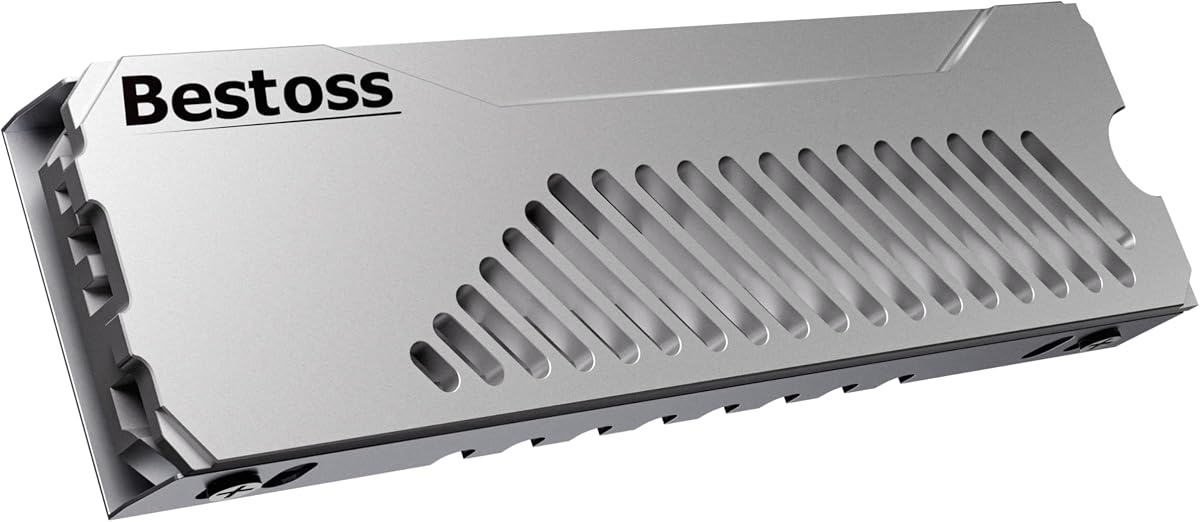
The Bestoss heatsink features a unique hollow heat dissipation design that enhances cooling efficiency beyond standard single-sided models. Its lightweight build ensures efficient airflow, making it suitable for enclosed spaces where air circulation is critical. The deep matte texture adds a modern touch.
We may earn a commission when you buy through this link, at no additional cost to you.
Constructed from aluminum alloy, this cooler effectively conducts heat away from the drive. Thermal pads with 3 W/mK conductivity ensure instant heat transfer to the heatsink surface. Testing shows a temperature difference of 8 to 13 degrees compared to uncooled drives under intensive loads.
While the hollow design looks sleek, it may feel less substantial than solid block coolers. However, the minimalist lines and effective thermal management make it a strong contender for creative professionals. It maintains smooth computer operation during heavy workloads.
Consider this option if you want a balance of style and function without high cost. It serves as a universally compatible heatsink for most mainstream setups. Proper installation ensures it delivers the claimed thermal benefits consistently.
The innovative thermal dissipation system works by precisely conducting heat and spreading it rapidly across the surface.
Ideal choice for content creators and demanding professionals needing consistent performance during long sessions.
We may earn a commission when you buy through this link, at no additional cost to you.
SABRENT delivers a robust cooling solution combining copper and aluminum for maximum thermal performance. This winning combination of materials ensures efficient heat transfer from the SSD to the air. It is a solid choice for desktop computers requiring reliable protection.
We may earn a commission when you buy through this link, at no additional cost to you.
The heatsink supports both single and double-sided M.2 2280 SSDs, offering flexibility for various drive configurations. Included thermal tape, screws, and a screwdriver make installation straightforward for most users. You do not need to purchase additional accessories separately.
While primarily designed for desktop PCs, its dimensions may not fit all console slots. The metal construction adds weight, which provides stability but requires secure mounting. Overall, it maintains maximum read and write speeds by keeping temperatures in check.
For users prioritizing raw thermal performance in a desktop environment, this model is a strong pick. It simplifies setup with included tools and hardware. We recommend checking motherboard clearance before purchase to ensure a perfect fit.
Copper and aluminum are combined to leverage the conductivity of copper and the weight balance of aluminum.
Everything needed for installation is included, removing the hassle of sourcing extra screws or tape.
We may earn a commission when you buy through this link, at no additional cost to you.
The be quiet! MC1 Pro stands out with an advanced aluminum heatsink featuring a built-in heatpipe. This integrated solution ensures efficient heat dissipation, keeping your M.2 NVMe SSD cool even under heavy workloads. Its sleek matte black finish delivers a clean look for modern builds.
We may earn a commission when you buy through this link, at no additional cost to you.
Thermal throttling is a significant risk for high-speed drives, but this cooler lowers temperatures effectively. By maintaining optimal heat levels, it allows your drive to sustain top performance for longer periods. This is crucial for gamers and creators working on large projects.
Compatible with both single and double-sided M.2 2280 modules, it offers flexible compatibility across a wide range of drives. The simple mounting system allows for a quick, hassle-free setup on your M.2 slot. It provides reliable cooling and long-term durability.
We choose this as our Editor's Choice for its balance of premium features and practical performance. If you value aesthetics alongside cooling power, this model is ideal. It is an investment in the longevity and speed of your storage system.
The integrated heatpipe technology provides superior passive cooling compared to standard fin-only designs.
A premium black aluminum design that matches high-quality PC builds without standing out negatively.
We may earn a commission when you buy through this link, at no additional cost to you.
This 5-pack set is perfect for users with multiple drives or who want spares on hand. Each unit utilizes an aluminum fin-type heatsink with high-performance thermal silicone pads. The design ensures that your M.2 SSD maintains a safe temperature effectively.
We may earn a commission when you buy through this link, at no additional cost to you.
Installation is made easy with two silicone elastic bands, allowing for tool-free setup. You simply place the thermal pad and press firmly to ensure close contact. The kit includes extra accessories like a screwdriver and screw kit for versatility.
While the bands offer convenience, they may not provide the same longevity as screw-fixed designs. However, for standard workstations and desktop PCs, the cooling performance is sufficient to prevent throttling. It works well with both single and double-sided NVMe drives.
Buying in bulk often saves money, and this bundle delivers solid value. It is an excellent choice for IT admins or enthusiasts with multiple systems to manage. Ensure the bands are tightened properly for optimal thermal transfer.
Purchasing a 5-pack provides significant savings compared to buying individual units for multiple machines.
Tool-free installation with silicone bands speeds up setup times for multiple drive configurations.
We may earn a commission when you buy through this link, at no additional cost to you.
The ARCTIC M2 Pro is specifically designed to meet Sony's required specifications for PS5 installation. This makes it a reliable choice for console users looking to upgrade storage without voiding warranties or risking fit issues. It effectively dissipates heat due to its additional mass.
We may earn a commission when you buy through this link, at no additional cost to you.
Installation is simplified with a click mechanism that fixes the NVMe SSD between the heat sinks. There are no screws or rubber bands needed, reducing the risk of losing small parts. The included TP-3 thermal pads adapt perfectly to height differences.
Users report reliable performance that allows M.2 SSDs to work efficiently during intensive write and read processes. The risk of thermal throttling is significantly reduced, maintaining high performance during gaming sessions. It is suitable for both PS5 and PS5 Slim models.
If you are building a storage expansion for your console, this model is highly recommended. Its specialized design ensures a perfect fit and optimal cooling. We value its simplicity and compatibility with strict console requirements.
This heatsink is engineered specifically to fit the tight constraints of the PS5 storage bay.
The click mechanism eliminates the need for screws, making installation clean and hassle-free.
We may earn a commission when you buy through this link, at no additional cost to you.
Thermalright is a renowned brand with over 20 years of development in computer accessories. Their M.2 2280 heatsink features high-performance heat sink silicone film for optimum cooling. The aluminum combination allows for effective dissipation across both sides of the drive.
We may earn a commission when you buy through this link, at no additional cost to you.
The anodized sandblasting process and surface treatment greatly increase the heat dissipation area. Users can expect a cooling effect ranging from 10 to 30 degrees depending on the environment. It is designed for desktop PC M.2 interfaces without interfering with other slots.
Installation includes screws for a tighter fit to the SSD, enhancing thermal conductivity over clip-only designs. Instructions and video tutorials are provided to guide you through the process quickly. It is compatible with many popular Samsung 9 series SSDs.
For those who trust established manufacturers, this model offers consistent quality. The double-sided design ensures all components on the PCB are cooled. We recommend it for standard PC builds where stability is key.
Anodized sandblasting increases the effective surface area available for heat radiation into the air.
Cooling both sides of the drive ensures all heat-generating components are managed effectively.
We may earn a commission when you buy through this link, at no additional cost to you.
This model features a solid 8mm pure copper heat pipe integrated into an all-aluminum heat sink. The heat pipe technology allows heat to spread rapidly from the contact point to the fin area. It is designed for M.2 interface 22*80mm SSDs and partly compatible with smaller sizes.
We may earn a commission when you buy through this link, at no additional cost to you.
The aluminum body is finished with a sandblasting process for a durable silver gray look. Double layer silicone sheets ensure a complete interface between the drive and the cooler. Each unit undergoes strict testing before it is sent to you.
While compatible with 2260 and 2242 SSDs partially, checking specific dimensions is advised. The solid construction provides a robust solution for high-performance drives that run hot. It balances thermal efficiency with a clean industrial design.
Choose this if you need the added benefit of a copper heat pipe at a reasonable price. It effectively lowers surface temperatures through proven heat transfer methods. It is a practical upgrade for any M.2 slot.
The 8mm copper pipe rapidly transfers heat from the SSD to the cooling fins efficiently.
Strict testing processes ensure that every unit meets performance standards before shipping.
We may earn a commission when you buy through this link, at no additional cost to you.
The HR09 model features advanced technology with a 6mm reverse gravity heat pipe and electroplated base. Its 4500mm² heat dissipation area is significantly larger than standard coolers, offering superior cooling effects. It includes a second-generation thermal pad with high conductivity.
We may earn a commission when you buy through this link, at no additional cost to you.
With a cooling effect ranging from 10 to 30 degrees, it effectively prevents overheating and throttling. The double-sided clip design comes with 6 adjustable height screws, suitable for M.2 SSDs of various heights. This ensures a stable installation and better protection.
The nano thermal pad is soft enough to fit uneven surfaces without damaging the warranty label. This attention to detail makes it ideal for premium builds where drive longevity is paramount. It offers an ultimate heat dissipation experience.
For users with high-end drives that demand top-tier cooling, this is the best option. It combines large fins with a dedicated heat pipe. We recommend it for serious enthusiasts who want maximum thermal headroom.
Nano Silicon Grease Material provides exceptional thermal conductivity for precise heat transfer.
Adjustable height screws allow this heatsink to fit drives with varying component heights securely.
We may earn a commission when you buy through this link, at no additional cost to you.
Unlike passive models, this Thermaltake unit includes an active micro blower fan running at 8000 RPM. This ensures powerful and silent high-speed cooling even in stagnant air environments. The integrated molding aluminum heatsink works with the fan for efficient heat removal.
We may earn a commission when you buy through this link, at no additional cost to you.
The stainless steel reinforced backplate adds structural strength and helps distribute heat. It is specially designed for M.2 2280 SSDs to provide targeted cooling where it is needed most. This approach actively pushes heat away from the drive.
Active cooling requires a power source such as a SATA power connector or motherboard header. This may add complexity to your build and introduce some noise. However, it offers the highest level of protection against extreme thermal throttling.
Choose this model if your PC case has poor airflow or you run intensive tasks for long periods. The active fan ensures consistent cooling regardless of ambient conditions. It is a robust solution for demanding gaming or work setups.
The micro blower fan actively forces air over the fins, enhancing cooling beyond passive capacity.
A stainless steel reinforced backplate adds physical strength and thermal mass to the cooler.
We may earn a commission when you buy through this link, at no additional cost to you.
Selecting the right heatsink requires understanding several key factors that impact performance and compatibility. This section breaks down the most important considerations to help you make an informed decision.
The material used in the heatsink directly affects how quickly heat moves from the SSD to the air. Aluminum is common due to its light weight and good conductivity, while copper offers better heat transfer at a higher cost. Look for alloys that balance weight and cooling efficiency.
Choose high-quality aluminum or copper blends for the best passive performance.
Heat pipes are internal components that rapidly transfer heat from the contact point to the fins. Models with larger diameters or multiple pipes generally perform better under load. This is crucial for high-performance NVMe drives that generate significant heat.
Prioritize heatsinks with copper heat pipes for superior thermal dissipation.
Thermal pads bridge the gap between the SSD and the heatsink to ensure efficient heat transfer. Higher thermal conductivity ratings indicate better performance. The thickness should match your drive components to maintain good contact without pressure.
Ensure the pads have high thermal conductivity and proper thickness.
Check that the heatsink fits your specific M.2 slot and SSD size. Some coolers are designed for desktop PCs while others support consoles like PS5. Verify dimensions to avoid issues with clearance or mounting brackets.
Verify compatibility with your motherboard slot and SSD type before purchasing.
Mounting mechanisms vary from clips and bands to screws and brackets. Clips allow for quick tool-free installation, while screws offer a more secure fit. Choose a method that suits your comfort level and stability needs.
Select an installation method that balances ease of use with secure fit.
Heatsinks come in various colors and finishes to match your build theme. Matte black, silver, and blue options exist depending on the model. While aesthetics do not change performance, they matter for visible builds.
Pick a design that matches the visual style of your computer system.
Most heatsinks are passive, relying on airflow and fins to cool the drive. Active models include fans that force air across the fins. Passive units are silent but may struggle in low-airflow cases.
Decide between silent passive cooling or active fan-based systems.
Established brands often provide better quality control and customer support. Research reviews and company history to gauge reliability. A well-regarded brand ensures you are getting a tested product.
Opt for reputable brands known for consistent performance.
Start by powering down your computer and unplugging it from the power source. Remove the case cover to access the M.2 slot on your motherboard. Locate the drive you intend to cool and remove it carefully if installing a new heatsink.
Apply the thermal pad to the controller area of the SSD ensuring there are no air bubbles. Place the heatsink over the drive and secure it with the provided screws or clips. Make sure the mount is firm to ensure good thermal contact.
Regularly check for dust accumulation on the fins as this can reduce airflow over time. Clean the fins gently with compressed air to maintain optimal performance. Verify the drive temperatures periodically using system monitoring tools to confirm efficiency.
High-performance NVMe SSDs can reach high temperatures under load leading to thermal throttling. Throttling reduces your storage speed causing performance drops. A heatsink keeps temperatures stable ensuring consistent read and write speeds.
Most modern SSDs allow heatsink installation without voiding the warranty. However, check the manufacturer policy on your specific drive model. Using included thermal pads usually protects warranty seals during installation.
Some heatsinks are specifically designed for PS5 constraints like height and shape. PC models might be too large for the console. Verify the product specifications confirm both use cases.
Single-sided coolers focus heat dissipation on one side of the drive. Double-sided units cover both sides to cool additional components on the PCB. Double-sided is better for high-end drives with more heat sources.
Use compressed air to blow dust out of the fins gently. Avoid using wet cloths directly on the electronics. Ensure the system is powered off and unplugged during cleaning.
A standard 2280 heatsink is designed for drives measuring 22mm wide and 80mm long. Some models may accommodate smaller sizes like 2260 or 2242. Check the specifications to confirm compatibility with non-standard sizes.
We have covered ten top options ranging from budget-friendly to premium active cooling solutions. The be quiet! MC1 Pro and Thermalright HR09 stand out for their advanced thermal technology. Budget buyers will appreciate the value offered by the M.2 Heatsink Cooler.
Prioritize compatibility with your specific drive and case when making your choice. A proper fit ensures efficient cooling without obstructing other components. Thermal conductivity and build quality should guide your final decision.
Remember that product availability and stock can change quickly. Check current details on the product pages before purchasing to ensure you select the right model. Investing in proper cooling protects your data and maximizes SSD performance.