
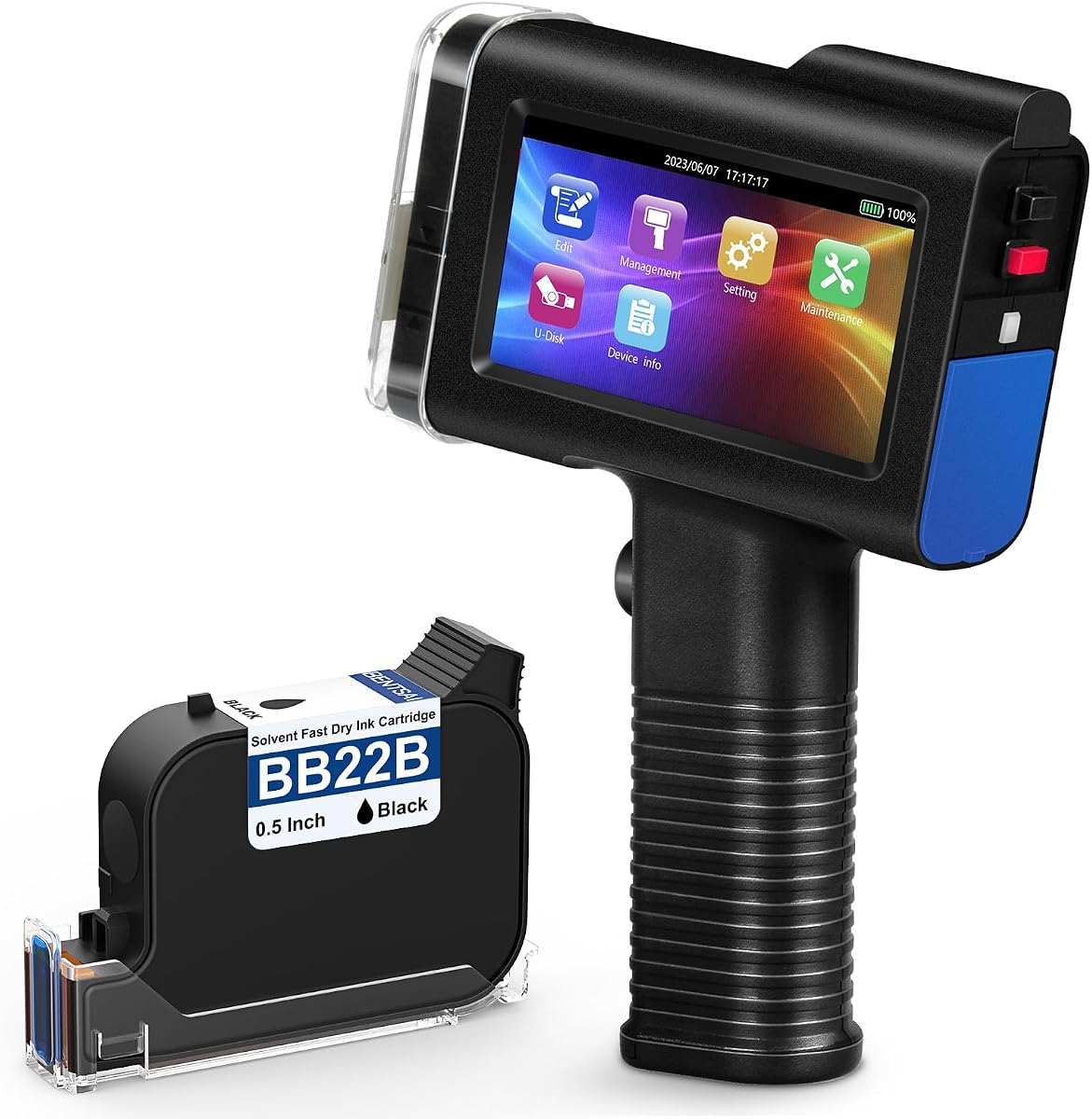
0.5 Inch Print Height Intelligent JC01 Handheld Inkjet Printer (Black)
4.2Editor score
390g lightweight design
300-nozzle system
16 hours continuous operation
Discover the top 10 handheld inkjet printers for 2026. This guide compares features, speed, and versatility to help you choose the right coding solution.
Handheld inkjet printers offer a versatile way to mark products, packages, and surfaces without bulky machinery. They are ideal for small businesses and warehouses needing quick batch codes or expiration dates on various materials.
We evaluated ten real products based on their print quality, battery life, ease of use, and versatility across different surfaces. Our analysis focuses on technical specifications and user feedback to ensure reliable performance for your needs.
Each pick highlights specific strengths like print height, ink capacity, and interface design. Keep in mind that product availability and features may change, so verify details before purchasing to ensure the best fit for your workflow.
4.2Editor score

4.7Editor score
4.4Editor score
This side-by-side comparison highlights the key specifications of ten leading handheld inkjet printers. Reviewing these details helps you understand differences in print height, battery life, and surface compatibility across models.


This handheld inkjet printer stands out as a top choice for businesses needing reliable batch coding and labeling. It features a robust design capable of printing on various materials with high clarity and speed.
We may earn a commission when you buy through this link, at no additional cost to you.
The device offers an impressive 16 hours of operation on a single charge, ensuring it lasts through long shifts. Its 4.3 inch HD capacitive touchscreen provides an intuitive interface for creating templates and importing files easily.
While it performs exceptionally well, the unit is slightly heavier than ultra-portable options. Additionally, users should factor in the cost of replacement ink cartridges for sustained operations over time.
It is ideal for manufacturers and warehouse staff requiring consistent, high-quality prints on plastic, metal, or cardboard. The combination of speed, durability, and ease of use makes it a strong recommendation for professional settings.
The advanced power management system ensures up to 16 hours of continuous printing, reducing downtime during critical production periods.
Support for multiple file formats and languages allows seamless integration into global workflows without needing external software.
We may earn a commission when you buy through this link, at no additional cost to you.
The JC01 Handheld Inkjet Printer offers an excellent balance of performance and affordability for small businesses. It is designed to be highly portable without sacrificing essential printing capabilities for daily tasks.
We may earn a commission when you buy through this link, at no additional cost to you.
Weighing just 390g, it is easy to handle for extended periods. The 300-nozzle system ensures clear output on various surfaces, while the long battery life supports all-day operations in busy environments.
However, it lacks the high resolution of more expensive units, which might be noticeable on detailed graphics. The ink capacity is also standard, requiring more frequent replacements compared to high-yield models.
This printer is perfect for users needing a reliable, lightweight solution for basic coding and labeling. Its user-friendly interface and drop-resistant design make it a practical choice for fast-paced industrial settings.
The lightweight construction and wrist strap ensure secure handling, reducing fatigue and risk of accidental drops during use.
Solvent-based ink dries quickly, preventing smudges and allowing immediate packaging or shipping after printing.
We may earn a commission when you buy through this link, at no additional cost to you.
The BENTSAI BT-HH6105B2 delivers premium performance with its 600 DPI high resolution capability. It is designed for businesses requiring detailed and durable markings on a wide range of industrial materials.
We may earn a commission when you buy through this link, at no additional cost to you.
Its 42ml quick-drying ink cartridge offers an impressive yield of up to 2 million characters, reducing maintenance frequency. The device can be mounted to conveyor lines for automation, boosting efficiency in production environments.
While the price is higher than basic models, the durability and precision justify the investment. However, its weight might be a consideration for users who need extreme portability for constant handheld use.
Ideal for professionals needing high-fidelity prints on non-porous and porous surfaces alike, this printer excels in demanding scenarios. The intuitive touch screen and robust build make it a top-tier option for serious users.
The 600 DPI resolution ensures crisp text and graphics, meeting compliance standards for barcode and logo printing.
Automatic mounting options allow for seamless integration into production lines, reducing manual labor and increasing speed.
We may earn a commission when you buy through this link, at no additional cost to you.
The BENTSAI BT-HH6205BL is designed for applications requiring large text and high visibility. With an adjustable print height of up to 1 inch, it suits marking on pallets and large containers effectively.
We may earn a commission when you buy through this link, at no additional cost to you.
Its unique motherboard technology doubles operation time, ensuring zero downtime during critical shifts. The 5-roller system provides smoother movement, reducing strain and improving print stability on uneven surfaces.
Though it is slightly heavier than standard models, the ergonomic handle mitigates fatigue. The premium build quality comes with a higher price tag, which may be a barrier for smaller operations with limited budgets.
This model is perfect for logistics and warehousing where large character visibility is essential. Its reliability and capacity for continuous operation make it a valuable tool for high-volume labeling needs.
Print heights up to 1 inch ensure clear visibility from a distance, ideal for shipping and storage identification.
The upgraded roller system minimizes friction, providing consistent print quality even on rough or uneven materials.
We may earn a commission when you buy through this link, at no additional cost to you.
The Phezer P15 operates independently without needing a computer or phone connection, simplifying setup for quick jobs. It features a powerful quad-core CPU that ensures stable operation even during prolonged use.
We may earn a commission when you buy through this link, at no additional cost to you.
Its lightweight body and large battery capacity make it easy to carry around the warehouse or production floor. The built-in memory card allows for storing multiple templates, enabling quick access to common codes.
While it offers good performance, the battery life is standard compared to extended-run models. The interface is straightforward but lacks the high-definition display found in premium units, affecting detail visibility.
This printer is ideal for small business owners looking for a cost-effective and easy-to-use labeling solution. Its independence from external devices reduces complexity, making it a reliable choice for on-site printing.
Operating without a connected device streamlines the workflow, reducing dependency on external networks or hardware.
Support for over 10 surface types ensures it can handle everything from cable bundles to fabric tags effectively.
We may earn a commission when you buy through this link, at no additional cost to you.
The MS-Z10 is a compact option tailored for DIY enthusiasts and light commercial use. It supports a range of DPI settings, allowing users to choose between speed and quality based on their specific needs.
We may earn a commission when you buy through this link, at no additional cost to you.
Its 42ml quick-drying ink ensures that prints dry rapidly, preventing smears during packaging. The 4.3-inch touch screen provides a familiar interface for importing images and customizing text layouts easily.
However, the ink is noted as water-resistant rather than permanent, which limits its use for long-term outdoor markings. Users seeking industrial-grade permanence may need to look at higher-end solvent-based options.
This printer is best suited for temporary labeling, retail promotions, or home projects. Its affordability and ease of use make it accessible for users who need occasional but clear and reliable prints.
Adjusting resolution from 300 to 600 DPI gives users control over print speed and detail based on the task at hand.
The small form factor fits easily into toolboxes or bags, making it convenient for mobile work environments.
We may earn a commission when you buy through this link, at no additional cost to you.
This printer is designed for tasks requiring large, easily readable text and marks. With a maximum print height of 1 inch, it is ideal for labeling pallets, bins, or large industrial components.
We may earn a commission when you buy through this link, at no additional cost to you.
The infrared aiming assist significantly improves positioning accuracy, helping beginners get aligned quickly. It supports up to 16 hours of continuous operation, ensuring it can handle long production shifts without interruption.
The device is relatively heavier than smaller models, which may cause fatigue during extended handheld use. Setup can also be slightly complex for those unfamiliar with industrial coding equipment, though guides are provided.
It is a solid choice for warehouses and logistics centers needing clear, large markings. The waterproof and fade-resistant ink ensures that labels remain legible even in harsh or humid environments.
The built-in laser or infrared assist helps align the print head precisely, reducing errors and material waste.
Waterproof ink prevents smearing and fading, ensuring compliance marks stay clear throughout the product lifecycle.
We may earn a commission when you buy through this link, at no additional cost to you.
The XMINI printer is a highly portable device weighing only 0.54 pounds, making it perfect for tight spaces. Its independent system allows for direct data input without connecting to external devices or apps.
We may earn a commission when you buy through this link, at no additional cost to you.
It features an anti-interference touch screen designed to withstand complex working environments with temperature and humidity variations. The positioner plate enhances printing on uneven or curved surfaces, improving overall accuracy.
The smaller 2.4 inch screen may be less comfortable for detailed editing compared to larger models. Calibration is recommended upon receipt to ensure touch sensitivity and accuracy, adding a step to the initial setup.
This model is best for field technicians or mobile workers who need extreme portability. The efficient ink system and robust build quality make it a reliable tool for varied marking tasks.
At just 0.54 pounds, the device minimizes hand strain, allowing for effortless operation during long periods.
With the positioner plate, users can print accurately on bottles, tubes, and other non-flat shapes without errors.
We may earn a commission when you buy through this link, at no additional cost to you.
The E12 Mini offers a unique dual-use design with a detachable handle, transforming from a standard handheld to a compact mini mode quickly. This flexibility suits diverse environments from warehouses to outdoor sites.
We may earn a commission when you buy through this link, at no additional cost to you.
Its quick-dry ink system delivers waterproof adhesion in under three seconds, ensuring durability and speed. The proprietary anti-clog nozzles and leak-proof design help maintain consistent quality over long periods of use.
While the print height is limited to 0.5 inch, it covers most common labeling needs effectively. Battery life may not last as long as models with extended runtimes, requiring occasional recharging during shifts.
This printer is perfect for users needing a versatile and compact labeling solution. Its pocket-sized portability and high-capacity ink system make it a reliable companion for varied and on-the-go marking tasks.
The ability to switch handle configurations allows users to adapt the tool to different working postures and spaces.
Proprietary nozzles prevent blockages, ensuring that the printer remains ready for use without frequent maintenance.
We may earn a commission when you buy through this link, at no additional cost to you.
This printer emphasizes ease of data transfer, allowing users to plug in a USB drive to upload TXT and image files directly. It simplifies the workflow for those who manage large volumes of batch data frequently.
We may earn a commission when you buy through this link, at no additional cost to you.
Weighing only 390g, it is designed for ergonomic handling and comfort. The battery life supports over 16 hours of continuous printing, making it suitable for all-day use without needing a charge.
The print height range is limited to 0.5 inches, which is ideal for standard codes but not for large character needs. While effective for most tasks, it may lack the visual impact required for prominent product markings.
It is well-suited for businesses that rely heavily on file imports and frequent updates. Its lightweight design and robust battery ensure that users can work efficiently with minimal interruption or physical strain.
Supporting direct file imports simplifies batch coding tasks, removing the need for computer software dependencies.
The wrist strap and lightweight build reduce hand fatigue, allowing operators to work comfortably for longer periods.
We may earn a commission when you buy through this link, at no additional cost to you.
Selecting the right handheld inkjet printer requires evaluating several key factors to ensure it meets your specific business needs.
Print height determines the size of your text and codes. Models range from 0.5 to 1 inch, with higher resolution options for detailed barcodes. Choose based on your visibility requirements and surface type.
For standard labels, 0.5 inch is often sufficient. Large containers need 1 inch options. Higher resolution like 600 DPI ensures clarity for scanning.
Battery life dictates how long you can work without recharging. Look for models offering at least 16 hours of continuous use. This is crucial for long shifts to avoid interruptions in workflow.
Extended battery life ensures that you do not face delays due to power loss. Consider capacity and charging speed to align with your working hours.
Ink quality affects durability and drying time. Fast-drying waterproof inks are ideal for wet environments. Capacity varies from 42ml to higher yields, impacting how often you replace cartridges.
Quick-drying inks prevent smearing and speed up production. Larger capacity reduces maintenance frequency and operational costs over time.
Different materials require specific ink adhesion. Ensure the printer supports non-porous surfaces like metal or glass as well as porous ones like wood or cardboard. Versatility is key for mixed material warehouses.
Check the manufacturer's list of supported surfaces. Some models handle curved surfaces better with positioner plates or specific nozzle types.
A touchscreen interface simplifies editing and template management. Look for intuitive designs with multi-language support if you have a diverse team. USB or wireless file import saves time on data entry.
User-friendly systems reduce training time and increase productivity. Features like direct file upload streamline complex coding tasks significantly.
Weight affects how comfortable the printer is to use over long periods. Lightweight models under 1 pound reduce fatigue and improve handling. Ergonomic grips and straps help prevent drops and strain.
Portability is essential for mobile workers. A compact device fits easily into toolboxes and makes it easier to move around large facilities.
While initial price matters, consider the cost of consumables like ink and accessories. High-end models may cost more but offer better durability and lower maintenance. Balance upfront costs with long-term value.
Set a budget that accounts for ongoing needs. Sometimes spending slightly more upfront saves money in the long run due to efficiency and longevity.
Reliable technical support ensures quick resolution of issues. Look for brands offering clear warranties and accessible customer service. Video tutorials and guides help with setup and troubleshooting.
Good support minimizes downtime during repairs or errors. Check availability of parts and accessories to ensure sustained operation.
To start, ensure the printer is fully charged and the ink cartridge is properly installed. Power on the device and select your preferred language on the touchscreen. This setup ensures the device is ready for immediate operation.
Create or import your text or image files before printing. Use the positioning plate to align the nozzle correctly with your surface. Press the trigger or select print to begin. Move the device steadily across the material for consistent results.
After use, replace the protective cap on the nozzle to prevent drying and clogging. Store the printer in a clean and dry environment. Regularly update your templates and clean the exterior with a soft cloth to maintain performance.
Many models support printing on curved surfaces like bottles or tubes. Using a positioner plate helps maintain alignment for consistent results on these shapes. Check the specifications for specific compatibility with uneven surfaces before purchasing.
Most handheld inkjet printers use fast-drying ink that sets within seconds. This quick drying time prevents smearing and allows immediate handling or packaging of items. Always allow a brief moment for complete drying on non-porous materials.
No, most modern handheld printers operate independently without requiring a computer or phone. You can input data directly on the device or use USB drives. This independence makes them convenient for on-site and mobile labeling tasks.
A single cartridge typically prints hundreds of thousands of characters depending on the font size and print density. Some high-yield options can reach over two million characters. Monitor your usage to plan replacements effectively.
Prints are usually waterproof and fade-resistant, but permanence varies by ink type and surface. Solvent-based inks offer better durability for industrial environments. Verify with the manufacturer if your specific use case requires long-term permanence.
To maintain nozzles, always replace the protective cap when not in use. Avoid letting the device sit idle without cleaning for extended periods. Regular cleaning and proper storage prevent clogging and ensure consistent print quality.
We have explored ten top handheld inkjet printers for 2026, each offering unique strengths for different business needs. From budget-friendly options to premium models with high resolution, there is a solution for every scenario.
When choosing, prioritize factors like battery life and print height that matter most to your operations. A reliable device will improve efficiency and reduce errors in your labeling and marking processes significantly.
Remember to check current availability and specifications as they may change. Selecting the right tool now ensures you stay productive and compliant with industry marking standards.