
Lenovo V15 Gen 4
4.5Editor score
Military-grade durability tested
Long battery life performance
Secure TPM encryption included
Finding a laptop that stands the test of time requires more than just high specs. It demands robust build quality, reliable components, and a platform that supports long-term software updates and security patches for sustained performance.
We evaluated ten top models based on durability certifications, processor lifespan, upgradeability options, and brand support policies. This guide compares business-class and rugged devices designed to handle daily wear while maintaining efficiency over multiple years.
Each selection highlights key strengths for longevity including military-grade testing, thermal management, and repairability. Note that stock levels and pricing fluctuate frequently, so verify current availability before making your final investment decision today.
4.5Editor score

4.5Editor score

4.2Editor score
As an Amazon Associate we earn from qualifying purchases.
This side-by-side comparison highlights key durability and performance specifications across ten leading laptops designed for extended use and reliability in professional environments.






This HP business laptop delivers reliable performance for daily tasks with its robust design and efficient AMD Ryzen 5 processor. It earned a high rating from users who value a large screen and durable keyboard for extended work sessions.
We may earn a commission when you buy through this link, at no additional cost to you.
The brushed metal finish and full-size numeric keypad make it ideal for professionals needing precision and longevity. Fast charge technology ensures you stay productive even when power outlets are scarce during travel or remote work.
While the 17.3-inch chassis adds some weight, it balances portability with a spacious display that reduces eye strain over time. The inclusion of security features and long battery life supports uninterrupted workflow across multiple days.
This device is perfect for office workers or students seeking a laptop that can handle years of regular use without slowing down. It combines practical features with durability to ensure long-term value and performance.
The sturdy design resists daily wear and tear, ensuring the laptop remains functional even after years of travel and desk use.
Advanced battery technology provides extended usage time while fast charge capabilities minimize downtime during busy schedules.
We may earn a commission when you buy through this link, at no additional cost to you.
The Lenovo V15 Gen 4 offers exceptional value for users seeking a durable machine built to withstand harsh conditions. Its military-grade testing ensures reliability even in environments with extreme temperatures or humidity changes.
We may earn a commission when you buy through this link, at no additional cost to you.
Features like a privacy shutter and TPM 2.0 encryption provide essential security for handling sensitive data over the long term. The AMD processor ensures smooth performance for standard business applications and web-based workflows.
Although 8GB RAM is sufficient for general use, power users might find it limiting for heavy multitasking. However, the SSD storage delivers fast boot times that keep workflows efficient throughout the workday.
This laptop is ideal for students or small businesses that need a reliable tool without overspending. It balances cost-effectiveness with robust security features that support safe and secure daily computing.
Tested against military standards, the chassis resists drops and environmental stressors to extend the device operational lifespan significantly.
Hardware-based privacy features protect your data and identity, ensuring secure communication and work habits over time.
We may earn a commission when you buy through this link, at no additional cost to you.
This ThinkBook combines premium materials with next-generation AI hardware to deliver exceptional performance that will remain relevant for years. The aluminum chassis provides a sleek look while protecting internal components from damage during travel.
We may earn a commission when you buy through this link, at no additional cost to you.
With 32GB of DDR5 RAM and a 1TB SSD, it handles massive datasets and heavy multitasking without hesitation. Thunderbolt 4 ports ensure you can connect to high-speed peripherals and displays as technology advances.
The integrated NPU enhances battery efficiency and accelerates productivity tasks, which is crucial for professionals on the go. Advanced security features like BitLocker and TPM 2.0 protect your critical business data against modern threats.
For users seeking a machine that can grow with their needs, this model offers the best combination of speed and durability. It is an excellent investment for professionals who demand reliability and advanced capabilities.
The latest processor architecture ensures compatibility with demanding software and provides headroom for future workflow requirements.
The durable aluminum body resists scratches and impacts, maintaining its professional appearance and structural integrity over time.
We may earn a commission when you buy through this link, at no additional cost to you.
Dell delivers a versatile laptop designed for comfort and clarity during long working hours. The 16-inch screen with a 16:10 aspect ratio offers more vertical space, which improves productivity for document editing and coding tasks.
We may earn a commission when you buy through this link, at no additional cost to you.
Features like ComfortView Plus reduce blue light exposure to protect eye health during extended use. The adaptive thermal system ensures the laptop runs cool and quiet, preserving battery health and component longevity.
One standout feature is the onsite service warranty, which provides peace of mind by having a technician come to your location if issues arise. This support structure extends the practical lifespan of the device significantly.
Ideal for office workers who prioritize screen quality and support, this model balances modern specs with user-friendly design. It is a solid choice for those who need a dependable machine for daily communication and tasks.
Display technologies reduce strain during long sessions, helping users maintain focus and comfort throughout the workday.
Onsite warranty support minimizes downtime and ensures that hardware issues are resolved quickly to maintain continuous workflow.
We may earn a commission when you buy through this link, at no additional cost to you.
This model is built for efficiency with a powerful H-series processor that handles demanding tasks faster than standard chips. It is particularly well-suited for users who need to run multiple applications simultaneously without lag.
We may earn a commission when you buy through this link, at no additional cost to you.
Windows 11 Pro adds advanced features like BitLocker and Remote Desktop, which are vital for secure business environments. The inclusion of Ethernet and HDMI ports allows for stable wired connections in office settings.
While the display is solid, it lacks the high brightness found in premium models, which might be a factor for outdoor use. However, the numeric keypad is a great addition for anyone working with spreadsheets or data entry daily.
This laptop is ideal for professionals who need raw power and security features in a portable package. It represents a strong middle ground between consumer devices and high-end business workstations.
The high-performance processor ensures that demanding applications run smoothly, reducing lag and improving workflow efficiency over time.
Built-in encryption and remote management tools protect sensitive data and simplify IT administration for long-term business use.
We may earn a commission when you buy through this link, at no additional cost to you.
This Lenovo V15 stands out for its impressive durability certification at a budget-friendly price point. The MIL-SPEC rating means it can withstand drops and vibrations, making it a great choice for mobile professionals or students.
We may earn a commission when you buy through this link, at no additional cost to you.
The inclusion of DDR5 RAM is rare at this price level and ensures better power efficiency and speed compared to older DDR4 models. This upgrade contributes significantly to the overall lifespan and responsiveness of the system.
While the integrated graphics are not suited for gaming, they are sufficient for everyday tasks and video conferencing. The privacy shutter adds a valuable layer of security for users who care about their digital footprint.
It is an excellent choice for users who want a reliable machine without paying for premium features. The combination of durability and modern memory technology makes it a smart long-term investment.
Military-grade testing ensures the device can handle rough conditions, extending its useful life in challenging environments.
DDR5 RAM provides faster data access and better power efficiency, ensuring smoother performance over the long term.
We may earn a commission when you buy through this link, at no additional cost to you.
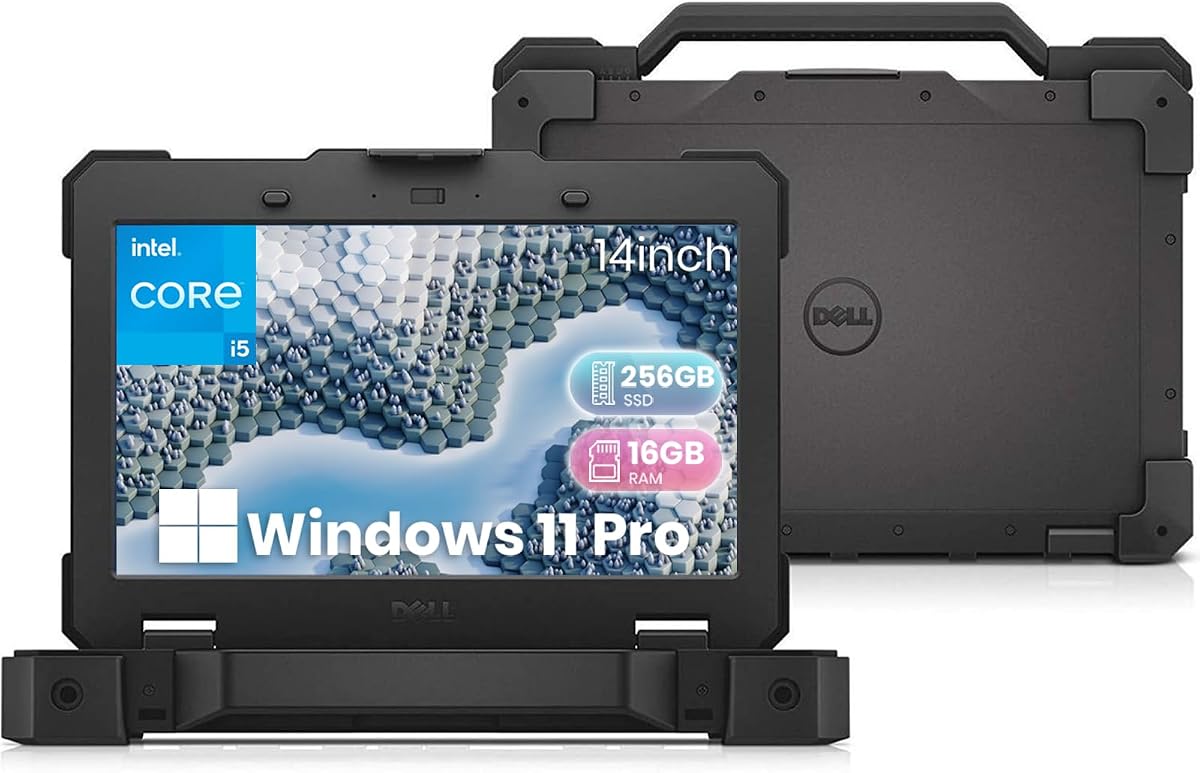
Designed for construction sites and field work, this Dell Latitude Rugged laptop is built to survive environments that would damage standard machines. Its touchscreen display remains visible even under bright sunlight, which is critical for outdoor use.
We may earn a commission when you buy through this link, at no additional cost to you.
The inclusion of industry-standard ports like RJ-45 and USB 3.1 allows direct connection to diagnostic tools and legacy equipment without adapters. This flexibility ensures the laptop remains useful in specialized industrial applications.
As a renewed unit, it offers significant cost savings while maintaining rigorous testing standards. The 16GB of RAM ensures it can handle multiple software tools simultaneously during inspections or reporting tasks.
This model is perfect for field technicians who need a device that won't fail in tough conditions. Its rugged design guarantees reliability where standard laptops would break down due to dust or drops.
The reinforced chassis resists dust and water, ensuring reliable performance even in dusty or wet field conditions.
Specialized display technology provides clear visibility in sunlight, allowing accurate data viewing anywhere outdoors.
We may earn a commission when you buy through this link, at no additional cost to you.
This rugged model is engineered to withstand drops, spills, and extreme temperatures, making it a dependable choice for harsh environments. The extensive port selection supports legacy hardware often found in older office or industrial setups.
We may earn a commission when you buy through this link, at no additional cost to you.
The inclusion of a serial interface is a unique feature for those who need to connect to industrial machinery or specialized equipment directly. This connectivity ensures the laptop remains relevant in industries still using older protocols.
While the processor is older, the 16GB RAM allows it to handle modern multitasking effectively. The renewed status offers a budget-friendly entry point for rugged durability without sacrificing essential performance.
Ideal for warehouse managers or field engineers, this laptop provides robust protection and connectivity for demanding workflows. It is a practical solution for businesses that need reliable hardware in tough conditions.
Multiple legacy ports ensure compatibility with older equipment, extending the laptop's utility across various technical roles.
Spill-resistant keyboards and reinforced hinges protect internal components, extending device life in high-risk work environments.
We may earn a commission when you buy through this link, at no additional cost to you.
This V-Series model stands out with an impressive 40GB of RAM, which is rare for business laptops and supports heavy multitasking effortlessly. It is ideal for users who run multiple virtual machines or large databases locally.
We may earn a commission when you buy through this link, at no additional cost to you.
The AMD Ryzen 7 processor provides robust performance for demanding workloads while maintaining energy efficiency. Combined with 1TB of storage, this laptop offers ample space for years of file retention and archival needs.
Although it may be slightly heavier than a standard ultrabook, the added capacity makes it a great stationary workstation or travel hybrid. The Windows 11 Pro features add enterprise-grade security for handling sensitive data.
This laptop is perfect for financial analysts or data scientists who need substantial memory without resorting to expensive enterprise brands. It balances raw power with business security for reliable long-term use.
High RAM allows for simultaneous heavy applications, ensuring smooth performance as software demands grow over time.
Large SSD storage ensures quick access to extensive files, keeping workflows fast and efficient across many years.
We may earn a commission when you buy through this link, at no additional cost to you.
The ThinkPad L16 brings enterprise-grade durability and AI capabilities to a versatile business laptop. It is designed to meet the demands of IT professionals and businesses needing reliable hardware that can handle years of daily usage.
We may earn a commission when you buy through this link, at no additional cost to you.
With customizable RAM and storage options, you can tailor the device to your needs and future-proof it as requirements change. The 10-hour battery life ensures you can work all day without needing a charger, which is vital for travelers.
Thunderbolt 4 connectivity supports high-speed data transfer and multiple external displays, enhancing productivity for power users. The MIL-STD certification confirms that the chassis can withstand extreme conditions and physical stress.
Ideal for businesses looking for an upgrade from standard models, this laptop offers superior build quality and security features. It is a reliable tool for anyone prioritizing longevity and performance in a professional setting.
Adjustable memory and storage ensure the device adapts to your specific needs and scales with your growing requirements.
Extended battery life supports full-day work away from outlets, ensuring productivity and mobility over long periods.
We may earn a commission when you buy through this link, at no additional cost to you.
Selecting a laptop for longevity involves evaluating build quality, processor architecture, and support policies to ensure sustained performance over several years.
Look for laptops with MIL-STD-810H certification which indicates the chassis can withstand drops, vibrations, and extreme temperatures. Reinforced hinges and spill-resistant keyboards are critical for ensuring physical components survive daily wear and tear.
Prioritize models with robust chassis materials like aluminum or reinforced polycarbonate that resist cracking and scratching over time.
Choose devices with modern multi-core processors and ample RAM headroom to handle future software requirements without immediate hardware changes. Upgradable RAM and storage options extend the device lifespan significantly as technology evolves.
Ensure the motherboard supports future memory upgrades so you can enhance performance without replacing the entire laptop unit.
Efficient thermal design prevents overheating which degrades internal components faster over years of heavy use. Look for models with intelligent cooling systems that adjust fan speeds to preserve battery health.
Select units with fast charging capabilities to minimize stress on the battery cells during daily plug-in cycles.
Extended warranty options and onsite service reduce downtime and ensure hardware issues are resolved quickly to maintain productivity. A strong service history indicates the manufacturer will support older models with drivers and updates.
Check if the vendor offers onsite service options that bring technicians to your location for faster repairs.
TPM chips and encryption capabilities ensure your data remains protected against modern cyber threats for the life of the device. Consistent firmware updates are essential for patching vulnerabilities that arise as software ages.
Select models with hardware-based security features to protect sensitive information throughout the laptop operational lifespan.
High-quality screens with anti-glare coatings and blue light filters reduce eye strain during long work sessions which preserves health. Durable glass and hinge mechanisms ensure the display remains functional after frequent opening and closing.
Look for displays that use advanced materials to resist scratches and remain readable in various lighting conditions.
A variety of standard ports reduces the need for dongles which can be lost or damaged over time. USB-C and Thunderbolt support ensures compatibility with future peripherals and docking stations without requiring adapter upgrades.
Prioritize models with standard Ethernet or HDMI ports for reliable wired connectivity without extra hardware.
Choose laptops that come with Pro versions of operating systems to access essential management tools like BitLocker and Remote Desktop. Compatibility with long-term software suites ensures you can continue using critical applications without upgrading hardware.
Ensure the device supports Windows 11 updates for years to maintain security and software functionality.
Keep your laptop in a protective case when transporting to shield it from physical impacts and scratches. Avoid placing heavy objects on top of closed laptops to prevent hinge stress and screen damage.
Regularly clean vents and ports with compressed air to prevent dust accumulation which causes overheating. Use a microfiber cloth to wipe screens and keyboards gently to maintain clear visuals and smooth typing.
Install updates regularly but schedule them during idle times to avoid interrupting work. Manage your startup programs to reduce unnecessary background load which helps preserve system responsiveness and battery life.
A laptop suitable for long-term use typically features a durable chassis tested against military standards, a modern processor with upgradeable RAM, and efficient thermal management. Additionally, strong brand support ensures you receive software updates and hardware repairs for years.
Yes, higher RAM capacity allows you to run modern software applications smoothly for longer periods without needing a hardware upgrade. Sufficient memory prevents performance degradation as operating systems become more resource-heavy over time.
If you work in challenging environments, a rugged model is better because it resists drops, dust, and moisture that would destroy standard laptops. For office use, a durable business laptop with a reinforced chassis is sufficient for years of reliable use.
Most business users replace laptops every four to five years to ensure security compliance and performance. However, with high-quality hardware and upgrades, many durable models can function effectively for seven years or more.
Certified renewed laptops can offer excellent value if they come with a warranty and have been professionally inspected. Look for units with newer processors and solid-state drives to ensure they will support modern workloads effectively.
Effective thermal management prevents overheating which is a primary cause of component failure over time. Laptops with better cooling systems maintain consistent performance and preserve battery health during prolonged use.
The laptops highlighted in this guide offer a range of options from rugged field devices to premium business machines designed for endurance. Whether you choose the HP Business model for its sturdy design or the Lenovo ThinkBook for its advanced specs, each selection prioritizes durability and performance.
Prioritize models with MIL-STD certification and ample RAM to ensure your device remains relevant for years of demanding use. Investing in a machine with strong support policies and security features will provide peace of mind and protect your data over time.
Always verify current availability and specs before purchasing as inventory changes frequently. Choosing the right tool for your specific workflow ensures you get the most value and reliability from your investment.