
MAYFLASH F300 Arcade Fight Stick
4.5Editor score
Multi-platform compatibility
Sanwa button compatible
Turbo functions included
Affordable price point
This guide compares the top arcade fight sticks for Switch 2, reviewing features like connectivity, customization, and build quality to help you find the
Finding the right arcade fight stick for Switch 2 can elevate your gaming experience significantly. A quality stick provides precision, durability, and comfort during intense fighting sessions. We look at compatibility and build to ensure you get the best tool for your setup.
We compared ten top-rated arcade sticks based on connectivity options, customization features, and overall build quality. Each product was evaluated for its support of Switch 2 and additional platforms. Our analysis focuses on what matters most to competitive players and casual enthusiasts alike.
Each pick shows key strengths and ideal use cases for different types of gamers. You will find options ranging from budget-friendly models to premium builds with high-end components. Please note that prices and availability can change frequently on retailer sites.
4.5Editor score
4.7Editor score

4.6Editor score
The following table provides a side-by-side comparison of all ten products reviewed in this guide. It highlights key specifications and features to help you quickly identify the model that best suits your specific gaming needs and preferences.




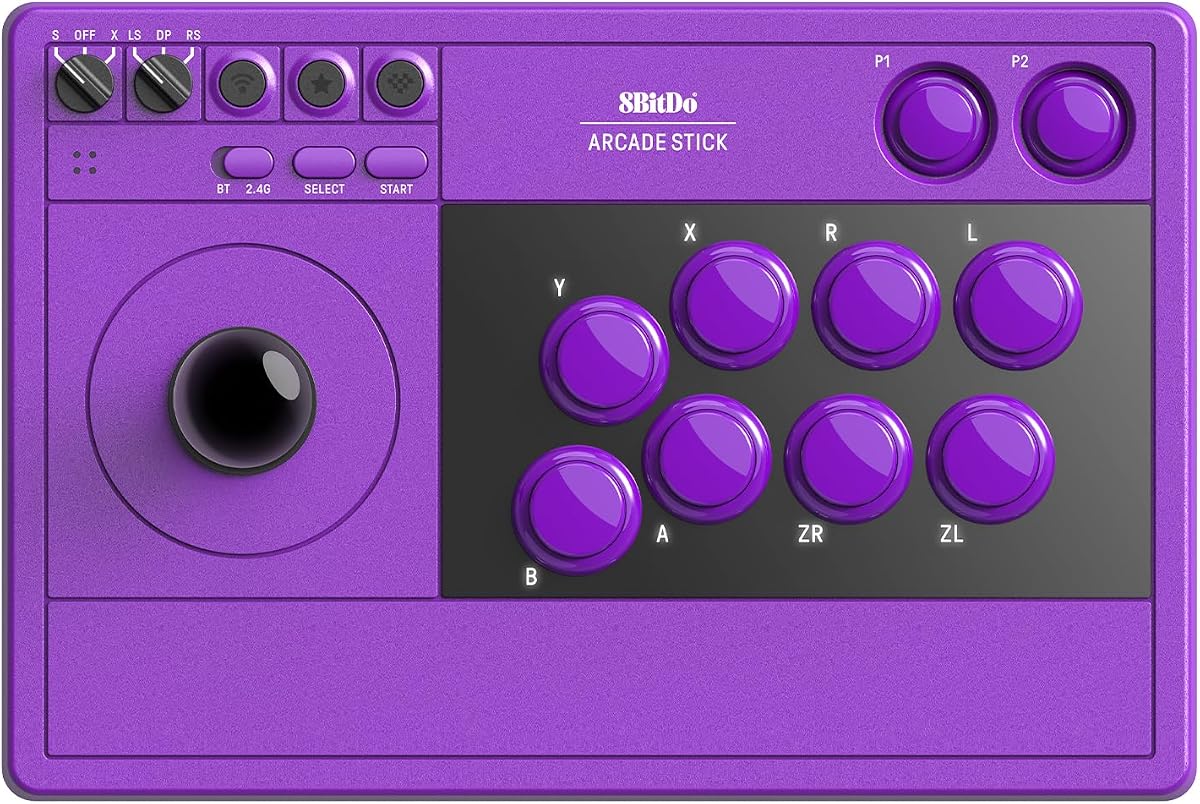
The 8BitDo Arcade Stick for Switch 2 stands out as the top choice for players seeking a premium fighting experience. With a strong rating and robust features, it delivers precision and reliability. Its unique dynamic layout adjusts visually when switching between platforms.
We may earn a commission when you buy through this link, at no additional cost to you.
This stick shines in its customization capabilities and solid construction. The Ultimate Software allows for deep button mapping and macro creation. The tempered glass faceplate adds a sleek look and ensures durability during intense sessions.
While it is more expensive than some competitors, the build quality justifies the investment. The only notable trade-off is the limited color availability, which might matter to some collectors. However, performance remains consistent across all modes.
Anyone serious about fighting games on Switch 2 should consider this model. It balances ease of use with professional-grade features effectively. The versatility across Switch and PC makes it a future-proof option for your gaming setup.
The visual button layout changes automatically when you switch modes, reducing confusion during gameplay transitions.
The glass faceplate resists scratches and wear, keeping the stick looking new even after heavy use over time.
We may earn a commission when you buy through this link, at no additional cost to you.
The MAYFLASH F300 offers an excellent entry point for players looking to try arcade sticks without a large investment. It supports a vast array of consoles including Switch 2. While basic, it provides the core functionality needed for competitive play.
We may earn a commission when you buy through this link, at no additional cost to you.
This model is particularly strong in its compatibility and customization potential. You can easily swap buttons and joysticks to Sanwa specs if desired. The turbo functions add utility for those who want to automate certain inputs.
The main downside is its wired-only connection and more budget build materials. However, for the price, it delivers reliable performance. It is ideal for beginners or those who prefer a simpler setup without extra frills.
If you need a versatile stick that works everywhere, this is a smart buy. It allows you to test your preferences before committing to a premium model. The wide console support ensures it grows with your collection.
Supports nearly every major console and PC, making it a versatile choice for households with multiple systems.
Designed to accept standard arcade parts, allowing users to upgrade components as their skills and needs evolve.
We may earn a commission when you buy through this link, at no additional cost to you.
The MAYFLASH F700 Elite is designed for competitive players who demand the highest level of performance. It comes pre-installed with genuine Sanwa parts known for their responsiveness. The build is solid, ensuring the stick stays put during fierce matches.
We may earn a commission when you buy through this link, at no additional cost to you.
It offers a comprehensive feature set including wireless connectivity and headset support. The anti-slip mat keeps it steady on any surface. Firmware updates ensure long-term compatibility with new consoles like Switch 2.
The price is high, and it is tailored specifically for fighting games rather than general use. However, for purists, this focus ensures optimal performance. The wireless freedom combined with pro components makes it a standout choice.
Serious competitors will appreciate the precision and reliability this stick offers. It removes variables like input lag or instability. Investing here ensures you have a tool that performs consistently in tournament-level play.
Genuine Sanwa buttons and joystick provide the tactile feedback and speed required for high-level competitive fighting games.
The included anti-slip rubber mat ensures the stick does not slide around, maintaining consistent positioning during play.
We may earn a commission when you buy through this link, at no additional cost to you.
This 8Bitdo model is recognized for its intelligent button mapping system. It visually changes the layout when you switch between Switch and PC modes. This feature helps prevent errors during gameplay transitions. It is a very user-friendly option.
We may earn a commission when you buy through this link, at no additional cost to you.
The stick supports the Ultimate Software for advanced customization like macros. It also features a universal mounting plate for easy modifications. Connectivity is flexible with Bluetooth, 2.4G, and wired options available.
You may need to install software to unlock all features like macros. Additionally, battery management is a factor if using wireless modes. Despite these minor hassles, the overall experience is smooth and versatile.
Gamers who switch platforms frequently will find this design very practical. It bridges the gap between console and PC gaming seamlessly. The modifiability ensures it can evolve with your specific control preferences over time.
The visual labels on the faceplate adjust to match the current mode, reducing confusion when changing between systems.
A universal mounting plate allows you to swap in any standard 30mm or 24mm arcade parts easily.
We may earn a commission when you buy through this link, at no additional cost to you.
The Retro Wireless model is designed for those who value play time and nostalgia. It offers up to forty hours of play on a single charge. This reduces interruptions during long gaming sessions. The look mimics classic arcade hardware.
We may earn a commission when you buy through this link, at no additional cost to you.
It includes all the standard 8Bitdo features like Ultimate Software and dynamic layout. The ability to swap buttons gives it a modding edge. Switch 2 support ensures it remains relevant for new releases.
You will need to account for charging time before sessions. The price is higher than basic wired sticks. However, the convenience of wireless freedom combined with long battery life justifies the cost for many users.
If you want a stick that lasts a long time between charges, this is ideal. It combines retro aesthetics with modern functionality well. The compatibility with PC and Switch makes it a flexible choice for any gamer.
With up to forty hours of battery life, you can play for days without needing to recharge the device.
The classic design brings back nostalgic vibes while providing modern connectivity and performance features.
We may earn a commission when you buy through this link, at no additional cost to you.
The Saitake stick stands out due to its integrated display and audio features. It allows you to adjust volume and lighting directly on the stick. The headphone jack makes it easy to listen to game audio without extra hardware.
We may earn a commission when you buy through this link, at no additional cost to you.
It supports detailed macro recording and various turbo modes. This level of control is rare in this price range. The compatibility list is extensive, covering almost every major device available today.
The interface can be a bit complex to set up initially. Users may need to spend time learning the menu system. However, once configured, the stick offers unique utility that others do not match.
This is perfect for gamers who want extra control features without buying extra gear. The audio capabilities are especially useful for private sessions. Its versatile connectivity makes it a practical choice for multi-device users.
A small screen allows you to adjust settings like volume and brightness directly from the controller itself.
The included headphone jack lets you plug in headphones directly for private audio monitoring during play.
We may earn a commission when you buy through this link, at no additional cost to you.
The F700 is built specifically for fighting games like Tekken and Street Fighter. It optimizes inputs for these titles to ensure smooth performance. It supports wireless connectivity and includes a headset port for chat.
We may earn a commission when you buy through this link, at no additional cost to you.
Compatibility covers most consoles and PC. The firmware is updatable to support new consoles like Switch 2. This ensures the stick remains functional as software evolves over time. Sanwa support allows for easy customizations.
It does not support Xbox Series X/S or other game types. This restriction might limit some users. However, for those focused on fighting games, the specialized features provide a competitive edge.
If you are a fighting game enthusiast, this model is tailored for you. The dedicated optimizations help reduce input issues. The wireless and chat features make it a complete package for online competition.
Optimized specifically for fighting games to ensure that every button press registers accurately during combos.
Supports wired headsets for online chat and background music on compatible consoles and PC setups.
We may earn a commission when you buy through this link, at no additional cost to you.
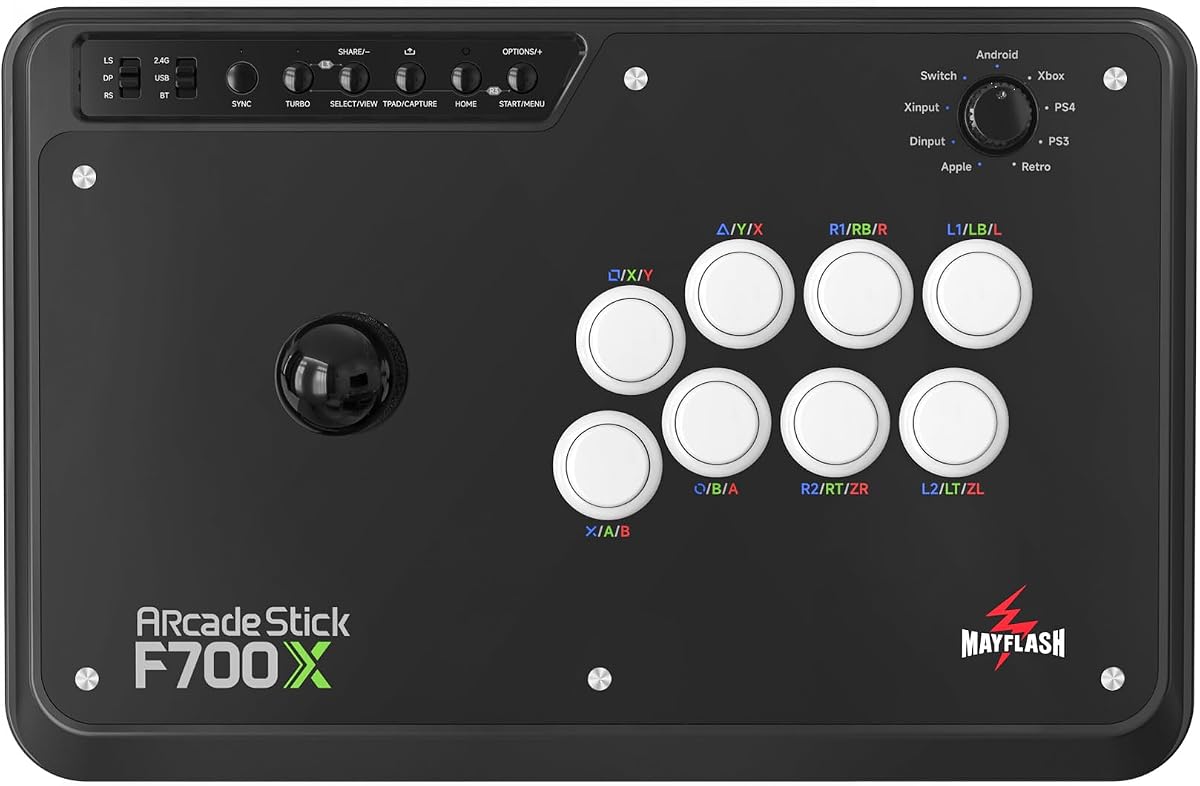
The F700X is the go-to choice for Xbox Series gamers seeking an arcade stick. It supports wireless connection and chat audio specifically for Xbox. This fills a gap left by other models that do not support Xbox Series natively.
We may earn a commission when you buy through this link, at no additional cost to you.
It retains the same build quality and Sanwa compatibility as the other F700 models. Switch 2 support is available via firmware updates. The turbo functions and wired options add to its utility.
It does not work with PS5, which limits its cross-platform use. The rating is slightly lower than other models, possibly due to Xbox-specific limitations. However, for Xbox owners, it is a strong option.
If you play primarily on Xbox Series, this stick is essential. It offers the wireless freedom you want on that console. The compatibility ensures you can still use it on Switch or PC when needed.
Specifically designed to work wirelessly with Xbox Series X/S consoles where other sticks fail.
Beyond Xbox, it supports Switch 2 and PC, making it useful for gamers with multiple systems.
We may earn a commission when you buy through this link, at no additional cost to you.
This Power A stick is officially licensed by Nintendo for Switch. It comes with a high level of quality assurance for reliability. The wireless setup is straightforward with Bluetooth. You can print custom face cards easily.
We may earn a commission when you buy through this link, at no additional cost to you.
It features a metal base for stability during play. Battery life is decent at thirty hours with AA batteries. It is a solid choice for casual players who value official branding and ease of use.
The battery system requires replacements which can add to cost. Customization options are limited compared to modifiable sticks. However, for those wanting a plug-and-play experience with official support, it works well.
Recommend this for players who prefer official licensed products. It ensures compatibility without worrying about firmware updates. The custom face card feature adds a fun personal touch for your setup.
As an officially licensed product, it guarantees compatibility with Nintendo Switch systems right out of the box.
Downloadable templates allow you to design and print your own face cards to match your personal style.
We may earn a commission when you buy through this link, at no additional cost to you.
The V3 Edition brings newer technology to the arcade stick market. It features a tempered glass faceplate and a large rechargeable battery. The dynamic layout updates in real-time to match your selected mode effectively.
We may earn a commission when you buy through this link, at no additional cost to you.
It supports deep macro management and profile saving. The included turbo feature is useful for shooting games. Build quality feels premium with modern materials. It covers Switch 2 and Windows out of the box.
Being a newer model means long-term reliability data is not available yet. The price is similar to other modern sticks. However, the inclusion of modern features like fast charging and glass adds significant value.
If you want the latest tech and modern aesthetics, this is a great choice. It balances performance with contemporary design. The battery capacity ensures you can play for long sessions without worry.
The tempered glass faceplate and sleek build offer a contemporary look that stands out in any collection.
A high-capacity 1000mAh rechargeable battery keeps you playing for hours without needing a cable.
We may earn a commission when you buy through this link, at no additional cost to you.
Selecting the right arcade fight stick for Switch 2 requires understanding your specific needs regarding connectivity, build quality, and customization. The following factors will help you narrow down your options effectively.
Consider whether you need wireless or wired connections. Bluetooth allows for less clutter, while wired offers stability. Look for models with both to ensure flexibility.
Check if the stick supports Bluetooth, 2.4G, and USB-C. This ensures you can use it in different scenarios without limitations.
Ensure the stick explicitly supports Switch 2. Some older models may need firmware updates to work properly with the new console.
Verify support for other devices like PC or PS5 if you plan to use it across multiple platforms.
A sturdy base prevents the stick from sliding during intense play. Materials like metal or reinforced plastic offer better durability over time.
Look for rubber mats or anti-slip features to keep the stick secure on your desk or table.
High-quality buttons like Sanwa Denshi offer better tactile feedback and longevity. Ensure the stick uses standard components for easy replacements.
Check if the buttons can be swapped out so you can upgrade them later as needed.
Software support allows you to map buttons and create macros. This is essential for complex fighting game combos.
Look for dedicated macro buttons and profile management tools to optimize your gameplay experience.
Wireless sticks need a reliable power source. Rechargeable lithium batteries are generally more convenient than AA batteries.
Check the playtime per charge to ensure it meets your gaming habits without frequent interruptions.
Higher prices often correlate with better components and features. Determine your budget and find the best balance between cost and performance.
Avoid overpaying for features you will not use, such as excessive customization you might not need.
Start by connecting the stick to your Switch 2 using the preferred method. For wireless, ensure the pairing mode is active. For wired, plug the USB-C cable securely into the console or adapter.
Use any provided software to customize your button layout. Set up macros for complex moves to improve efficiency. Save multiple profiles for different games to switch easily.
Clean the faceplate and buttons regularly to prevent dust buildup. Store the receiver in the hidden compartment when not in use. This ensures longevity and consistent performance over time.
Yes, the F300 is compatible with Switch 2. It supports a wide range of consoles and PC systems. You may need to check for firmware updates to ensure optimal performance with the newer hardware.
Many modern sticks support wireless connections like Bluetooth or 2.4G. Always verify the specific model details to ensure it works with Switch 2 before purchasing.
Most models come with software that allows button mapping. Connect the stick to your PC and use the provided app to configure mappings and macros.
Good wireless sticks offer at least 30 hours of playtime. Models with rechargeable batteries reduce the hassle of replacing AA batteries frequently during gaming sessions.
Yes, many sticks like those from 8BitDo and MAYFLASH allow button swaps. They use standard sizes so you can replace them with high-quality options.
Yes, these sticks are designed specifically for fighting games. They offer the precision and speed required for competitive gameplay on various platforms.
We reviewed ten top arcade fight sticks for Switch 2 ranging from budget picks to premium models. Each offers unique features suited for different player needs and preferences.
Consider your priority factors such as wireless connectivity or component quality when choosing. The right stick will enhance your gaming experience significantly.
Always verify current availability and features before buying. Prices and models can change so double-check details to ensure you get the right tool.