
GIGABYTE B650 Eagle AX
4.6Editor score
12+2+2 Digital VRM
Triple M.2 Slots
WiFi 6E Included
This guide compares the top Gigabyte Motherboard models for gamers and creators, evaluating power delivery, connectivity, and thermal performance for optimal
Choosing the right Gigabyte Motherboard is essential for building a powerful and reliable computer system. These boards support the latest processors and offer advanced features for gaming and productivity tasks.
We analyzed ten top models based on power design, connectivity options, and thermal management. Each product was selected for its reputation and user feedback across various computing needs.
Each pick highlights key strengths and ideal use cases for different builders. Keep in mind that availability and pricing can change frequently, so check current listings before purchasing.
4.6Editor score

4.4Editor score

4.2Editor score
This table provides a side-by-side overview of the ten featured Gigabyte Motherboard models. It highlights key specifications to help you compare features at a glance.



This Gigabyte Motherboard stands out as a top choice for modern AMD builds. It supports the latest Ryzen processors and delivers stable performance through its robust power design.
We may earn a commission when you buy through this link, at no additional cost to you.
The 14+2+1 power phase ensures reliable power delivery even under heavy loads. Features like PCIe 5.0 M.2 and USB-C connectivity future proof your system effectively.
While the price is higher than budget options, the included features justify the cost. The thermal design keeps temperatures low during demanding tasks without excessive fan noise.
If you are building a high performance PC with Ryzen 9000 series processors, this board is highly recommended for its balance of features and reliability.
The 14+2+1 digital VRM solution provides stable power to the CPU for consistent performance during gaming or rendering tasks.
Support for PCIe 5.0 and USB-C 3.2 Gen 2 ensures you can use the fastest storage and peripherals available today and tomorrow.
We may earn a commission when you buy through this link, at no additional cost to you.
This model offers cutting edge networking and storage features for enthusiasts. It is designed for users who need the fastest wireless and storage speeds available.
We may earn a commission when you buy through this link, at no additional cost to you.
The inclusion of WIFI7 and USB4 makes it a forward looking choice. The four M.2 slots provide ample room for high speed NVMe SSDs.
Cost is a significant factor here but the features are unmatched in its class. The five year warranty adds peace of mind for long term use.
Ideal for power users who want the latest AMD platform capabilities without compromise on networking or storage performance.
WIFI7 delivers ultra low latency and high throughput for seamless online gaming and large file transfers.
Four M.2 slots allow you to install multiple high speed SSDs for massive capacity and fast system access.
We may earn a commission when you buy through this link, at no additional cost to you.
This Gigabyte Motherboard combines top tier performance with a striking white aesthetic. It is perfect for builds where visual appeal is as important as raw power.
We may earn a commission when you buy through this link, at no additional cost to you.
The 80A smart power stage ensures efficient power delivery while the WIFI7 and USB4 features keep it competitive with other high end boards.
Build quality is excellent with robust thermal solutions. The white color scheme is well executed and looks premium in a glass case.
Buy this if you want a high performance AMD system that matches a white themed build without sacrificing functionality.
The all white PCB and heatsinks create a cohesive look that elevates the visual appeal of your PC build.
High amperage smart power stages ensure your CPU receives stable power even during intense workloads.
We may earn a commission when you buy through this link, at no additional cost to you.
This flagship Intel motherboard delivers professional grade performance and connectivity. It supports the latest Core Ultra processors and offers extensive expansion options.
We may earn a commission when you buy through this link, at no additional cost to you.
Thunderbolt 4 and 10GbE LAN make it ideal for workstations. The five M.2 slots provide unmatched storage flexibility for content creators.
The price reflects its high end positioning and advanced features. It is built to handle demanding tasks with stable power delivery.
Choose this for professional workstations that require maximum bandwidth and connectivity for high end Intel systems.
Thunderbolt 4 ports enable fast data transfer and support for multiple high resolution displays.
Five M.2 slots allow for multiple NVMe SSDs ensuring you have plenty of space for large projects.
We may earn a commission when you buy through this link, at no additional cost to you.
This Gigabyte Motherboard offers exceptional value for AMD AM5 builders. It provides key features without the premium price tag of higher end models.
We may earn a commission when you buy through this link, at no additional cost to you.
The 12+2+2 VRM is more than enough for most Ryzen CPUs. WiFi 6E and triple M.2 slots ensure you do not miss out on essential modern features.
It lacks some of the RGB and extra USB options found on costlier boards. For budget focused builds this trade off is often acceptable.
Highly recommended for budget gamers and general users who want reliable performance without breaking the bank.
You get modern AM5 support and WiFi 6E at a price point that keeps the total build cost manageable.
The digital VRM solution ensures stable power delivery even when running demanding applications.
We may earn a commission when you buy through this link, at no additional cost to you.
This board is a solid choice for users sticking with the AM4 platform. It supports Ryzen 5000 series processors and offers good upgrade paths for existing users.
We may earn a commission when you buy through this link, at no additional cost to you.
The 12+2 power phase handles most CPUs effectively. Features like WiFi6 and USB-C make it feel modern despite the older socket.
DDR4 memory keeps costs lower but limits future bandwidth compared to DDR5. If you already have AM4 parts this is a great upgrade option.
Best for those who want to keep their existing CPU and RAM while getting a better motherboard experience.
Supports the full range of Ryzen 5000 series processors for strong performance without needing new hardware.
Includes WiFi6 and RGB Fusion ensuring you still get modern connectivity and customization options.
We may earn a commission when you buy through this link, at no additional cost to you.
This Gigabyte Motherboard targets Intel users looking for a balanced option. It supports 12th to 14th Gen processors and offers DDR5 memory compatibility.
We may earn a commission when you buy through this link, at no additional cost to you.
PCIe 5.0 support ensures you can use the latest GPUs. The VRM design is sufficient for most mainstream processors without overheating.
It lacks some extra storage slots but covers the basics well. This is a practical choice for a solid mid range gaming rig.
Buy this if you want a reliable Intel Z790 platform with modern features without spending a fortune.
Fully compatible with the latest Intel Core processors for peak gaming and productivity performance.
Utilizes the latest DDR5 memory for faster data access and improved system responsiveness.
We may earn a commission when you buy through this link, at no additional cost to you.
This board is designed for users who want to push their CPU limits. The 16+1+2 power phase provides the stability needed for heavy overclocking.
We may earn a commission when you buy through this link, at no additional cost to you.
Four M.2 slots offer great storage options for your media. The thermal design ensures components stay cool even under stress.
While it costs more than entry level boards the features justify the price for enthusiasts. It handles high wattage CPUs with ease.
Ideal for gamers and creators who need maximum performance and stable power for their Intel systems.
The robust VRM design allows for stable overclocking sessions without compromising system reliability.
Full covered MOSFET heatsinks keep the board cool and ensure long term durability during intense tasks.
We may earn a commission when you buy through this link, at no additional cost to you.
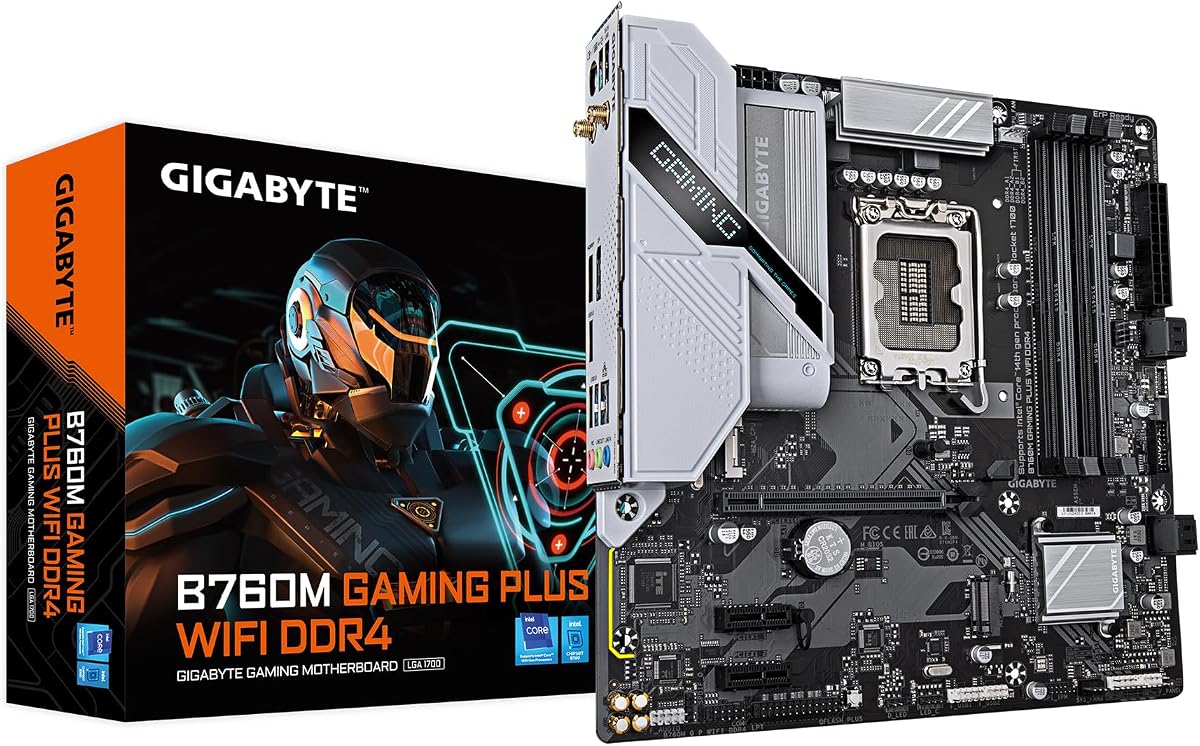
This M-ATX Gigabyte Motherboard is perfect for smaller builds. It fits in compact cases while still offering key gaming features.
We may earn a commission when you buy through this link, at no additional cost to you.
Support for Intel 12th to 14th Gen CPUs ensures good performance. The included WiFi and USB-C port add convenience for smaller desks.
Due to its size there are fewer slots for expansion. This is acceptable for most users who do not need multiple graphics cards.
Choose this for small form factor builds that need reliable performance without taking up much space.
The M-ATX form factor allows you to build in smaller cases saving space on your desk.
Even in a smaller package it includes WiFi and USB-C to meet modern connectivity needs.
We may earn a commission when you buy through this link, at no additional cost to you.
This is the most affordable Gigabyte Motherboard in our list. It provides a solid foundation for budget AMD builds without unnecessary extras.
We may earn a commission when you buy through this link, at no additional cost to you.
The 10+3 power phase handles Ryzen processors well for everyday tasks. Q-Flash Plus makes BIOS updates easy even without a CPU installed.
It lacks high end features but covers the basics effectively. This is a great choice for first time builders on a tight budget.
Best for those who need a reliable and simple motherboard to get started with AMD AM4 systems.
Offers essential features at a very competitive price point making it easy to build a budget system.
Q-Flash Plus allows you to update the BIOS without needing a CPU installed saving time and hassle.
We may earn a commission when you buy through this link, at no additional cost to you.
Selecting the right Gigabyte Motherboard requires understanding your CPU needs and future plans. This guide breaks down the key factors to consider before buying.
The most critical factor is ensuring the motherboard supports your processor. Gigabyte offers AM5 for latest AMD Ryzen and AM4 for older models as well as LGA1700 for Intel. Always check the CPU list before purchasing to avoid compatibility issues.
Always match the socket type of your CPU with the motherboard to ensure it fits and functions correctly.
Modern boards come with either DDR4 or DDR5 support. DDR5 offers higher speeds and bandwidth but is more expensive. DDR4 is still viable for budget builds and older processors. Decide based on your budget and performance goals.
Choose DDR5 for future proofing or DDR4 if you want to save money on memory.
The VRM design determines how stable power is delivered to the CPU. Higher end models have more phases and better cooling which is crucial for overclocking. Basic models work fine for standard usage but may struggle under heavy loads.
Look for higher VRM counts if you plan to use high end processors or overclock.
Consider how many storage and graphics cards you need. PCIe 5.0 support is becoming standard for new boards and offers faster data transfer. M.2 slots for SSDs are essential for modern storage speeds.
Ensure there are enough M.2 slots for your storage needs and PCIe slots for your graphics card.
Modern motherboards should include USB-C ports and wireless networking. WiFi 6E or WiFi7 provides better speed and range than wired connections. Check the rear panel for the number of USB ports required.
Prioritize boards with USB-C and modern WiFi standards for better daily usability.
The size of the motherboard must match your case. ATX boards are standard and offer more slots while M-ATX fits smaller cases. Mini-ITX is best for very compact builds but limits expansion options.
Check your case specifications to ensure the board size fits your build.
Thermal design is vital for maintaining performance. Look for large heatsinks on VRMs and M.2 slots to prevent overheating. Poor cooling can lead to throttling and reduced system lifespan.
Look for boards with good heatsinks to keep temperatures low during heavy use.
Gigabyte typically offers warranties ranging from one to five years depending on the model. Higher end boards often come with better support. A good warranty can save you money if the board fails.
Check the warranty terms to ensure you have protection for your investment.
Always handle the motherboard by the edges to avoid static damage. Use an anti-static wrist strap if possible during installation. This prevents electrical damage to sensitive components.
Keep the motherboard clean from dust by using compressed air occasionally. Dust buildup can trap heat and reduce cooling efficiency. Cleaning helps maintain performance over time.
Update the BIOS regularly to ensure compatibility and security. Gigabyte provides tools like Q-Flash to make updates easy. This ensures you have the latest fixes and features.
Gigabyte Motherboards are known for reliability and durability across their product lines. They use quality components and rigorous testing standards. Many users report long term stability in both gaming and productivity builds.
AORUS boards are premium models with better power delivery and cooling. Eagle series boards are budget friendly with essential features. Choose AORUS for high performance and Eagle for cost effective builds.
Yes, installing drivers from Gigabyte's website is recommended. Network and audio drivers improve performance and stability. Drivers ensure all features work as expected after OS installation.
No, DDR4 and DDR5 memory are not compatible physically. You must use DDR5 RAM on DDR5 boards. Mixing types will not work and can damage the system.
Use the Q-Flash tool available in the BIOS menu or via USB. Download the latest BIOS file from Gigabyte's support page. Follow the on screen instructions carefully during the process.
Many models include WIFI as standard while others require an adapter. Check the specific product title for WIFI or WIFI6E mentions. Integrated WIFI is common on AORUS and Eagle AX models.
We have reviewed the top ten Gigabyte Motherboards ranging from budget options to premium workstation boards. Each model offers distinct strengths for different build requirements.
Prioritize compatibility with your CPU and future upgrade plans. Power delivery and thermal solutions are just as important as the features themselves for long term stability.
Prices and availability change often so verify the current details before ordering. A well chosen board ensures your system runs smoothly for years to come.