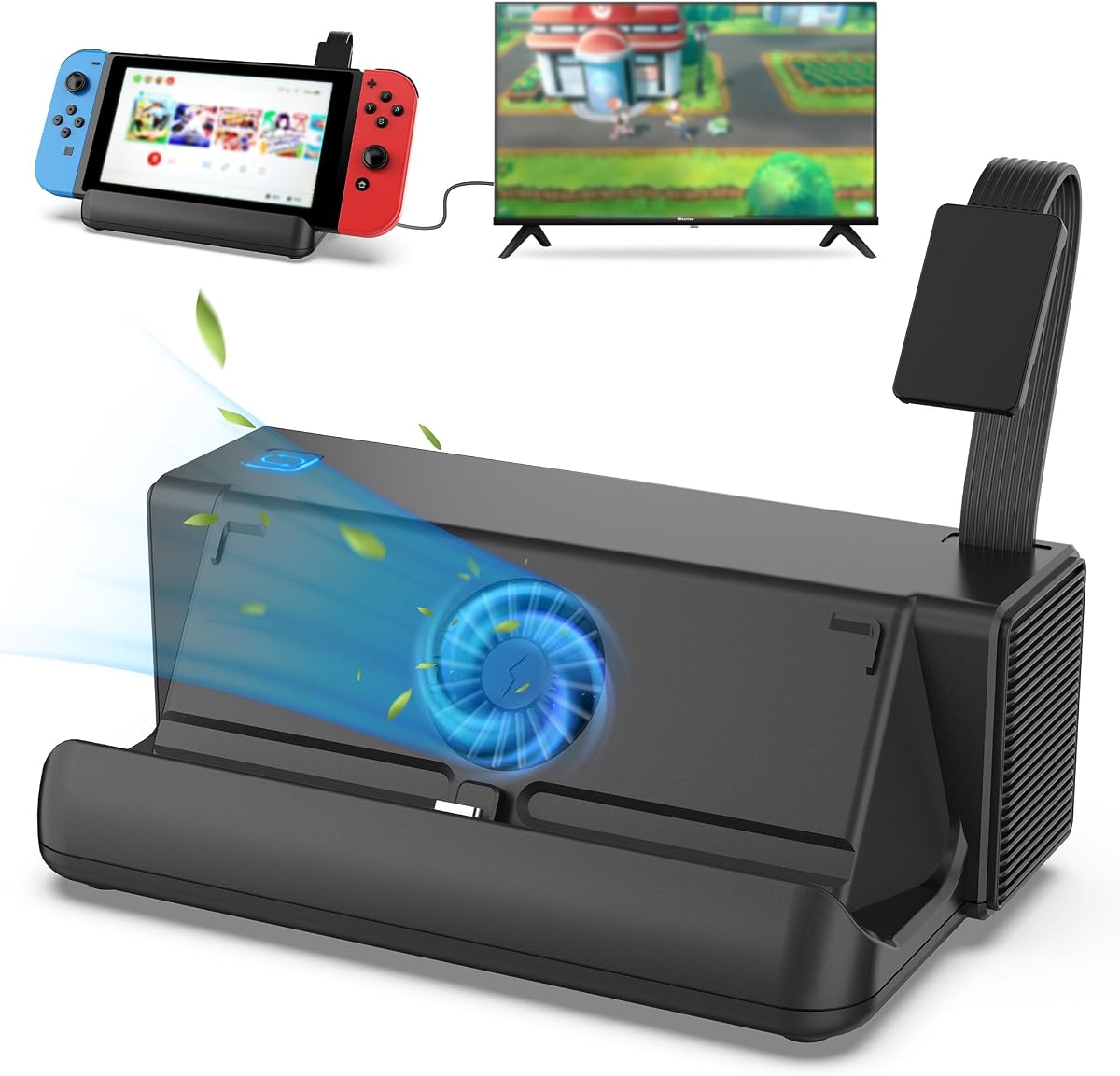
ZMBESUP Switch Dock Station
4.4Editor score
Built-in cooling fan with multiple ports
8 game card storage slots included
Independent power control switches
This guide compares the top external cooling fans for Nintendo Switch dock to prevent overheating and extend console lifespan during long gaming sessions.
Gaming on your Nintendo Switch for hours can cause the console to heat up significantly. An external cooling fan for the Nintendo Switch dock helps maintain optimal temperatures and prevents performance throttling during intense play sessions.
We evaluated ten real products based on their cooling efficiency, noise levels, ease of installation, and build quality. Our comparisons focus on how well each accessory integrates with your existing dock setup without adding bulk or complexity.
Each pick highlights key features and trade-offs to help you choose the right solution for your setup. Keep in mind that availability and pricing may change frequently so verify current details before purchasing.
4.4Editor score

4.6Editor score

4.0Editor score
The following table provides a side-by-side overview of each product's core specifications to help you quickly identify the right cooling solution for your Nintendo Switch dock.


This cooling fan ranks first with a 4.6 rating due to its precise control and monitoring features. It fits directly into the original dock to improve airflow while keeping your console safe from heat buildup.
We may earn a commission when you buy through this link, at no additional cost to you.
The standout quality is the digital LED display that shows both fan RPM and exhaust temperature in real time. You can adjust speeds from 510 to 6000 RPM using three buttons for total control over ventilation.
While the fan is nearly silent below 2400 RPM it may produce some sound at max speed. This trade-off is acceptable given the powerful heat exhaust performance and the included fixed pad that prevents scratches.
Gamers who play for hours without pauses will benefit most from this accessory. It offers a reliable way to maintain stable performance and extend the lifespan of your Switch during extended sessions.
The LED display allows you to see exact exhaust temperatures so you can react before throttling occurs.
Included sponge pads and a fixed pad ensure the fan stays secure and won't scratch your console or dock.
We may earn a commission when you buy through this link, at no additional cost to you.
This unit features three high speed fans designed specifically for the original dock. It aims to lower console temperature quickly and quietly to prevent overheating during long gaming sessions.
We may earn a commission when you buy through this link, at no additional cost to you.
Its main strength lies in the trio of fans which provide robust airflow for heat dissipation. You can switch between turbo and normal modes depending on how much cooling your current game demands.
The compact footprint allows it to fit neatly under a TV stand or in an entertainment cabinet. However some users may find the noise level higher compared to single fan models at max speed.
It suits gamers who prioritize raw airflow over fine tuning controls. The straightforward design makes it a practical choice if you want basic cooling without complex features.
Three fans working together create stronger ventilation to cool down the system faster than single fan units.
No tools are needed to install it since it simply inserts into the dock and connects to the USB port.
We may earn a commission when you buy through this link, at no additional cost to you.
This stand targets the Switch 2 dock with dual fans and 3 stage cooling levels. It promotes heat dissipation to extend the lifespan of your console while playing demanding titles without crashes.
We may earn a commission when you buy through this link, at no additional cost to you.
Beyond cooling it offers 6 game card slots and USB expansion ports for controllers or headsets. The RGB modes add visual flair that matches your gaming setup aesthetic for a cohesive look.
While tailored for the new dock its feature set makes it a premium upgrade for organized setups. The lights can be turned off easily if you prefer a minimalist desk environment.
It is ideal for Switch 2 owners seeking both performance and convenience. The combination of cooling storage and connectivity in one unit reduces desk clutter significantly.
USB ports allow you to charge controllers or connect headsets directly from the docking station.
Six slots keep your favorite cartridges handy so you can swap games quickly without searching.
We may earn a commission when you buy through this link, at no additional cost to you.
This base stand uses three fans to keep the console cool during intense gaming sessions. It is small and compact making it easy to install without cluttering your entertainment area.
We may earn a commission when you buy through this link, at no additional cost to you.
The unit features a side button to adjust between turbo and normal speeds or turn off completely. Superior materials ensure the bracket remains sturdy while providing consistent airflow for your dock.
While it lacks advanced displays or LED lights it delivers reliable cooling at an accessible level. Users who want straightforward performance without extra features will appreciate its simplicity.
It serves well as a basic cooling layer for older docks. The compact profile ensures it fits easily into existing setups without requiring major rearrangement.
You can install and start using this cooler immediately without needing extra tools or complicated steps.
Made from superior materials it resists wear and tear to maintain performance over long periods.
We may earn a commission when you buy through this link, at no additional cost to you.
This station combines a cooling fan with multiple ports and game card switching technology. It allows you to switch between four active game cards with a single button press to reduce wear.
We may earn a commission when you buy through this link, at no additional cost to you.
The built-in cooling fan maintains optimal performance during extended play. Independent power switches let you turn off unused features to save energy and reduce noise when not needed.
Its compact design supports both desktop and TV modes for flexible use at home or on the go. This all-in-one solution eliminates the need for multiple separate accessories on your desk.
It is perfect for users who want a complete docking solution with extra storage and cooling. The independent controls offer flexibility to tailor usage to your specific gaming habits.
Switch between game cards electronically to avoid frequent physical swapping that can damage slots.
Turn off the cooling fan or card reader individually to reduce power draw and noise.
We may earn a commission when you buy through this link, at no additional cost to you.
This cooler is built specifically for the 2021 OLED dock to ensure a perfect fit. High efficiency turbo fans blow air directly onto the base surface to dissipate heat faster and prevent overheating.
We may earn a commission when you buy through this link, at no additional cost to you.
The top surface includes 14 game card slots so you can store your favorite cartridges within easy reach. The Type-C cable ensures compatible power delivery while the ABS construction keeps the unit durable.
The tech-inspired blue light adds a unique look but cannot be dimmed or turned off via controls. This visual effect complements the gaming setup though some users may prefer a neutral look.
It is the right choice for OLED owners wanting a precise replacement with extra storage. The dedicated design ensures stability and better airflow compared to generic alternatives.
Designed for the HEG-007 dock it integrates seamlessly to avoid gaps that could hinder cooling.
Fourteen slots let you organize a large library of games without needing extra storage cases.
We may earn a commission when you buy through this link, at no additional cost to you.
This fan is designed specifically for the Switch OLED model base to speed up internal air circulation. It uses a high speed fan to reach heat dissipation and maintain stable performance during play.
We may earn a commission when you buy through this link, at no additional cost to you.
The unit features a Type-C header that connects directly to the OLED base for power. A blue LED inside the fan syncs with the switch to offer a subtle visual effect on your desk.
Installation is straightforward and the switch allows you to turn the fan on or off easily. The design focuses on simplicity so you can add cooling without changing your setup dramatically.
It works well for owners who want a minimal addition to their OLED dock. The quiet performance ensures it does not distract during cinematic or quiet game moments.
The fan accelerates airflow inside the host base to help cool critical components effectively.
Connects to the Type-C input port so it uses the existing base power without extra cables.
We may earn a commission when you buy through this link, at no additional cost to you.
This fan offers three adjustable wind speeds to match different gaming scenarios. It features a premium 45mm turbine fan that generates ample airflow while cutting down operating noise greatly.
We may earn a commission when you buy through this link, at no additional cost to you.
The auto on-off function means the fan starts and stops with your console without manual input. A vertical air duct aligns with the console inlet to deliver efficient airflow for fast heat removal.
The minimalist base can be placed with nano tape or without for easy repositioning. This flexibility suits users who move their setup frequently but be careful with adhesive residue.
It is ideal for Switch 2 users who want controlled airflow and automation. The balance of performance and silence supports immersive gaming without distracting sounds.
The fan begins cooling as soon as the console starts saving you from manual adjustments.
Blades are shaped to move more air while reducing mechanical noise for quieter operation.
We may earn a commission when you buy through this link, at no additional cost to you.
This stand uses an elevated hollowed-out structure to boost airflow around the dock without any moving parts. It provides silent cooling that reduces overheating risks while keeping your desk completely quiet.
We may earn a commission when you buy through this link, at no additional cost to you.
Constructed from black acrylic it offers a sleek look with non-slip silicone pads to prevent damage. Installation is effortless since you simply place the dock on the stand without assembly.
The fanless design means no wear and tear from spinning blades so the unit lasts indefinitely. It works by encouraging natural convection to carry heat away from the console vents.
It is best for users prioritizing silence and simplicity. The minimalist approach protects your dock and prolongs its lifespan with zero maintenance.
Elevated design allows air to flow under the dock to cool it naturally without electricity.
Silicone pads lock the dock in place to prevent slips and scratches on your desk.
We may earn a commission when you buy through this link, at no additional cost to you.
This versatile fan fits the original dock and other consoles like Steam Deck to prevent overheating. An LED display shows real-time fan speed and exhaust temperature for complete visibility.
We may earn a commission when you buy through this link, at no additional cost to you.
Speed adjustment ranges from 510 to 6000 RPM to meet different cooling needs. Running silent below 2400 RPM it balances strong cooling with a low noise experience for quiet rooms.
The package includes a Micro USB cable and a stabilizer pad to ensure the unit stays in place. Quality materials support durable use and a 24-hour customer service team addresses issues promptly.
It is a solid choice for users wanting detailed metrics and flexibility. The warranty and support add confidence for those seeking a reliable cooling option.
Compatible with multiple devices like Switch OLED and Steam Deck for broader utility across setups.
The manufacturer promises a lifetime warranty so you can rely on long-term support for defects.
We may earn a commission when you buy through this link, at no additional cost to you.
Selecting the right cooling solution involves considering your specific dock type and how much noise or complexity you can accept.
Ensure the fan matches your exact Switch model and dock version. Some units work only with the original dock while others are optimized for OLED or newer Switch 2 docks.
Check the product description for specific dock codes like HEG-007 to avoid mismatched accessories.
Look at fan RPM and the number of fans to gauge airflow strength. Higher RPM and multi-fan setups generally dissipate heat faster than single fan models.
Prioritize adjustable speed settings so you can balance cooling power with noise levels based on your environment.
Decide how much sound you can tolerate during gameplay. Some fans become audible above certain speeds while others remain nearly silent across their range.
Read reviews focusing on noise to ensure the unit fits your preference for a quiet gaming atmosphere.
Check how the fan receives power whether via USB or Type-C. Ensure you have an available port on your dock or adapter to avoid cable clutter.
Auto on-off functions can simplify usage by syncing with your console without requiring extra outlets.
Evaluate the materials used such as ABS plastic or acrylic to determine durability and weight. Sturdy builds resist wear and protect your console from scratches during installation.
Look for non-slip pads or fixed stabilizers to keep the fan secure during extended use.
Consider extras like game card slots, RGB lighting, or temperature displays. These features add utility or style but may increase cost and complexity.
Decide which features matter most to your workflow to avoid paying for unnecessary add-ons.
Review the warranty terms to ensure you have coverage for potential defects. Reputable sellers often provide lifetime warranties or quick customer service responses.
Good support adds peace of mind especially for electronic accessories that may encounter issues.
Choose a unit that installs without tools to save time and effort. Simple slide-in or clip-on designs reduce the risk of damaging your dock during setup.
Check if the fan blocks any existing ports or slots that you rely on for other accessories.
Install the fan by aligning it with your dock's ventilation channels and securing it with included pads. Connect the power cable to an available USB port on your dock or adapter.
Adjust the fan speed to match your gaming intensity. Lower speeds work for casual sessions while higher speeds help during graphically demanding titles.
Regularly clean dust from the fan blades to maintain airflow efficiency. Avoid bending the blades when cleaning and keep the unit in a dry environment.
Using external cooling fans typically does not void your console warranty unless they cause physical damage. Always ensure the unit fits correctly and does not interfere with official ports or connectors.
Some fans are designed specifically for the OLED dock while others fit the original model. Check compatibility details carefully since the OLED dock uses a Type-C power connection unlike the original.
Most units come with the necessary USB or Type-C cables for power. If your dock lacks free ports you may need a powered hub to connect additional accessories without issues.
Noise levels vary by model and speed setting. Many fans run nearly silent at low speeds but may produce some sound at max power so consider your room acoustics.
Compatibility depends on the specific stand and fan design. Some cooling units are built into the dock cover so using a separate vertical stand might require additional space or modifications.
It is recommended to turn off the fan to save energy if it does not have an auto shut-off feature. This practice also reduces wear on the fan motor over time.
Clean the fan every few weeks if you play regularly to remove dust buildup. More frequent cleaning is advised in dusty environments to maintain optimal airflow and cooling.
Yes these accessories are designed for long-term use and help prevent overheating during extended play. Just ensure proper airflow around the fan to avoid trapping heat within the setup.
Our top three picks offer a range of features from precise temperature control to all-in-one docking solutions. Each model balances performance with usability to suit different gaming preferences.
When deciding prioritize compatibility with your specific dock and acceptable noise levels. A unit that matches your setup needs will provide better long-term value than one with unused features.
Prices and availability can shift so verify current details before purchasing to secure the best deal for your home entertainment setup.