
NexiGo N60 1080P Webcam
4.3Editor score
Full HD 1080P
Built-in Noise Cancelling Mic
Privacy Protection Cover
Compare the best external webcams for Mac including 4K and HD options with features like autofocus and privacy covers for superior video calling quality.
Finding the right external webcam for your Mac can transform your video conferencing experience significantly. Modern cameras offer sharp resolution, better low-light performance, and essential features like privacy covers that built-in options lack.
We evaluated ten top-rated models based on image quality, audio performance, build durability, and seamless macOS compatibility. Each product was selected for its ability to deliver professional results across popular platforms like Zoom and Teams.
Each pick highlights key strengths and trade-offs to help you decide based on your specific needs. Please note that product prices and availability can fluctuate frequently, so verify current details before making your final purchase decision today.
4.3Editor score

4.6Editor score

4.6Editor score
This side-by-side comparison highlights the core specifications and capabilities of each selected webcam to help you quickly identify the model that best fits your Mac setup and budget requirements for effective communication.




This Acer model stands out as the top choice for Mac users seeking professional-grade video clarity. With a rating of 4.6 stars, it delivers true 4K visuals powered by a genuine Sony sensor that ensures balanced and detail-rich images.
We may earn a commission when you buy through this link, at no additional cost to you.
Its Phase Detection Autofocus keeps your face sharp during movement, while the dual high-sensitivity mics capture clear audio from a distance. The aerospace-grade aluminum body ensures reliable heat dissipation for long sessions.
While the price is higher than budget models, the image quality and durable build justify the investment. The magnetic privacy cover offers peace of mind without compromising on design or usability during calls.
Ideal for streamers, remote professionals, and creators who demand the best video performance on Mac. Choose this if you value premium materials and superior low-light capabilities in your conferencing setup.
The large Sony 1/2 CMOS sensor captures more light for clearer visuals even in dimly lit home offices without needing extra ring lights or fixtures.
Phase Detection Autofocus locks onto your face instantly, preventing blurry transitions during dynamic meetings or when you lean in to show documents.
We may earn a commission when you buy through this link, at no additional cost to you.
The Anker PowerConf C200 delivers crisp 2K video that balances quality and cost effectively for everyday Mac users. It boasts a 4.4 rating and excels in audio clarity through advanced AI noise cancellation during virtual meetings.
We may earn a commission when you buy through this link, at no additional cost to you.
One of its unique strengths is the ability to adjust viewing angles via software, allowing you to frame your shot precisely. The low-light correction ensures you remain visible even when working in darker rooms.
Privacy is handled by a simple integrated cover that slides over the lens easily. While not 4K, the 2K resolution is sufficient for most professional needs and looks great on standard screens.
Choose this model if you want versatile framing options and strong audio performance without paying premium 4K prices. It is a practical choice for hybrid workers needing reliable daily connectivity.
Select from 65, 78, or 95-degree angles to match your room setup or include whiteboards and background details in your shot.
AI noise cancellation filters out background distractions like fans or traffic so your voice remains clear and focused during calls.
We may earn a commission when you buy through this link, at no additional cost to you.
The EMEET C960 offers genuine 4K clarity without the high cost of brand-name competitors. Rated 4.5 stars, it uses a true 4K sensor to provide ultra-clear visuals that make remote meetings feel more natural and immersive.
We may earn a commission when you buy through this link, at no additional cost to you.
Its PDAF focus technology ensures stability during movement, while auto light adjustment handles bright or dark environments seamlessly. The dual microphones capture natural audio, reducing the need for external mics.
You must switch to 4K via software to unlock full potential, but the result is worth the minor setup effort. The privacy cover and flexible mounting ensure secure and convenient use on any Mac setup.
Opt for this if you want high-resolution video at an accessible price point. It is particularly well-suited for students and freelancers who prioritize image quality over brand recognition.
Unlike models that upscale 1080p, this camera uses a native 4K sensor to capture real detail and color accuracy for professional results.
Adjust horizontal and vertical angles easily or mount on a tripod using the 1/4-inch thread for versatile placement options.
We may earn a commission when you buy through this link, at no additional cost to you.
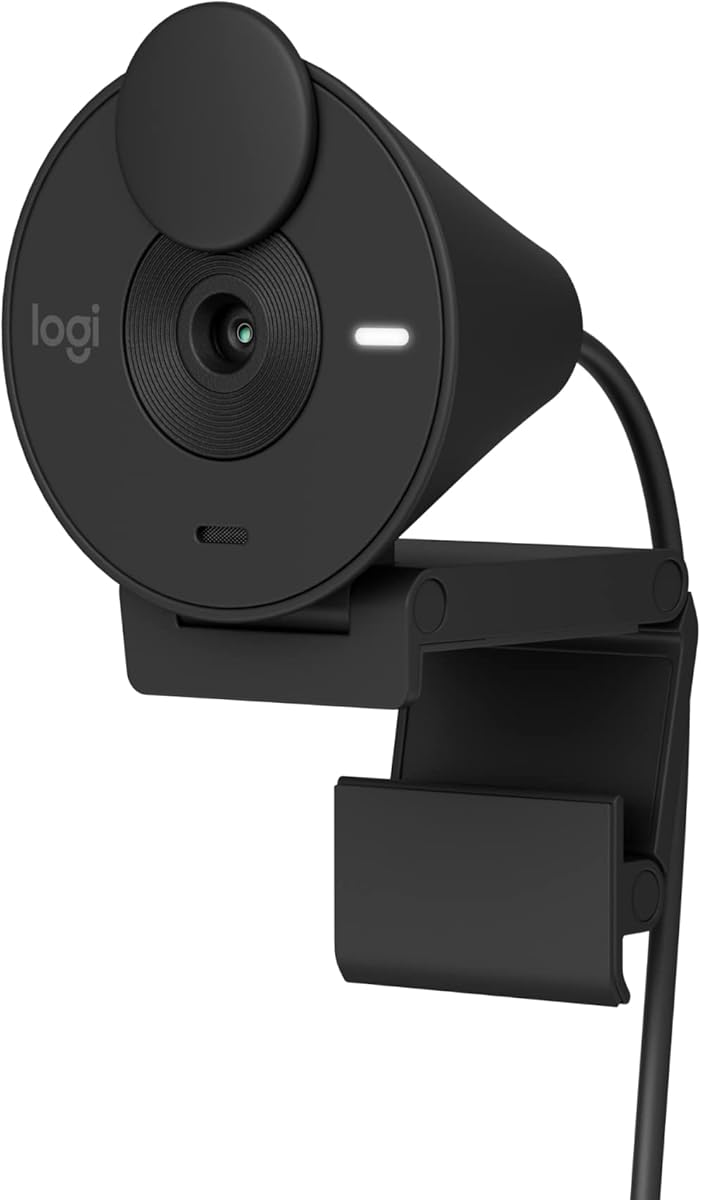
The NexiGo N60 is the most cost-effective solution for Mac users needing reliable 1080p video. It earns a 4.3 rating for delivering sharp images and clear audio at a fraction of the cost of premium models.
We may earn a commission when you buy through this link, at no additional cost to you.
Equipped with a noise-canceling microphone, it enhances voice clarity even in noisy environments. The privacy cover is simple but effective for protecting your lens when not in use during workdays.
It uses a fixed focus lens optimized for typical desk distances, which works well for most standard setups. While build quality is basic, it remains durable enough for daily personal or casual professional use.
Pick this if you need a straightforward, affordable webcam that gets the job done without complex features. It is ideal for students or anyone on a tight budget who still wants HD quality.
No drivers are required as the webcam works instantly via USB connection on Mac OS, allowing you to start meetings within minutes.
The built-in mic filters background noise so your voice comes through clearly, improving communication during virtual calls or recordings.
We may earn a commission when you buy through this link, at no additional cost to you.
The Brio 100 brings Logitech's trusted quality to a compact and affordable package. Rated 4.4 stars, it features RightLight technology to adjust brightness and reduce shadows for a natural look on video calls.
We may earn a commission when you buy through this link, at no additional cost to you.
Its integrated slide cover offers instant privacy, and the design uses recycled plastic, appealing to eco-conscious buyers. The camera connects easily and supports major platforms like Teams and Zoom seamlessly.
While it lacks autofocus, the fixed focus lens works well for static desk setups. The bright white finish matches modern Mac aesthetics, making it a visually appealing addition to your workspace.
Choose this for a reliable, stylish camera that prioritizes simplicity and environmental responsibility. It suits remote workers who want easy operation without extra software configuration.
RightLight boosts brightness by up to 50 percent to counteract shadows so you look your best even in poor lighting conditions.
The integrated slide cover blocks the lens physically ensuring you control exactly when the camera is active during your day.
We may earn a commission when you buy through this link, at no additional cost to you.
Designed specifically for business environments, the Brio 301 ensures seamless integration with enterprise tools. It holds a 4.4 rating and features RightLight 2 to correct lighting issues automatically during meetings.
We may earn a commission when you buy through this link, at no additional cost to you.
The spin privacy shutter provides a secure way to hide the lens when not in use. Certified for major platforms like Zoom and Teams, it guarantees compatibility and performance consistency for work applications.
Audio is mono with noise reduction, sufficient for clear speech but less immersive than stereo options. You can customize color and image quality using the free Logi Tune app for better results.
Select this model if you need a certified business tool that balances performance and affordability. It is ideal for professionals requiring stable and compliant video gear.
RightLight 2 automatically adjusts exposure and contrast to ensure you look clear even in challenging lighting scenarios.
Use Logi Tune to tweak colors and image settings for a personalized look that fits your brand or preference.
We may earn a commission when you buy through this link, at no additional cost to you.
The C920e is built for corporate environments with strict certification and privacy needs. Rated 4.6 stars, it delivers consistent 1080p video with built-in autofocus to keep you sharp throughout meetings.
We may earn a commission when you buy through this link, at no additional cost to you.
Two omnidirectional microphones capture clear audio from up to one meter away ensuring everyone hears you clearly. The attachable privacy screen gives you physical control over visibility during breaks.
It includes tripod threads for flexible mounting on various devices. While slightly pricier, its reliability and business certifications make it a smart investment for enterprise deployment.
Choose this if you need a trusted solution that works seamlessly with company video tools. It is perfect for offices and remote workers prioritizing professional consistency.
Certification for Zoom and Teams ensures optimized performance and compatibility without technical issues during critical work calls.
The flip-up privacy screen physically blocks the lens so you know exactly when the camera is active or off.
We may earn a commission when you buy through this link, at no additional cost to you.
This pro model excels for streamers and content creators needing smooth motion and background removal. With a 4.6 rating, it offers 720p at 60fps for fluid video and includes an XSplit VCam license for background effects.
We may earn a commission when you buy through this link, at no additional cost to you.
HD light correction and autofocus ensure bright and sharp images even in low-light settings. Stereo audio via dual mics enhances the quality of recorded content and live calls significantly.
While it lacks a privacy shutter, the premium optics and software support compensate. It is designed for users who need more than just basic video chat functionality.
Choose this if you stream or record high-quality video and need advanced software features. It is the top pick for creators wanting professional output without additional hardware.
Create and share video content easily with the included software tools that simplify editing and streaming tasks.
Opt for 720p at 60fps to capture fast movements smoothly without motion blur in your video feed.
We may earn a commission when you buy through this link, at no additional cost to you.
The C920S builds on the classic C920 with added privacy security and premium audio. Rated 4.6 stars, it delivers crisp video and vibrant colors thanks to HD autofocus and light correction.
We may earn a commission when you buy through this link, at no additional cost to you.
Stereo audio with dual mics makes conversations sound natural and immersive. The privacy shutter offers manual control, giving you peace of mind between calls or when not recording.
It lacks advanced background replacement software but excels as a reliable video camera. The build quality is solid, making it a long-term asset for any Mac setup.
Select this for a classic, high-performance webcam that balances features and reliability. It is ideal for professionals needing clear video and audio without streaming extras.
The snug privacy shutter keeps your lens safe and ensures you control exactly when the camera is in use.
Stereo audio captures natural sound with dual mics enhancing the clarity of voice on recorded videos or calls.
We may earn a commission when you buy through this link, at no additional cost to you.
The second Acer listing reinforces its strong reputation for premium materials and image quality. Rated 4.4 stars, it offers 4K resolution with fast heat dissipation and a compact design perfect for travel or mobile work.
We may earn a commission when you buy through this link, at no additional cost to you.
The all-metal body ensures durability and a sleek look that complements Mac hardware. Its magnetic privacy cover is secure and easy to manage during breaks from work sessions.
It relies on a secure physical connection eliminating wireless risks but may need an adapter for some setups. The universal compatibility covers all major platforms and streaming tools seamlessly.
Pick this if you prefer a minimalist, durable build over software bloat. It suits users who value hardware quality and reliable video performance above advanced customization.
Crafted from aerospace-grade aluminum with precision machining for a premium feel and reliable heat dissipation during use.
Rely on a physical connection without WiFi or Bluetooth to eliminate wireless signal risks and protect sensitive data.
We may earn a commission when you buy through this link, at no additional cost to you.
Selecting the right webcam depends on understanding your specific needs regarding resolution, features, and budget. This guide breaks down the most important factors to consider before making your final choice for Mac setups.
Resolution determines how sharp your image appears during calls. While 1080p is sufficient for most meetings, 4K offers superior detail for streaming or professional presentations where clarity matters most.
Look for native resolution options like 4K if you want future-proofing or 1080p for standard professional needs.
Autofocus keeps your face sharp even if you move during meetings. Phase Detection Autofocus is faster and more reliable than standard models especially for active speakers.
Choose cameras with PDAF if you need consistent clarity during dynamic video sessions.
Built-in mics vary widely in audio clarity. Dual omnidirectional microphones with noise cancellation ensure your voice is heard clearly without needing external hardware.
Prioritize models with noise reduction features if your work environment is noisy or shared with others.
Low-light performance is critical for home offices without professional lighting. RightLight technology and auto exposure adjustments ensure you remain visible and well-lit during calls.
Select cameras with advanced light correction if you often work in dim rooms.
Physical privacy covers or shutters are essential for security and peace of mind. They provide a guaranteed way to block the lens without relying on software.
Always verify that a physical cover is included before purchasing to protect your privacy.
Mac systems often use USB-C, so check if the camera includes adapters or uses USB-C directly. Plug-and-play functionality ensures you can start using the device without installing drivers.
Opt for models with USB-C or adapters to avoid compatibility issues with modern Mac hardware.
Materials like aluminum offer better heat dissipation and a more professional look than plastic. Durable construction ensures longevity especially for daily use.
Choose metal bodies for better reliability and cooling during extended sessions.
The field of view determines how much of your room is visible. A 78-degree angle is standard for individuals while wider angles suit group meetings.
Adjustable FOV options offer flexibility depending on your workspace layout.
Connect the webcam to your Mac via USB or USB-C. Most models are plug-and-play so the system automatically detects the device without needing extra driver installations.
Open a video application like Zoom or FaceTime and select the external camera as your input source in the settings menu. Ensure the lens is clean and positioned at eye level for the best framing.
Protect the lens from dust by closing privacy covers when not in use. Store in a cool dry place and avoid exposing it to extreme temperatures during travel.
Yes, all models listed support macOS 10.11 or higher with plug-and-play functionality. They are compatible with major conferencing apps like Zoom and Teams on Mac systems.
The NexiGo N60 offers the best value with solid 1080p video and privacy features at an affordable price. It is perfect for users on a budget who still need HD quality.
Many modern webcams like the Brio series include RightLight technology to adjust brightness. However, adding a simple desk lamp or ring light also helps significantly in dark rooms.
External webcams typically offer higher resolution better autofocus and privacy covers that built-in cameras lack. They provide more control over image quality and framing for professional calls.
Most webcams work immediately via USB without installing software. However, some models like the C922x include optional apps for advanced background removal or customization features.
Yes, models like the C922x and Acer 4K support streaming platforms like OBS or Twitch. They deliver high-quality video suitable for content creation and live broadcasts.
Webcams with physical shutters like the C920S or C960 offer the most reliable privacy. You can physically block the lens when not in use to ensure total security.
We found the Acer 4K Webcam to be the overall top pick due to its impressive image quality and durable design. It stands out for professionals seeking premium visuals and reliability in their daily workflow.
For budget-conscious users the NexiGo N60 provides excellent HD performance at a minimal cost. Prioritize privacy features and resolution based on your specific meeting needs and room lighting.
Always check current pricing and availability as deals change frequently. Investing in the right external webcam will significantly improve your video call experience on Mac today.