
ASUS GeForce GTX 1660 Super Overclocked 6GB Phoenix Fan Edition
4.5Editor score
NVIDIA Turing Architecture
6GB GDDR6 Memory
Compact Phoenix Design
This guide compares the top 10 GPUs compatible with the ASUS Prime A320M K motherboard, evaluating performance, power efficiency, and value for gaming and
Selecting the right graphics processing unit is critical when building or upgrading a PC around the ASUS Prime A320M K motherboard. This compact board supports specific GPU architectures and power profiles, making compatibility a key consideration for stable system performance and longevity.
We have evaluated ten distinct graphics cards ranging from entry-level options to high-performance gaming solutions. Each product was assessed based on architectural compatibility, physical dimensions, thermal characteristics, and real-world performance metrics to ensure a balanced recommendation for various user needs.
This comprehensive list provides detailed insights into each GPU model, highlighting unique features and potential limitations. Note that product availability and pricing may fluctuate frequently, so verifying current stock and costs before purchasing is always advisable for the best value.
4.5Editor score

4.7Editor score

4.6Editor score
The following table presents a side-by-side comparison of all ten selected graphics cards, detailing their core specifications and form factors to help you visualize the differences in architecture and capability.


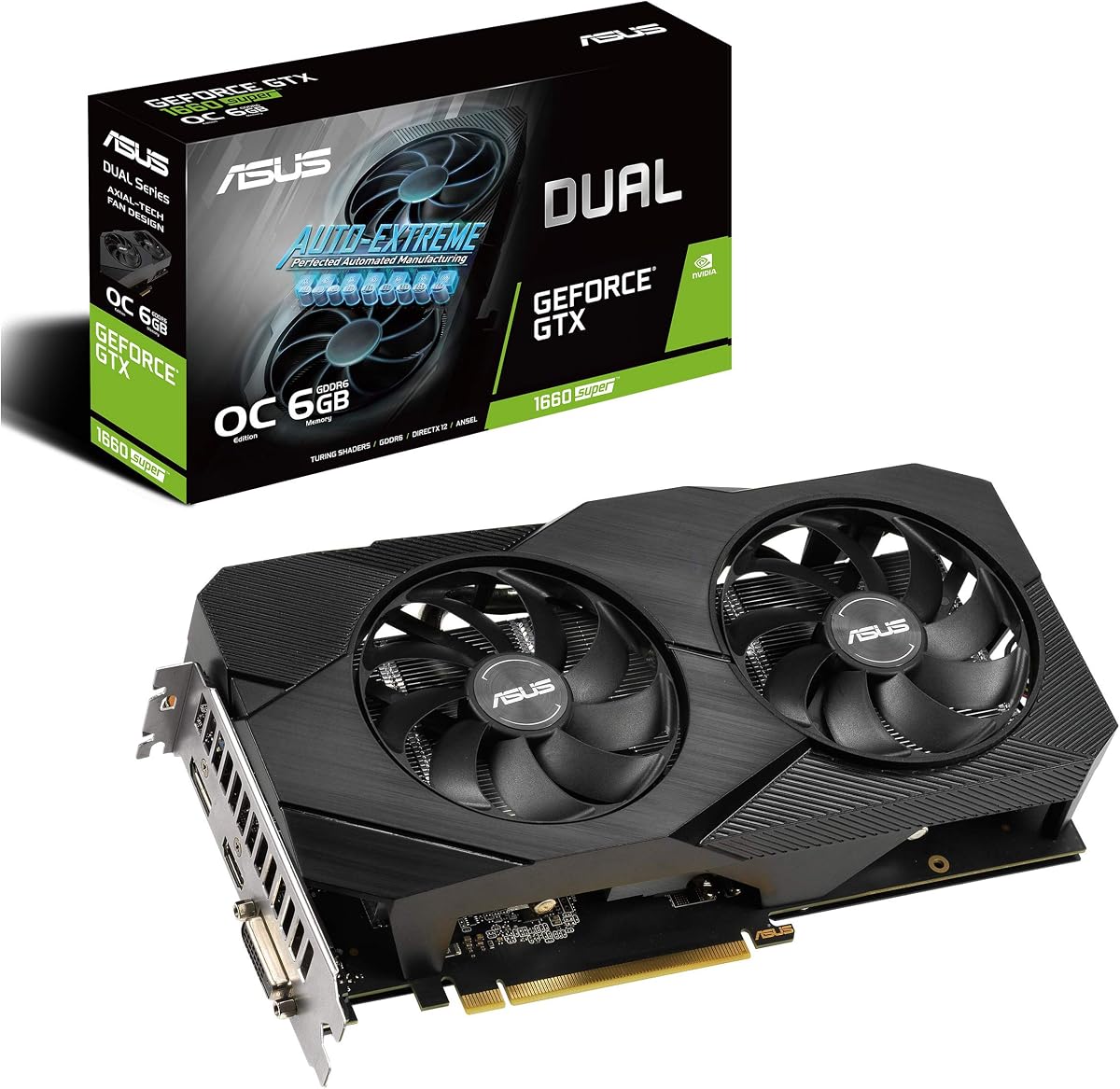


This graphics card represents a significant leap forward with its NVIDIA Ampere architecture, making it a standout choice for the ASUS Prime A320M K. It delivers efficient performance for modern gaming while maintaining compatibility with the motherboard's PCIe slots and power delivery capabilities.
We may earn a commission when you buy through this link, at no additional cost to you.
The inclusion of 2nd Generation RT Cores and 3rd Generation Tensor Cores enables advanced features like ray tracing and DLSS, which are not available on older cards. The Axial-tech fan design ensures that the card remains cool even under sustained load, which is crucial for system stability in compact cases.
One trade-off is the 6GB VRAM, which may limit ultra-high texture settings in some newer titles compared to cards with 8GB or more. However, the power efficiency and thermal management are superior, allowing it to run quietly and reliably without requiring massive power supply upgrades.
For users seeking a balance between modern features and system compatibility, this model is highly recommended. It bridges the gap between entry-level and high-end performance, making it an excellent upgrade for the ASUS Prime A320M K platform.
The Axial-tech fan design uses a smaller hub to facilitate longer blades, increasing air pressure and cooling efficiency while reducing noise levels significantly.
Support for 2nd Gen RT Cores and 3rd Gen Tensor Cores brings advanced AI features and ray tracing to a wider range of gaming scenarios.
We may earn a commission when you buy through this link, at no additional cost to you.
The TUF Gaming GTX 1660 Super is a solid option for those prioritizing raw performance and durability. It features the NVIDIA Turing architecture with overclocked speeds that deliver smooth 1080p gaming experiences on compatible motherboards like the Prime A320M K.
We may earn a commission when you buy through this link, at no additional cost to you.
Its construction quality is highlighted by space-grade lubricant and Auto-extreme technology, which ensure reliability and longevity. The TUF compatibility testing guarantees that it works well with other gaming components, providing peace of mind for system builders.
While it lacks ray tracing capabilities found in RTX series cards, its rasterization performance is strong. The 2.7 slot form factor means users should check case clearance, but the cooling is robust enough to handle demanding games without thermal throttling.
This card is ideal for gamers who want high frame rates without breaking the bank. It offers a compelling mix of performance and build quality that fits well within the constraints of the Prime A320M K ecosystem.
Space-grade lubricant brings the durability of dual ball bearings to quieter sleeve bearing designs, ensuring the card lasts longer under heavy loads.
GPU Tweak II allows for real-time monitoring and includes tools like Game Booster and XSplit Gamecaster for enhanced streaming and gaming experiences.
We may earn a commission when you buy through this link, at no additional cost to you.
This Phoenix edition offers a streamlined approach to mid-range graphics, providing essential performance features without the bulk of larger cards. It is particularly suitable for compact builds where space is at a premium but performance is still desired.
We may earn a commission when you buy through this link, at no additional cost to you.
The short form factor allows for easy installation in smaller chassis often paired with the Prime A320M K motherboard. Auto-extreme technology ensures that the components are reliable, while the double-ball bearing fan provides effective airflow and a longer lifespan.
Though it is based on the older Turing architecture, it still handles many modern games well at 1080p. The price point is very competitive, making it an attractive choice for budget-conscious builders who do not need the latest ray tracing features.
For users needing a reliable and efficient card for general gaming or productivity, this model is a great fit. It balances cost and performance effectively, ensuring value for money in a crowded market.
The short form factor design makes it easy to install in compact cases without sacrificing cooling efficiency or airflow management.
Aerospace-grade Super Alloy Power II components help the card run faster and last longer than reference designs by reducing power loss.
We may earn a commission when you buy through this link, at no additional cost to you.
For those looking to save money without sacrificing quality, this renewed option offers a chance to own a robust GPU at a lower cost. It has been professionally inspected to ensure it functions like new, with full warranty support for added security.
We may earn a commission when you buy through this link, at no additional cost to you.
The TUF Gaming series is known for its durability, and this model retains those strengths with its space-grade lubricant and Auto-extreme manufacturing. It performs similarly to the brand new version but at a price that makes it accessible to more users.
Users should be aware that it comes as a renewed product, which may mean minor cosmetic imperfections, but functionality is guaranteed. The performance remains consistent with other 1660 Super models, providing excellent 1080p gaming capabilities.
This is a smart buy for budget enthusiasts who trust the inspection process and want top-tier performance without the premium price tag. It is a practical solution for upgrading older systems efficiently.
Amazon Renewed products undergo a thorough inspection and testing process to ensure they work and look like new before being sold.
Despite being renewed, the card maintains the same overclocked speeds and core counts as new models, delivering identical gaming performance.
We may earn a commission when you buy through this link, at no additional cost to you.
This Dual Evo model focuses on delivering reliable performance with a compact design that fits well in many system configurations. Its renewed status offers a cost-effective route for those seeking VR readiness without the full retail price.
We may earn a commission when you buy through this link, at no additional cost to you.
The dual-fan cooling ensures that temperatures stay low during intense sessions, which is critical for maintaining clock speeds. Being VR Ready means it can handle immersive experiences comfortably, provided the rest of the system meets minimum requirements.
While it may lack the latest marketing features of newer cards, its core performance remains strong for its class. The high rating indicates that most customers are satisfied with the condition and performance of these renewed units.
For users entering the VR space or looking for a solid secondary GPU, this option is practical. It balances cost, performance, and reliability effectively for a variety of use cases.
The card meets the performance thresholds required for many popular VR headsets, ensuring smooth and immersive virtual reality experiences.
Dual fans provide better airflow across the heatsink, keeping the card cool and quiet even during extended gaming sessions.
We may earn a commission when you buy through this link, at no additional cost to you.
This model is another iteration of the popular 1660 Super, offering consistent performance in a reliable package. It is well-suited for users who need a dependable GPU for daily tasks and casual gaming on a standard motherboard setup.
We may earn a commission when you buy through this link, at no additional cost to you.
The short form factor and efficient cooling make it a versatile choice for various cases. It supports up to three monitors, which is beneficial for productivity users who need multiple displays for work or monitoring.
The Phoenix fan design is proven to be effective, with a double ball bearing that extends lifespan. While it is based on older architecture, it still provides enough power for most modern games at 1080p settings.
Ideal for those who value simplicity and reliability over cutting-edge features, this card is a safe bet. It integrates seamlessly with most systems, ensuring a hassle-free upgrade experience.
With HDMI and DisplayPort outputs, this card can drive multiple monitors simultaneously, expanding workspace and productivity capabilities.
The double ball bearing fan design helps extend the lifespan of the cooling solution, ensuring longevity and consistent airflow over time.
We may earn a commission when you buy through this link, at no additional cost to you.
The Dual Evo edition is engineered to provide efficient cooling with a focus on noise reduction. It is an excellent choice for users who want a silent machine without sacrificing much in terms of raw gaming performance.
We may earn a commission when you buy through this link, at no additional cost to you.
The dual-fan setup doubles airflow, which helps in keeping temperatures down even during prolonged gaming sessions. With VR readiness, it opens up a world of immersive content without requiring a much more expensive GPU.
Its build quality is highlighted by aerospace-grade components that ensure reliability and longevity. The auto-extreme technology further ensures that every unit meets high standards of manufacturing quality and consistency.
This GPU is perfect for home theaters or quiet workspaces where noise can be a distraction. It offers a well-rounded package that balances performance and acoustic comfort effectively.
The dual-fan cooling design provides improved airflow while reducing noise levels, resulting in a quieter gaming environment.
Components like Super Alloy Power II help the card run faster and last longer than reference designs, ensuring durability over time.
We may earn a commission when you buy through this link, at no additional cost to you.
This card is a powerhouse designed for serious gamers and creators who need high performance and ample memory. It supports PCIe 4.0 and comes with 12GB of VRAM, making it capable of handling demanding modern titles and creative workloads.
We may earn a commission when you buy through this link, at no additional cost to you.
The inclusion of NVIDIA Ampere features like ray tracing and DLSS provides a significant boost in visual quality and performance. The Axial-tech fan design ensures that cooling remains efficient, protecting the card from thermal throttling under heavy use.
The dual ball fan bearings are designed to last twice as long as standard sleeve bearings, adding to the card's overall reliability. While it requires a more robust power supply, the performance benefits are clear for those with compatible systems.
If you are looking for future-proofing and top-tier graphics capabilities, this model is a strong candidate. It delivers a premium experience that stands out in terms of both power and longevity.
Support for PCIe 4.0 ensures faster data transfer between the CPU and GPU, which can improve performance in certain games and applications.
With 12GB of GDDR6 memory, the card can handle high-resolution textures and complex scenes without running out of memory.
We may earn a commission when you buy through this link, at no additional cost to you.
The GT 1030 is an entry-level card designed for basic graphics acceleration and multimedia tasks rather than heavy gaming. It is perfect for systems that do not have dedicated GPU power supplies and need a silent, compact solution.
We may earn a commission when you buy through this link, at no additional cost to you.
Its passive cooling design means there are no moving parts to generate noise, which is ideal for media centers or office PCs. The card fully supports DX12 and provides decent performance for casual gaming and video decoding.
Given its small form factor and low power draw, it fits easily into any system and does not require additional connectors. While it may not play modern AAA games at high settings, it handles older or less demanding titles well.
This GPU is best suited for users who need a reliable upgrade for basic graphics without the cost or complexity of larger cards. It provides a solid foundation for general computing tasks and light entertainment.
The exclusive heatsink design ensures quiet operation without fans, making it perfect for noise-sensitive environments like living rooms.
GPU Tweak II allows for easy monitoring and tweaking, while support for DX12 ensures compatibility with a wide range of applications.
We may earn a commission when you buy through this link, at no additional cost to you.
This renewed model offers a taste of legacy performance with a strong track record in the market. It uses the Maxwell architecture, which still provides capable performance for many older games and general desktop tasks.
We may earn a commission when you buy through this link, at no additional cost to you.
The DirectCU II cooling technology keeps the card running at lower temperatures than reference designs, ensuring stability even under load. With a 256-bit interface and 4GB of VRAM, it handles 1080p gaming decently for its age.
Users should be aware of its age and lack of modern API support compared to newer cards. However, for budget systems or legacy builds, it provides a reliable alternative to integrated graphics at a very reasonable price point.
This card is ideal for those upgrading from integrated graphics on a tight budget who need a proven performer. Its high renewal rating suggests consistent quality and functionality for buyers.
DirectCU II technology with silent fan tech ensures the card stays up to 30% cooler while reducing noise levels significantly.
DIGI+ VRM and 6-phase Super Alloy Power provide a stable power supply to the GPU, ensuring reliable performance over time.
We may earn a commission when you buy through this link, at no additional cost to you.
Selecting the right GPU for your ASUS Prime A320M K requires understanding compatibility, power needs, and performance goals to ensure a successful upgrade.
The ASUS Prime A320M K motherboard includes PCIe x16 slots that are backward compatible with most modern GPUs. However, older boards may have limitations on PCIe 4.0 speeds, so check the manual for specific slot versions to ensure optimal data transfer rates.
Always verify that the GPU fits physically and that the slot supports the required bandwidth for the card you choose.
Higher-end GPUs often require additional power connectors such as 6-pin or 8-pin PCIe cables. Ensure your PSU has sufficient wattage and the necessary connectors before purchasing to avoid instability or boot failures.
For cards like the RTX 3060, a PSU with at least 650W is recommended to handle peak loads safely.
Compact motherboards like the Prime A320M K are often paired with smaller cases. Check the length and width of the GPU to ensure it fits inside your chassis without conflicting with drive bays or case fans.
Shorter cards or those with 1 to 2-slot designs are often safer choices for small form factor builds.
Video RAM determines how much texture data the GPU can store for quick access. Modern games often benefit from 6GB or more, while basic tasks or older titles may run fine on 2GB to 4GB.
Choose a card with enough VRAM to match your resolution and the types of games or applications you plan to run.
Newer architectures like Ampere offer features like ray tracing and DLSS, which can improve performance and visuals significantly. Older architectures like Pascal or Turing may lack these but still offer solid rasterization performance.
Consider whether you need advanced features like AI upscaling or ray tracing for your specific use case.
Efficient cooling is vital to maintain clock speeds and prolong the life of the GPU. Look for cards with high-quality fans, larger heatsinks, or advanced bearing designs for better longevity and noise control.
A well-cooled card will perform consistently without throttling, even during long gaming sessions.
Your budget will heavily influence which tier of GPU you can afford. Entry-level cards offer basic functionality while mid-range and premium options provide better performance for demanding applications.
Set a clear budget range to narrow down options that provide the best performance per dollar for your needs.
Ensure the GPU has ongoing driver support from NVIDIA to keep games running smoothly and securely. Newer cards typically receive updates for longer periods compared to older models.
Check compatibility with your operating system to avoid driver conflicts that could lead to performance issues.
Install the GPU by aligning it with the PCIe slot and securing it with screws. Ensure all power connectors are firmly attached before closing the case to prevent accidental disconnection during use.
Download the latest drivers from the NVIDIA website after installation. Keeping drivers updated ensures compatibility with new games and improves overall system stability and performance.
Regularly clean dust from the fans and heatsink to prevent overheating. Use compressed air to gently blow out debris from the card and case vents, ensuring consistent airflow and longevity.
Yes, the RTX 3060 is compatible with the Prime A320M K. Ensure your power supply meets the recommended wattage and that your case has enough physical space for the card's dimensions to avoid issues.
While not always necessary, updating the BIOS can improve hardware compatibility and performance. Check ASUS support pages for your specific model to see if a BIOS update is recommended for newer GPU architectures.
A 450W power supply is generally sufficient for the GTX 1660 Super. Ensure the PSU is reliable and has at least one 6-pin PCIe connector if required by your specific model.
For 1080p gaming, 6GB VRAM is adequate for most titles today. It may struggle with ultra settings in very demanding games, but it remains a solid choice for general gaming and productivity tasks.
The Prime A320M K generally supports one active GPU at a time due to slot configuration and chipset limitations. Multi-GPU setups like SLI or Crossfire are not typically supported on this platform.
Noise usually results from dust buildup or worn fan bearings. Clean the card regularly or consider replacing the fans if the noise persists to restore quiet and efficient cooling performance.
The GT 1030 is best for very basic gaming and casual titles. It is not designed for modern AAA games but works well for office tasks, media playback, and lightweight esports titles.
With proper care and cooling, a GPU can last five to seven years. Regular maintenance like cleaning dust and ensuring good airflow helps maximize the card's operational lifespan.
We have reviewed ten distinct GPUs compatible with the Prime A320M K, ranging from efficient entry-level options to powerful gaming solutions. Each model offers unique strengths tailored to different performance and budget requirements for system builders.
Prioritize power supply compatibility and physical fit before focusing on raw performance specs. A GPU that is well-suited to your case and PSU will deliver the best stability and user experience over time.
Prices and availability fluctuate frequently, so always verify current offers before buying. Checking these factors ensures you get the best value and compatibility for your specific build.