
LISEN iPad Stand Tablet Holder for Desk
4.6Editor score
Folds flat for travel
Gravity-based secure system
Bridge screw adjustment rod
Finding the right iPad stand for desk use can transform your workspace into a more ergonomic and efficient environment. A good stand elevates your screen to eye level, reducing neck strain during long work sessions. It also frees up valuable desk space, allowing for a cleaner and more organized setup. Whether you are typing documents, attending video calls, or streaming media, the right accessory ensures comfort.
We have evaluated ten top-rated tablet holders based on stability, adjustability, material quality, and user feedback. Our analysis covers a wide range of prices and designs, from compact foldable options to robust commercial-grade kiosks. Each product was selected for its ability to hold devices securely while offering versatile viewing angles. We prioritized stands that maintain their position even during active use or typing.
Each pick in this list highlights specific strengths, such as portability, rotation capabilities, or premium build materials. You will find detailed insights into compatibility with various iPad models and accessories like cases. Note that prices and availability can change frequently, so always verify the latest details before purchasing. This guide aims to simplify your decision-making process with clear and objective information.
4.6Editor score

4.8Editor score

4.5Editor score
As an Amazon Associate we earn from qualifying purchases.
This side-by-side comparison highlights the key specifications and features of each model to help you choose quickly.



The Lamicall iPad Stand is a top-tier choice for desktop use, earning a high rating for its sturdy construction and versatility. It supports a wide range of devices from 4 to 13 inches, making it suitable for most iPads and phones. Its aluminum alloy build ensures it remains stable even during active typing sessions without wobbling.
We may earn a commission when you buy through this link, at no additional cost to you.
This stand features a multi-angle design that allows you to switch between vertical and horizontal viewing easily. The rubber pads on the hooks and feet protect your device from scratches and prevent sliding. It is particularly well-suited for office desks where stability and professional appearance are priorities.
While it does not fold flat or rotate 360 degrees, its fixed design provides superior rigidity compared to many portable options. This trade-off is acceptable for users who prioritize a permanent desk setup over frequent movement. The width of the hook accommodates most cases up to 18mm thick.
If you need a reliable and durable stand for everyday office tasks, this model is highly recommended. It offers the perfect balance of price and performance for most users. The included service support from the brand adds extra confidence to your purchase decision.
The weighted base and wide footprint prevent the stand from tipping even when tapping keys repeatedly.
Compatible with everything from small iPhones to large 13-inch tablets without needing adjustments.
We may earn a commission when you buy through this link, at no additional cost to you.
The COOPER TabHolder is designed specifically to address ergonomic concerns by raising screens to eye level. It features a telescoping range that brings your device up to reduce strain on your neck and back during long work sessions. This makes it ideal for remote workers or students who spend hours on their devices.
We may earn a commission when you buy through this link, at no additional cost to you.
Its triple stability design includes a weighted metal base and EVA non-slip padding to prevent any slipping or tipping. The holding plate is 40% wider than average, offering more support for larger tablets or even portable monitors. This extra width ensures that heavy devices stay secure during use.
While it does not fold flat, its robust construction makes it perfect for semi-permanent setups on desks or kitchen counters. The cooling vents help dissipate heat, which is useful for prolonged video playback or gaming. It is a solid choice for those prioritizing comfort over portability.
If you struggle with neck pain from looking down at screens, this stand offers a practical and effective solution. The build quality ensures it will last through years of daily use. It is a great investment for anyone seeking a more comfortable viewing experience.
The telescoping mechanism allows precise positioning to match your eye level for better posture.
The weighted base and wide plate prevent wobbling even with heavier tablets or monitors.
We may earn a commission when you buy through this link, at no additional cost to you.
This foldable stand combines portability with advanced features like a full 360-degree rotating base. It is ultra-slim, folding down to just 0.59 inches thick, which makes it easy to slip into a backpack or laptop bag. The rotation feature is perfect for sharing screens during meetings or collaborating with clients.
We may earn a commission when you buy through this link, at no additional cost to you.
The stand uses high-strength alloy and tight hinges to ensure stability. You can adjust the hinge tightness with an included wrench to match your device weight. This customization ensures the stand stays in place without loosening over time. The widened hooks accommodate devices with protective cases up to 0.75 inches thick.
While the initial force required to unfold it can be firm, this ensures the hinges remain tight for long-term use. The weighted base prevents tipping even when the tablet is rotated to different angles. It is a versatile tool for travelers or professionals who move between workspaces frequently.
If you need a stand that is both portable and feature-rich, this model is an excellent choice. It offers a balance of convenience and durability that is hard to find. The rotating feature alone makes it stand out among basic flat holders.
Rotate the base smoothly to share content with others without lifting the tablet.
Use the included wrench to tighten the joints for stable support of heavier devices.
We may earn a commission when you buy through this link, at no additional cost to you.
The tounee Tablet Holder stands out for its ability to support devices up to 16.9 inches, including portable monitors. This makes it ideal for users who need a larger screen for multitasking or media consumption. The innovative locking mechanism allows you to secure the height and angle exactly as needed.
We may earn a commission when you buy through this link, at no additional cost to you.
Its all-metal alloy construction provides robust stability and long-lasting durability. The weighted base prevents the stand from tipping even with heavy devices attached. Anti-slip silicone pads protect your device and desktop from scratches and accidental slips. This combination of materials ensures a premium feel and performance.
While it is not designed for laptops, its versatility for tablets and portable monitors is impressive. The stand folds flat for easy storage, making it convenient for travel or limited desk spaces. It is a strong option for professionals who use portable second screens regularly.
If you own a large tablet or portable monitor, this stand offers the necessary support and flexibility. The locking mechanism ensures your viewing position remains consistent throughout the day. It is a reliable and sturdy choice for demanding workflows.
Fits tablets and monitors up to 16.9 inches for versatile home or office use.
The locking mechanism holds your chosen angle and height firmly without drifting.
We may earn a commission when you buy through this link, at no additional cost to you.
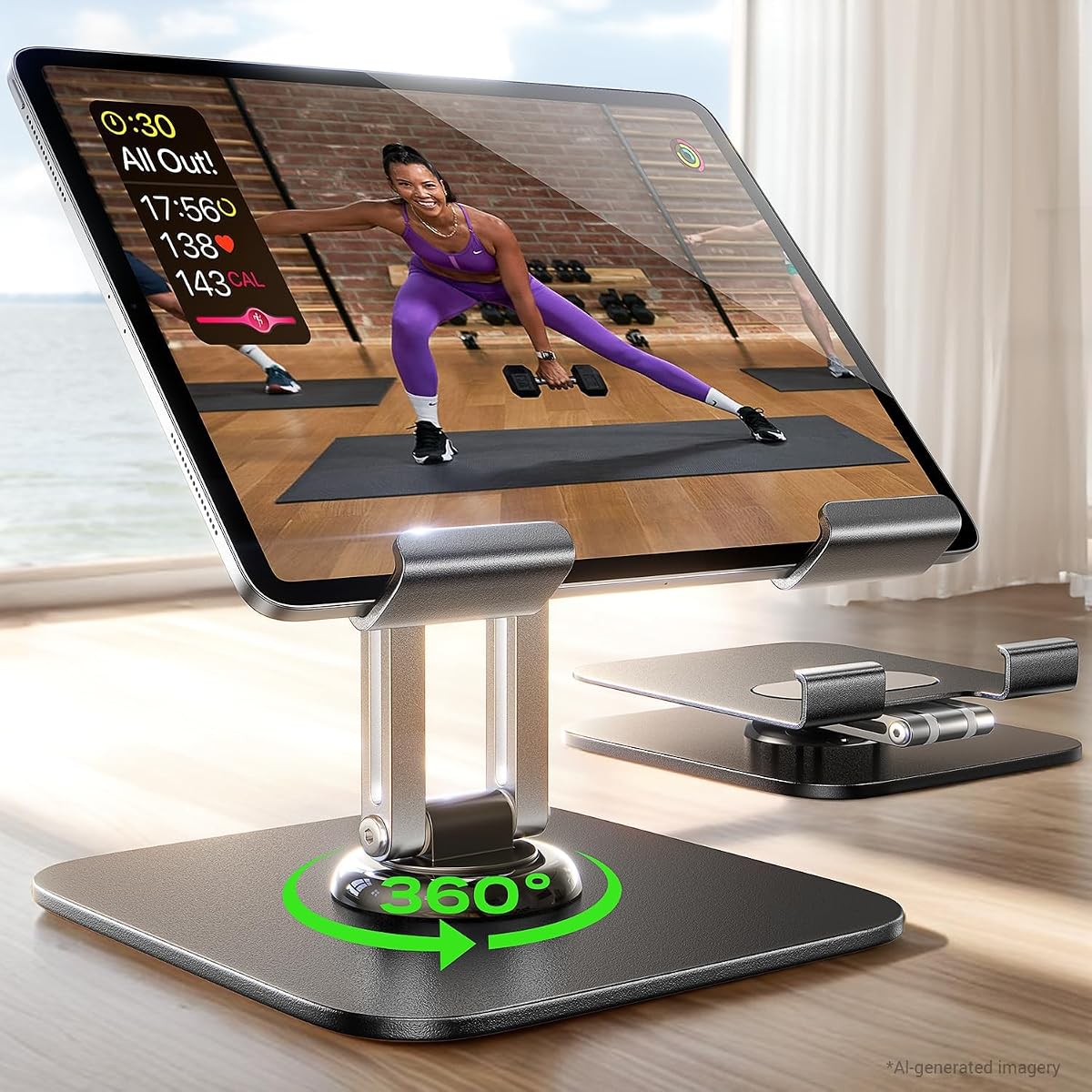
The LISEN iPad Stand offers excellent value for its price while still providing essential features for daily use. It features a gravity-based system that secures your device without clips or magnets. The bridge screw adjustment rod allows you to tighten the joints to prevent loosening over time.
We may earn a commission when you buy through this link, at no additional cost to you.
Its foldable design lets it collapse to a pocket size, making it incredibly portable for travel. The stand is made of high-quality ABS plastic with a metal panel base for stability. It supports devices from 4 to 15.9 inches, covering a wide range of phones and tablets.
While the materials are lighter than all-metal stands, they are durable enough for regular use. The adjustment mechanism ensures the stand stays stable even after months of use. This makes it a great option for students or travelers on a budget.
If you need a reliable stand that costs less without sacrificing functionality, this model is ideal. The bridge screw upgrade adds longevity that many budget stands lack. It is a practical and affordable solution for most users.
The bridge screw rod keeps the stand tight and stable over long-term use.
Folds down to fit in a pocket or small bag for easy transport.
We may earn a commission when you buy through this link, at no additional cost to you.
This stand is designed for commercial environments like stores or offices where reliability is key. It features a highly flexible 360-degree rotatable base and folding arm for easy interaction. The rubber padded bracket holders fit a wide range of tablets securely without damaging them.
We may earn a commission when you buy through this link, at no additional cost to you.
The ergonomic design allows for quick attach and detach with a simple button push. This makes it easy to clean or move the device as needed. There is dedicated space for power cord charging, ensuring your device stays powered during use. It is ideal for POS systems or reception desks.
The weighted base plus hard folding arm provide a sturdy structure to withstand heavy operation. This durability ensures it can handle constant interaction from multiple users throughout the day. It is a professional-grade solution for businesses needing a reliable display stand.
If you run a business and need a stand for customer interaction, this model is highly suitable. The secure hold and smooth rotation make it efficient for busy settings. It is a long-term investment for operational efficiency.
Built to withstand heavy daily use in retail or office reception areas.
Easy attach and detach buttons simplify device handling for staff members.
We may earn a commission when you buy through this link, at no additional cost to you.
The Urmust Tablet Stand offers fully adjustable height and angle to match your posture. It is made from aircraft-grade aluminum alloy, ensuring it is both stable and lightweight. The scientific base design supports heavy devices without wobbling, up to 2.42 pounds.
We may earn a commission when you buy through this link, at no additional cost to you.
Integrated cable clips help keep your workspace organized by managing power cords neatly. The stand includes a wrench to tighten joints for extra stability during use. It fits devices from 4.7 to 15.6 inches, covering most popular tablets. The 360-degree rotation allows for easy sharing of content.
While it is designed for tabletop use only, its flexibility makes it great for various settings from kitchen to office. The adjustable joints ensure you can find the most comfortable viewing position for any task. It is a robust option for those needing precise control over screen positioning.
If you want a stand that can adapt to different seating positions and activities, this is a strong choice. The build quality ensures it holds up under regular adjustments. It provides a comfortable experience for reading, gaming, or watching videos.
Adjust height and angle freely to reduce neck strain during long sessions.
Built-in clips keep charging cables tidy and out of your work area.
We may earn a commission when you buy through this link, at no additional cost to you.
This stand is designed with Al-Ti alloy to provide strength while remaining lightweight. It features a 360-degree smooth rotation to help you find the perfect viewing angle. The locking mechanism ensures your tablet stays in place securely during use. It is suitable for devices from 4.7 to 12.9 inches.
We may earn a commission when you buy through this link, at no additional cost to you.
The weighted base is made of all aluminum alloy with soft silicone non-slip pads. This protects your desktop and prevents the stand from sliding even with vigorous shaking. It folds down to a pocket size, making it easy to carry for remote work. The bridge screw adjustment allows you to tighten joints for long-term stability.
While it does not support portrait mode for phones, it is excellent for tablets. The build quality is military-grade, ensuring durability through years of daily use. It is a reliable option for those seeking a premium feel at a reasonable price point.
If you need a stand that is both portable and robust, this model fits the bill. The rotation feature adds versatility to your desk setup. It offers a strong balance of features for the average user.
Tested to ensure ultra-strong support without falling even under heavy use.
Rotate your screen effortlessly to share content or switch views.
We may earn a commission when you buy through this link, at no additional cost to you.
The UGREEN Tablet Stand is incredibly small, measuring just 4.7 by 4.2 inches when folded. This makes it easy to slip into a pocket for travel. It supports tablets from 4 to 11 inches, covering many standard phones and smaller devices. The multi-angle adjustment allows you to find a comfortable view from 15 to 100 degrees.
We may earn a commission when you buy through this link, at no additional cost to you.
Its premium ABS material ensures durability without adding significant weight. Silicone pads on the bottom protect your device and desktop from sliding and scratches. It is a practical solution for users who prioritize portability above heavy-duty stability. The small size does not compromise on essential functionality.
While it is not as strong as metal options, it is sufficient for light use. The angle range is wide enough for most media consumption needs. It is an excellent choice for students or frequent travelers with limited luggage space.
If you need a minimal stand for on-the-go use, this model is a top pick. It is affordable and easy to carry anywhere. It ensures your device is always ready for viewing or recording.
Folds down to fit easily into a jacket pocket or small bag.
Adjustable from 15 to 100 degrees for multiple use cases.
We may earn a commission when you buy through this link, at no additional cost to you.
The COOPER TabStand reaches a perfect eye level for dual monitors and video calls. Its 20-inch height adjustment eliminates neck pain by raising the screen significantly. It supports heavy devices like portable monitors up to 17 inches and 4.4 pounds. This makes it ideal for traders, designers, and healthcare workers.
We may earn a commission when you buy through this link, at no additional cost to you.
Its aircraft-grade aluminum construction ensures it remains sturdy and stable. The reinforced silicone-padded clamp holds devices securely without scratching. A weighted anti-slip base prevents the stand from moving even during vigorous use. It includes 360-degree rotation to switch between portrait and landscape modes quickly.
While it is a larger item, its professional features justify the size and price. It assembles quickly and works with all iPads and Kindle devices. The eco-friendly packaging reflects a commitment to sustainability. It is a top choice for professional setups requiring maximum ergonomics.
If you need a stand that prioritizes height and strength, this model is exceptional. It is trusted by professionals for its reliability. It offers the best in ergonomic support for daily productivity.
Raises your screen to eye level to prevent neck and back strain.
Supports up to 4.4 lbs to accommodate heavy portable monitors.
We may earn a commission when you buy through this link, at no additional cost to you.
Selecting the right stand depends on your specific needs, devices, and environment. Consider these key factors before purchasing.
Metal stands made of aluminum or alloy are generally more durable and stable than plastic ones. They resist wobbling and can support heavier devices better. Look for weighted bases to ensure the stand does not tip over easily.
Choose all-metal options for long-term use or heavy devices.
Ensure the stand supports the size and weight of your tablet or phone. Check if it accommodates cases or if you need to remove them. Some stands work with phones only in landscape mode.
Verify size limits and case compatibility before buying.
Stands with 360-degree rotation allow you to share screens or switch orientations easily. Adjustable height and tilt help you achieve ergonomic eye-level viewing. Locking mechanisms ensure the stand stays in place once set.
Prioritize rotation and tilt if you need flexible viewing angles.
If you travel or work from different spots, a foldable stand is essential. Look for models that fold to pocket size or slim profiles. Lightweight materials help reduce carry weight.
Choose foldable designs for easy transport and storage.
Anti-slip pads and weighted bases prevent movement and protect your device. A wider footprint adds extra stability for typing or active use. Check reviews regarding tipping issues.
Select stands with robust bases for typing or active use.
Budget stands offer basic functionality at lower costs, while premium ones provide advanced features. Consider long-term value and build quality over just the price. Upgrades like adjustment rods improve longevity.
Balance features with cost to find the best value for your needs.
Place the stand on a flat, stable surface to ensure safety and prevent tipping. Adjust the height and angle to match your eye level for optimal ergonomics. Tighten any joints or screws using provided tools for secure support.
Clean the stand regularly with a soft dry cloth to remove dust and debris. Avoid harsh chemicals that might damage protective pads or metal finishes. Check screws and joints periodically to ensure they remain tight over time.
Store portable stands in a padded bag when traveling to prevent scratches. Avoid placing heavy objects on the stand when not in use to maintain stability. Follow manufacturer guidelines for specific maintenance and care instructions.
Many stands feature widened hooks or larger grips that can accommodate cases up to a certain thickness, often around 0.5 to 0.75 inches. However, always check the specific compatibility details before purchasing to ensure a snug fit. If your case is particularly bulky, you may need to remove it for stability.
Most stands allow you to rotate your device between portrait and landscape orientations. However, some budget models may have fixed slots that only support one orientation. Look for rotating bases or adjustable clamps if you need both modes.
Stands with weighted bases and non-slip rubber pads are generally stable enough for typing. Metal builds offer better rigidity than plastic. If you type frequently, choose a model designed with typing in mind to prevent screen wobble.
Some stands designed for flexible use may work on soft surfaces, but most require a flat, stable tabletop. Using them on uneven surfaces can lead to wobbling or falling. Check product descriptions for specific surface recommendations.
Many of the heavier-duty models explicitly support portable monitors up to 17 inches. Ensure the stand has a high weight capacity and secure clamps. It is best to verify the dimensions and weight limits before purchasing.
Yes, some models feature telescoping arms or multi-joint designs that allow you to adjust the height. This is useful for achieving eye-level viewing. Check the product specifications to confirm height adjustment capabilities.
The Lamicall iPad Stand Adjustable Tablet Holder, LISEN iPad Stand, and COOPER TabStand are top picks for their distinct strengths. They offer a range of options from durable metal builds to ergonomic height adjustments. Choosing the right one depends on whether you prioritize portability, strength, or height.
Consider your primary use case such as typing, video calls, or travel when making a selection. A stable and adjustable stand can significantly improve your comfort and productivity. Look for models with anti-slip features and solid materials for long-term use.
Prices and availability can vary, so always check the latest information before purchasing. Investing in a good stand is a small cost for significant daily comfort. Make sure to verify current deals and shipping options for the best value.