
KPXOS OSU3X
3.4Editor score
Independent Key Calibration Support
Visual Feedback Key Travel
Plug-and-Play USB Interface
This guide compares the top 10 keyboards for Geometry Dash focusing on rapid trigger, magnetic switches, and custom layouts to help players achieve precise
Choosing the right keyboard for Geometry Dash can significantly impact your performance and ability to complete difficult levels. Precision timing and rapid key repetition are essential for navigating the fast-paced challenges that define this rhythm-based platformer. Players often seek devices that offer quick actuation and customizable features to suit their unique playing style.
We evaluated ten distinct models based on their switch technology, polling rates, and customization options. Our analysis focuses on how each device handles rapid inputs and minimizes latency during intense gameplay sessions. This list covers dedicated mini keypads alongside compact mechanical keyboards designed for competitive rhythm gaming.
Each selection highlights specific strengths such as magnetic switches, hall effect technology, or unique display features. Note that availability and pricing may vary depending on your region and current stock levels. Always check the latest product details before making your final decision to ensure compatibility with your setup.
3.4Editor score
4.7Editor score

4.2Editor score
The following table provides a side-by-side overview of all ten models selected for this guide. It highlights key specifications including switch type, polling rate, and unique features to help you quickly identify the best fit for your specific gaming needs.







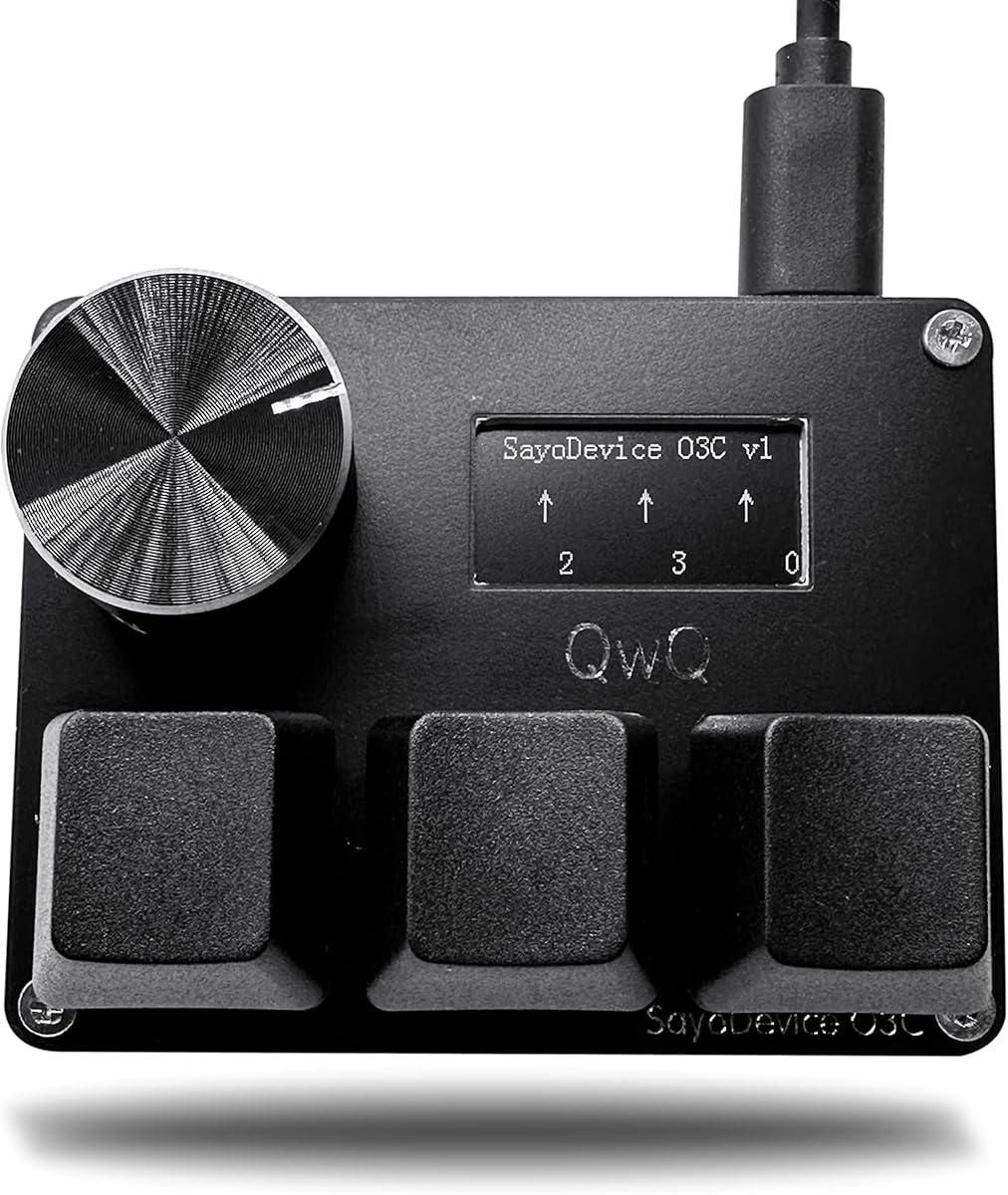
The BTXETUEL SayoDevice O3C stands out as a top-tier choice for Geometry Dash players seeking precision. It features Hall magnetic linear switches and an impressive 8000Hz polling rate for rapid inputs. The 0.96 inch IPS screen allows you to monitor key counts and status in real time.
We may earn a commission when you buy through this link, at no additional cost to you.
Key strengths include the ability to customize the screen and knob functions to match your workflow. You can set the knob to scroll through song lists or use the screen to display your custom ID. This flexibility ensures the device adapts to your specific needs rather than the other way around.
One trade-off is the need to perform calibration before first use or after firmware upgrades. While this adds a setup step it ensures consistent performance across all keys. The process is straightforward when following the steps provided in the product figures.
This keyboard is ideal for dedicated rhythm game enthusiasts who value speed and customization. If you want a mini keypad that delivers competitive performance without unnecessary bulk this model is highly recommended. Its focus on functionality makes it a reliable companion for intense gaming sessions.
The Hall magnetic linear switches provide smooth and consistent actuation without physical contact wear. This technology ensures long-term reliability for high-frequency inputs required in Geometry Dash.
The IPS screen provides immediate visual feedback on key travel and button counting. This helps players understand their input patterns and adjust their technique for better scores.
We may earn a commission when you buy through this link, at no additional cost to you.
The KPXOS OSU3X offers an accessible entry point for players exploring magnetic keyboards. It supports adjustable trigger distances down to 0.05mm for fine-tuned precision. The device includes a 0.96 inch IPS screen for visual feedback on key actions.
We may earn a commission when you buy through this link, at no additional cost to you.
Its main advantage lies in the ability to calibrate each key independently. This ensures consistent performance across the keyboard even with varying magnetic pole switches. The minimalist design keeps the footprint small while retaining essential functions like copy and paste.
Users may find the ratings lower due to potential inconsistencies in build quality or software support. It is important to check community feedback before purchasing to manage expectations. The budget-friendly price does reflect some compromises in materials compared to premium models.
This option is best for those on a tight budget who still want rapid trigger technology. If you need a simple tool to improve timing in Geometry Dash without a large investment this model provides good value. It serves well as a secondary device or starter keyboard.
Magnetic switch technology is typically expensive but this model brings it to a lower price range. This allows budget-conscious gamers to experience rapid trigger benefits without breaking the bank.
The design focuses on essential keys to save desk space for mouse movement. This layout is particularly useful for players who need more room for their gaming mouse.
We may earn a commission when you buy through this link, at no additional cost to you.
This model offers the same robust feature set as the top pick with a focus on user customization. It features 3 Hall magnetic linear switches and a high-speed 8000Hz connection. The IPS screen displays key range and button counting for real-time monitoring.
We may earn a commission when you buy through this link, at no additional cost to you.
You can customize the first line of text on the screen to show your own ID or notes. The knob can be set to any key function such as scrolling through song lists. This flexibility helps players optimize their workflow for specific game modes.
The device is similar to other versions but may come in different packaging or slight variations. Performance remains consistent with the rapid trigger capabilities that are essential for rhythm games. Calibration is required for optimal performance which is a standard step for this technology.
Players looking for a proven setup with customizable display elements should consider this option. It balances cost and features effectively while providing the necessary tools for high-level play. The reliability of the switch mechanism makes it a safe choice for daily use.
The ability to write custom text on the screen allows for personalization beyond standard functions. This can be used for motivational quotes or quick reference notes during gameplay.
Supporting any Hall magnetic switches means you can upgrade or change the feel of the keys easily. This ensures longevity and adaptability as your preferences evolve.
We may earn a commission when you buy through this link, at no additional cost to you.
The O3C Rapid Trigger keyboard emphasizes flexibility with custom trigger release settings from zero to four millimeters. This allows players to adjust the sensitivity of each key to their preference. The device uses professional game magnetic switches designed for rapid actuation.
We may earn a commission when you buy through this link, at no additional cost to you.
The screen supports custom animations and displays key range and button counting effectively. You can set the keys and knob to control functions like Ctrl or Alt combinations. This multi-key combination support aids in complex command execution without extra tools.
Like many models in this category calibration is needed before first use. This step ensures the magnetic switches are correctly mapped to your specific hardware. The process is simple but adds a minor hurdle to immediate usability.
This keyboard suits players who want precise control over trigger points without a full-sized layout. It is a reliable choice for those who value adjustability in their input devices. The hot-swappable design further extends its life by allowing easy maintenance.
Setting the trigger release point allows you to fine-tune how quickly keys reset. This is crucial for maintaining rhythm in high-speed levels where milliseconds matter.
Supporting any Hall magnetic switch means you are not locked into one brand or feel. This flexibility helps you find the exact tactile experience you prefer.
We may earn a commission when you buy through this link, at no additional cost to you.
The Aula WIN60 HE delivers high-performance features in a compact sixty percent design. It features rapid trigger technology with an ultra-low actuation step distance for lightning-fast responses. The web-based driver simplifies customization without requiring bulky software downloads.
We may earn a commission when you buy through this link, at no additional cost to you.
Its magnetic switches provide consistent actuation without physical contact wear which is vital for durability. The keyboard supports up to 8000Hz polling rates to ensure your inputs are registered instantly. This performance level is ideal for competitive gaming where timing is everything.
A potential drawback is the reliance on a web driver which requires an internet connection. This might be inconvenient if you prefer offline customization or have strict firewall settings. However the interface is streamlined to make the process efficient.
This keyboard is perfect for gamers who need more keys than a mini keypad provides. It offers the speed of rapid trigger in a format that supports standard workflows. The compact size helps save desk space while maintaining full functionality.
Using a web-based driver removes the need to install large applications on your system. This keeps your operating system clean and allows access from any browser.
Dynamic RGB lighting with lower light position illuminates PBT keycaps effectively. You can choose from millions of colors to match your gaming environment.
We may earn a commission when you buy through this link, at no additional cost to you.
The RedThunder K95 Wireless offers advanced features with a large TFT screen and CNC knob. It supports triple mode connections including Bluetooth wireless and wired for maximum versatility. The gasket design provides a superior typing feel through shock absorption.
We may earn a commission when you buy through this link, at no additional cost to you.
Its battery life ensures continuous usage for extended sessions without frequent recharging. The hot-swappable PCB allows you to experiment with different switches without soldering. This flexibility makes it a future-proof choice for custom keyboard enthusiasts.
While the price is higher the added wireless capabilities and build quality justify the investment. It is suitable for users who want a complete experience with media controls and RGB customization. The screen supports custom images which enhances the visual appeal significantly.
For players seeking a premium device that doubles as a productivity tool this is an excellent pick. The combination of wireless freedom and rapid performance options it stands out. Just ensure you are comfortable with the software setup for full customization.
The ability to switch between devices and modes seamlessly improves workflow efficiency. You can use the keyboard for gaming and work without swapping cables.
Five-layer shock absorption and a positioning plate create a soft and quiet typing experience. This reduces fatigue during long gaming marathons or work sessions.
We may earn a commission when you buy through this link, at no additional cost to you.
The NSYCA WIN68 HE gaming keyboard features Hall Effect magnetic switches with adjustable actuation from 0.01mm to 4mm. Rapid Trigger technology dynamically resets keys based on movement instead of fixed points. This delivery faster response and greater control for competitive gaming.
We may earn a commission when you buy through this link, at no additional cost to you.
It offers advanced gaming features like DKS and SOCD to optimize input handling. The web-based driver allows customization of RGB macros and actuation points without installation. This ensures a seamless setup experience across different systems.
The gasket structure with sound-dampening foam creates a quiet and satisfying typing experience. This engineering eliminates harsh vibrations and metallic echoes common in standard keyboards. The premium PBT keycaps resist wear and shine over long-term usage.
Players who demand the lowest latency and most customization options will appreciate this model. It bridges the gap between productivity and high-end competitive gaming effectively. The compact layout retains arrow keys while saving valuable desk space for movement.
Being able to set actuation down to 0.01mm provides unmatched precision for timing. This ensures you can trigger inputs exactly when needed for perfect rhythm.
Customizing settings through a web browser avoids the need for large software downloads. This keeps your system clean and makes adjustments accessible from any device.
We may earn a commission when you buy through this link, at no additional cost to you.
The AULA WIN68 HE offers magnetic switches with adjustable actuation points from 0.02mm to 3.44mm. It features a professional web driver that allows users to customize mapping and lighting without downloading software. This one-stop management system simplifies the setup process.
We may earn a commission when you buy through this link, at no additional cost to you.
With 16.8 million RGB colors and preset lighting effects this keyboard adds visual appeal to your setup. The south-facing LEDs provide better visual experience and key illumination. The 60% design saves up to 40% of desktop space while retaining arrow keys.
It is important to note that the web driver supports only Windows systems not Mac. Users on macOS will need to rely on basic keyboard functionality without deep customization. This limitation might restrict its usability for cross-platform users.
For Windows gamers seeking a compact and customizable keyboard this model offers great value. The web driver ensures easy management and the high polling rate supports competitive needs. It is a solid choice for those prioritizing speed and convenience.
The dedicated support for Windows ensures deep customization and full feature access. Mac users should verify compatibility before purchasing to avoid limited functionality.
The 60% layout keeps your setup minimal and efficient. It is ideal for smaller desks or travel where space is at a premium.
We may earn a commission when you buy through this link, at no additional cost to you.
The KPXOS OSU3X White provides visual feedback with a 0.96 inch IPS color screen. It supports precise magnetic calibration with independent trigger distance adjustment for each key. This design aims to improve user interaction by showing real-time key travel and action feedback.
We may earn a commission when you buy through this link, at no additional cost to you.
Its minimalist design includes programmable keys and a customizable rotary knob. You can set multi-key combinations like copy paste or media control to streamline your workflow. The plug-and-play setup with Type-C interface makes it easy to connect without drivers.
However user ratings indicate some inconsistency in performance or build quality. It may require patience to get the calibration right or to deal with software quirks. This makes it a better option for those willing to experiment rather than casual players.
If you want to try magnetic technology at a low cost this model is worth considering. It offers essential features like rapid trigger and adjustable triggers to support rhythm gaming. Just be prepared for potential setup challenges.
Seeing real-time key travel helps you understand your typing mechanics better. This is useful for improving consistency in fast-paced game modes.
Personalizing the startup screen allows you to add your own device name or graphics. This adds a personal touch and helps identify your device quickly.
We may earn a commission when you buy through this link, at no additional cost to you.
The KPXOS OSU4X is designed as a simple keypad with three buttons one knob and a screen. It supports magnetic calibration with adjustable trigger travel down to 0.05mm for rapid inputs. The home screen displays key travel status and counting for monitoring.
We may earn a commission when you buy through this link, at no additional cost to you.
You can customize the first line of text on the main screen to modify your device name. This allows for basic personalization and identification. The device supports USB 2.0 high-speed 8000Hz polling for fast data transmission.
While affordable this model may lack the advanced features of higher-end keyboards. It is best suited for basic needs or as an auxiliary input device. Users should expect a straightforward experience with fewer software options.
This keyboard serves well for players who need a simple and compact setup. Its plug-and-play nature makes it easy to use without complex configuration. For those on a strict budget it provides basic rapid trigger capabilities.
Being able to change text on the screen allows for basic identification. This helps keep your setup organized and personalized.
No complex setup is required to start using the keyboard. Just connect the Type-C interface and begin playing.
We may earn a commission when you buy through this link, at no additional cost to you.
Selecting the right input device requires understanding how different features impact your gameplay performance and comfort.
Magnetic and Hall effect switches provide rapid trigger capabilities essential for rhythm games. These switches allow adjustable actuation points and faster reset times compared to traditional mechanical switches.
Prioritize models with adjustable actuation to fine-tune key sensitivity.
A higher polling rate such as 8000Hz ensures your inputs are transmitted to the system faster. This reduces input lag and helps maintain precise timing in high-speed levels.
Look for keyboards with at least 1000Hz for competitive play.
Mini keypads offer maximum desk space for mouse movement but have limited keys. Full-size or 60% layouts provide standard functionality while saving space compared to full keyboards.
Choose a layout that fits your desk and key requirements.
Wired connections generally offer lower latency than wireless. Ensure the keyboard uses a reliable Type-C interface for stable data transfer.
Avoid wireless options if latency is your primary concern.
Software support allows you to remap keys and adjust RGB lighting or screen settings. Some keyboards offer web-based drivers which eliminate the need for software installation.
Check if the software works on your operating system.
Materials like PBT keycaps resist wear and shine over time. A gasket mount design provides a softer and more consistent typing feel.
Invest in durable materials for long-term use.
Many rapid trigger keyboards require an initial calibration step to ensure accuracy. This process usually involves simple clicks or software setup.
Be prepared to perform calibration before first use.
Higher priced models often include better build quality and more software features. Budget options may lack advanced customization or have lower reliability ratings.
Balance your budget with the features you need.
Always perform the initial calibration steps provided by the manufacturer before using a new magnetic keyboard. This ensures all keys are correctly mapped and provide consistent performance across the device.
Keep the keyboard clean by using compressed air to remove dust from switches and keycaps regularly. Avoid eating or drinking near the device to prevent spills and residue buildup.
If the keyboard has firmware updates check the manufacturer website periodically to maintain optimal performance. Update software settings to reset configurations if you experience issues with key mapping.
Yes magnetic switches often offer rapid trigger technology which allows keys to reset faster. This is beneficial for rhythm games where quick repeated inputs are necessary for completing levels accurately.
A mini keypad can be sufficient if you configure it with the right key mappings. Many players use mini keypads to save desk space for mouse movement which is crucial for precision.
A polling rate of 8000Hz provides the fastest response times but 1000Hz is also effective. Higher rates reduce latency and help ensure inputs are registered instantly.
Most models include RGB lighting customization through software or key combinations. You can select from preset effects or adjust colors to match your setup aesthetic.
Many keyboards have web drivers that support Windows but not all support macOS. Check the product details for Mac compatibility before purchasing to avoid limitations.
Hot-swappable models allow you to replace switches without soldering by pressing the keycap and swapping the switch. Ensure you use compatible magnetic switches to maintain functionality.
This guide has highlighted ten distinct keyboards suitable for Geometry Dash players seeking precision and speed. The BTXETUEL SayoDevice O3C and Aula WIN60 HE offer excellent performance for competitive needs.
Prioritize features like rapid trigger technology and adjustable actuation to match your playstyle. Consider the layout and connectivity options to ensure compatibility with your current setup.
Always verify the latest prices and stock availability before making a purchase. Prices may fluctuate over time so checking current listings is recommended.