
HP Chromebook 14 x360 Plus
4.2Editor score
Flexible 2-in-1 design
Touchscreen display
Long battery life
Finding the right laptop can be challenging when you want MacBook performance without the price tag. This guide explores powerful alternatives that offer great value and reliability.
We compared ten top-rated devices based on performance, build quality, battery life, and user reviews. Each pick offers unique strengths for students, professionals, and casual users.
Every entry includes detailed specs, pros, cons, and real-world usage insights. Prices and availability may change, so check current listings before making your final decision.
4.2Editor score

4.4Editor score

4.6Editor score
As an Amazon Associate we earn from qualifying purchases.
Here is a side-by-side comparison of all ten laptops to help you quickly identify the best fit for your specific needs and budget requirements.


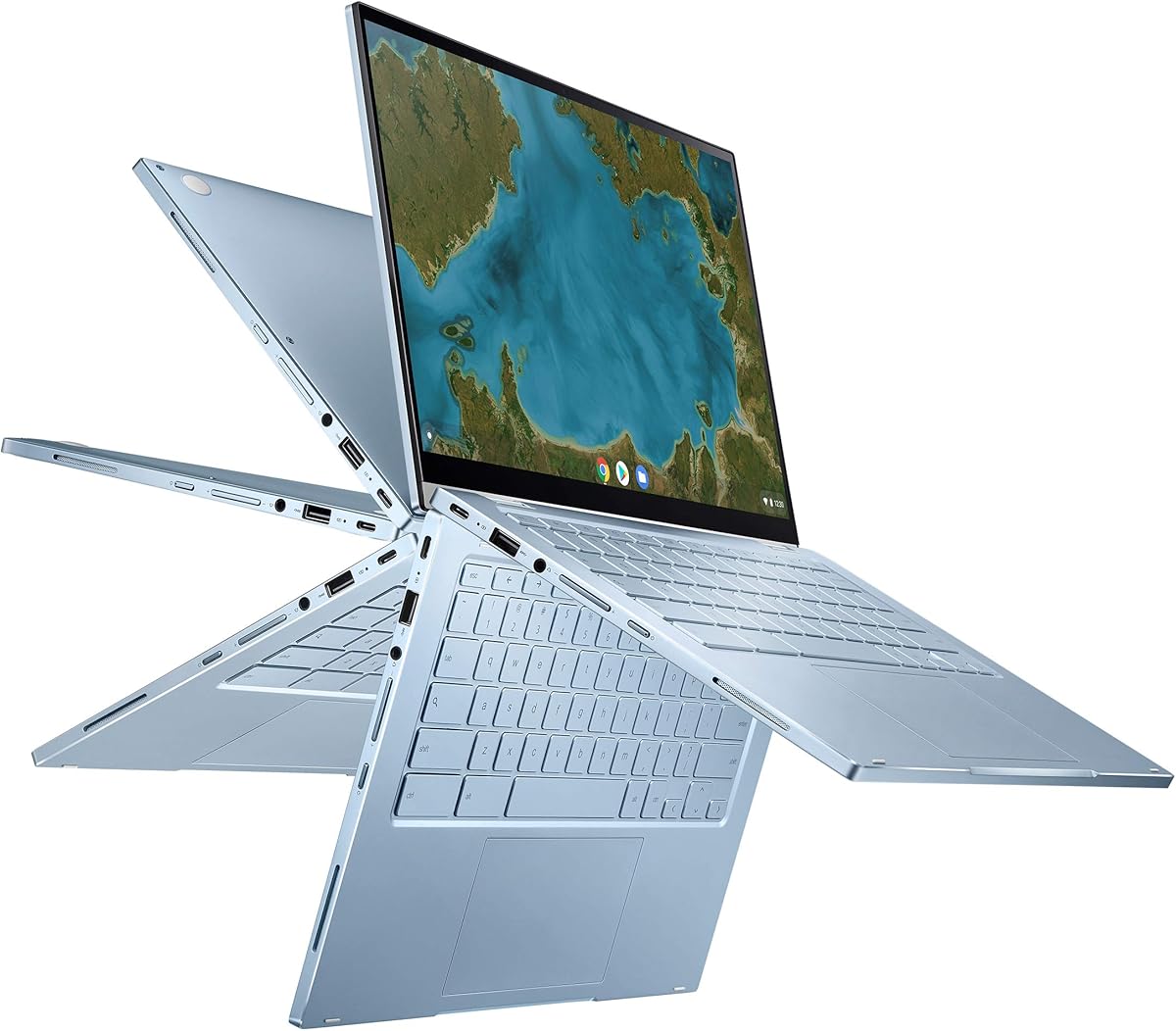


The HP Chromebook 14 x360 Plus is an affordable option for those seeking a versatile device. It ranks highly among budget alternatives due to its flexible design and reliable performance for daily tasks.
We may earn a commission when you buy through this link, at no additional cost to you.
Its 360-degree hinge allows multiple modes for productivity and entertainment. The display offers crisp visuals suitable for streaming and reading. Wi-Fi 6 ensures fast connectivity.
While it lacks raw power, it handles web browsing and document editing smoothly. The main trade-off is limited storage, but cloud integration mitigates this for most users.
This device is ideal for students or families needing a secondary laptop. It delivers essential features without breaking the bank.
The 360-degree hinge supports laptop, tent, stand, and tablet modes for flexible use.
Chrome OS provides automatic updates, security, and access to thousands of Android apps.
We may earn a commission when you buy through this link, at no additional cost to you.
The ASUS Chromebook Flip CX1 offers exceptional value with additional cloud benefits. It stands out for its durability and generous RAM allocation for a budget device.
We may earn a commission when you buy through this link, at no additional cost to you.
Its FHD touchscreen provides clear visuals for media and work. The US Military Grade standard ensures it can withstand daily wear. Battery life supports full days of use.
Performance is suitable for light multitasking but not heavy apps. The inclusion of Google One AI Premium adds significant value for cloud storage needs.
This model is perfect for casual users needing reliability and basic productivity tools. It balances cost and features effectively.
Three months of Google One AI Premium provide 2TB cloud storage and advanced AI tools.
Weighing just 3.59 lbs, it is easy to carry for students and travelers.
We may earn a commission when you buy through this link, at no additional cost to you.
The Samsung Galaxy Book4 2024 brings strong performance for professionals. It offers ample RAM and storage for multitasking and local file management.
We may earn a commission when you buy through this link, at no additional cost to you.
The 15.6-inch display is ideal for spreadsheets and documents. The Intel Core 7 processor ensures smooth performance. Windows 11 Home provides full desktop flexibility.
Though it lacks top-tier graphics, it handles general workloads well. The fingerprint reader adds security convenience. Its size makes it less portable.
This laptop suits business users needing a capable Windows machine. It delivers robust specs at a competitive price point.
The 10-Core Intel 7 processor handles demanding tasks with ease.
Includes HDMI, Ethernet, and multiple USB ports for versatile connections.
We may earn a commission when you buy through this link, at no additional cost to you.
The Google Pixelbook Go is praised for its portability and build. It features a lightweight chassis that fits easily into bags.
We may earn a commission when you buy through this link, at no additional cost to you.
The Hush Keys keyboard provides a comfortable typing experience. Boot times are instant. Titan C security chip ensures data protection.
Its fanless design means silent operation. However, storage is modest compared to Windows devices. It is ideal for cloud-centric users.
This device is best for travelers needing a reliable Chrome OS laptop. It delivers a premium experience in a compact form.
The grippable design and spacious touchpad enhance usability.
Built-in Titan C chip and antivirus protect against threats.
We may earn a commission when you buy through this link, at no additional cost to you.
The Lenovo Flex 14 offers versatility with an included active pen. It allows for precise note-taking and creative work on the touchscreen.
We may earn a commission when you buy through this link, at no additional cost to you.
The 12GB RAM supports heavy multitasking. The SSD ensures quick app loading. Privacy shutter protects webcam security. Battery life supports full days.
Windows 10 is stable but older. The device is slightly heavier than rivals. Its design balances productivity and flexibility.
This is a great choice for students needing pen input. It provides strong performance for creative tasks.
The included active pen enables drawing and precise note-taking.
Physical privacy shutter allows you to block webcam access.
We may earn a commission when you buy through this link, at no additional cost to you.
The ASUS Chromebook Flip C433 delivers impressive speed in a compact body. Its Core m3 processor handles web tasks efficiently.
We may earn a commission when you buy through this link, at no additional cost to you.
The NanoEdge display maximizes screen real estate. Backlit keys help in low light. USB-C ports offer versatile connectivity.
While storage is limited, cloud storage compensates. The 360-degree hinge is durable. It is a reliable daily driver.
This device suits travelers needing a small, fast laptop. It balances portability with solid Chrome OS performance.
The narrow bezels allow a 14-inch screen in a 13-inch footprint.
Includes USB-C and USB-A for connecting various peripherals.
We may earn a commission when you buy through this link, at no additional cost to you.
The Lenovo Flagship Chromebook is a slim, lightweight option. It uses the MediaTek Kompanio 520 for decent speed.
We may earn a commission when you buy through this link, at no additional cost to you.
Its IPS display offers good viewing angles. Privacy shutter protects webcam. Wi-Fi 6 ensures connectivity. It is easy to carry.
The 4GB RAM is enough for browsing. Storage is tight but manageable. It is ideal for simple tasks.
This model is perfect for students on a tight budget. It offers essential features without unnecessary bulk.
Weighing just 2.86 lbs, it is one of the lightest options.
The 8-core processor handles everyday tasks with speed.
We may earn a commission when you buy through this link, at no additional cost to you.
The Apple 2026 MacBook Neo offers premium features with AI integration. Its A18 Pro chip handles tasks efficiently.
We may earn a commission when you buy through this link, at no additional cost to you.
The Liquid Retina display shows vivid colors. Battery life supports full days. Eco-friendly design is appealing. It works seamlessly with iPhone.
Though pricey, it delivers longevity. The lack of touch is a minor trade-off. It fits users in the Apple ecosystem.
This device is best for those wanting top-tier performance. It combines sustainability with robust technology.
Apple Intelligence helps summarize notes and write content effortlessly.
The enclosure uses 60 percent recycled aluminum content.
We may earn a commission when you buy through this link, at no additional cost to you.
The Apple 2021 MacBook Pro M1 Max delivers workstation performance. Its 64GB RAM handles heavy workloads effortlessly.
We may earn a commission when you buy through this link, at no additional cost to you.
The 2TB SSD stores extensive files. The M1 Max chip excels in rendering. It is a powerhouse for creatives.
As a renewed product, it may lack original accessories. Performance remains top-tier. It suits professionals needing power.
This is the ideal choice for video editors and developers. It offers flagship specs at a competitive price.
The M1 Max chip supports intense multitasking and creative work.
Two terabytes provide ample room for large media libraries.
We may earn a commission when you buy through this link, at no additional cost to you.
The Apple MacBook Pro Intel i7 offers an affordable macOS entry. Its 15-inch screen is great for multitasking.
We may earn a commission when you buy through this link, at no additional cost to you.
The 16GB RAM supports daily workflows. It runs macOS applications smoothly. The build quality remains premium.
As a renewed model, battery life may vary. It is older than newer chips. It suits budget-conscious Mac fans.
This laptop is best for those needing macOS on a budget. It provides classic Apple quality for general use.
The Retina display offers sharp visuals for work and media.
Full macOS access ensures compatibility with familiar apps.
We may earn a commission when you buy through this link, at no additional cost to you.
Selecting the right laptop requires balancing performance, portability, and budget. Here are key factors to consider for your needs.
Consider whether Chrome OS, Windows, or macOS suits your workflow best. Chrome OS is simple and secure, Windows offers full desktop apps, and macOS provides a polished ecosystem.
Choose the OS that aligns with your existing tools and preferences.
The CPU determines speed. Look for Intel Core or Apple Silicon for high performance. For basic tasks, entry-level chips or MediaTek options are sufficient.
Match the processor to your workload to avoid bottlenecks.
RAM affects multitasking. Eight GB is standard for general use. Sixteen GB or more is recommended for heavy workloads and large applications.
Opt for higher RAM if you run many apps simultaneously.
SSDs provide fast boot and app loading times. NVMe SSDs are fastest. If you need massive storage, ensure cloud options are available for cheaper models.
Prioritize SSD speed over capacity for daily performance.
High-resolution screens reduce eye strain. IPS panels offer wide viewing angles. Touchscreens add versatility for creative tasks.
Select a display that fits your visual needs clearly.
Long battery life ensures productivity on the go. Many modern laptops offer 10+ hours. Always check real-world reviews for accuracy.
Prioritize battery life if you work away from outlets.
Materials matter for longevity. Aluminum and durable plastics protect against wear. Military-grade tested devices withstand rough use.
Choose a build that matches your mobility needs.
Ensure the laptop has necessary ports. USB-C, USB-A, HDMI, and SD card readers vary by model. Adapters may be needed for older peripherals.
Check port selection to avoid extra accessory costs.
Keep your device clean by using a microfiber cloth on the screen. Avoid liquids and store in a protective case when not in use.
Update the operating system regularly to maintain security and performance. Manage startup apps to ensure faster boot times and longer battery life.
Utilize cloud storage for large files to prevent local storage issues. Use strong passwords and enable two-factor authentication for data protection.
Chromebooks are excellent for web-based tasks and education. They are affordable and secure but lack offline software. Choose them if you rely on browser apps and need a lightweight device.
Windows laptops run full software like Office. Chromebooks support Android and web apps but not native Windows programs. Choose Windows if you need specific desktop applications.
Apple devices often lead in efficiency. The MacBook Neo and Pro models offer up to 16 hours. Check reviews for specific real-world results as usage varies.
Most modern laptops support external displays via USB-C or HDMI. Ensure the device has the correct ports for your setup. Adapters may be required for older connections.
Renewed devices are inspected and tested for functionality. They offer cost savings but may lack original accessories. Check warranty terms and return policies before buying.
M1 Max is faster and more energy-efficient than older Intel chips. It handles intensive tasks better. Choose Apple Silicon for longevity and performance in macOS environments.
All listed options work for education. Chromebooks are popular for their simplicity and cost. Windows and Mac models offer more flexibility for advanced coursework.
Touchscreens enable direct interaction with content. Non-touch screens are often cheaper and lighter. Choose touch if you value stylus input or interactive browsing.
We highlighted ten top choices including budget Chromebooks and high-end Macs. Each offers unique strengths to fit different user needs and budget constraints.
Prioritize performance, battery life, and software needs. For most people, a mid-range Windows laptop or a Chromebook provides excellent value.
Prices change frequently, so check current listings for the best deals. These alternatives ensure you get a reliable laptop without overspending on a brand.